HRMS Software Cost in India (2026): Pricing Guide for 10, 50 & 100 Employees
As Indian businesses grow, HR operations often become harder to manage through spreadsheets, WhatsApp approvals, attendance registers, and manual payroll sheets.
That is why many companies are now searching for one practical solution: HRMS software.
Before making a decision, most business owners ask the same question:
How much does HRMS software cost in India?
The answer depends on team size, payroll needs, features, support level, and customization.
Whether you run a startup, SME, retail business, manufacturing unit, or multi-location company, understanding HRMS pricing helps you choose the right platform without overspending.
This guide explains real pricing factors, what affects cost, how to compare vendors, and what businesses with 10, 50, or 100 employees should expect in 2026.
Quick Answer
HRMS software cost in India usually depends on employee count, modules required, payroll complexity, implementation scope, and support needs.
Small teams often need basic attendance and payroll. Larger companies usually require automation, approvals, compliance workflows, analytics, and integrations.
What is HRMS Software?
HRMS stands for Human Resource Management System.
It is software designed to manage employee operations from one platform.
Most HRMS tools include:
- Payroll processing
- Attendance tracking
- Leave management
- Employee database
- Shift scheduling
- Onboarding workflows
- Reports and dashboards
- Compliance support
- Employee self-service portal
Instead of managing HR through multiple tools, HRMS creates one organized system.
How Much Does HRMS Software Cost in India?
There is no single market price. Most vendors use one of these models:
- Per employee per month pricing
- Flat monthly plans
- Annual subscription plans
- Custom enterprise pricing
Pricing Snapshot by Team Size
Employee Size | Typical Need | Common Pricing Style |
10 Employees | Basic payroll + attendance + leave | Starter monthly plan |
50 Employees | Payroll + workflows + reports | Per employee / business package |
100 Employees | Automation + compliance + multi-location | Custom quote |
HRMS Cost for 10 Employees
Small teams generally need simplicity.
Common Priorities:
- Salary processing
- Attendance records
- Leave requests
- Employee data storage
Best Option:
Choose affordable software with fast onboarding and low admin effort.
Ideal For:
- Startups
- Agencies
- Clinics
- Small offices
HRMS Cost for 50 Employees
At 50 employees, operations usually become more structured.
Common Priorities:
- Payroll accuracy
- Shift handling
- Approval hierarchy
- Reports
- Leave policy automation
- Compliance processes
Best Option:
Choose scalable software that can grow with the company.
Ideal For:
- SMEs
- Retail chains
- Growing service businesses
- Multi-department teams
HRMS Cost for 100 Employees
Once a company crosses 100 employees, manual HR usually becomes expensive and inefficient.
Common Priorities:
- Multi-branch attendance
- Department workflows
- Advanced payroll
- Compliance management
- Employee lifecycle automation
- Dashboards and analytics
Best Option:
Robust HRMS with support, automation, and reporting.
Ideal For:
- Mid-size companies
- Factories
- Warehouses
- Multi-location businesses
What Affects HRMS Software Pricing in India?
Several factors influence total cost.
1. Employee Count
Larger teams often increase pricing tiers.
2. Payroll Complexity
Businesses managing:
- Overtime
- Bonuses
- Variable pay
- Contractors
- Multi-state payroll
usually need stronger payroll systems.
3. Attendance Features
Advanced attendance tools like:
- Biometric sync
- GPS attendance
- Shift rostering
- Geo-fencing
may affect pricing.
4. Leave Management
Complex leave policies or approval chains can increase plan requirements.
5. Compliance Needs
PF, ESI, TDS, payslips, and statutory workflows add business value. Businesses should stay updated through the EPFO official portal and the ESIC official portal.
6. Mobile App Access
Employee self-service apps are often included in higher plans.
7. Customization
Custom workflows, branding, or approval logic may cost extra.
8. Support Quality
Dedicated onboarding or premium support can affect price.
9. Implementation Scope
Large data imports and complex setups may involve one-time charges.
Monthly vs Annual HRMS Pricing: Which is Better?
Factor | Monthly Plan | Annual Plan |
Upfront Cost | Lower | Higher |
Flexibility | Strong | Moderate |
Long-Term Value | Moderate | Often Better |
Good for Startups | Yes | Sometimes |
Best for Stable Teams | Good | Excellent |
Recommendation
Choose Monthly If:
- Team size may change
- You are testing software
- You want lower upfront cost
Choose Annual If:
- Team size is stable
- You want better overall value
- You plan long-term usage
Hidden Costs Businesses Should Check
Low headline pricing does not always mean low total cost.
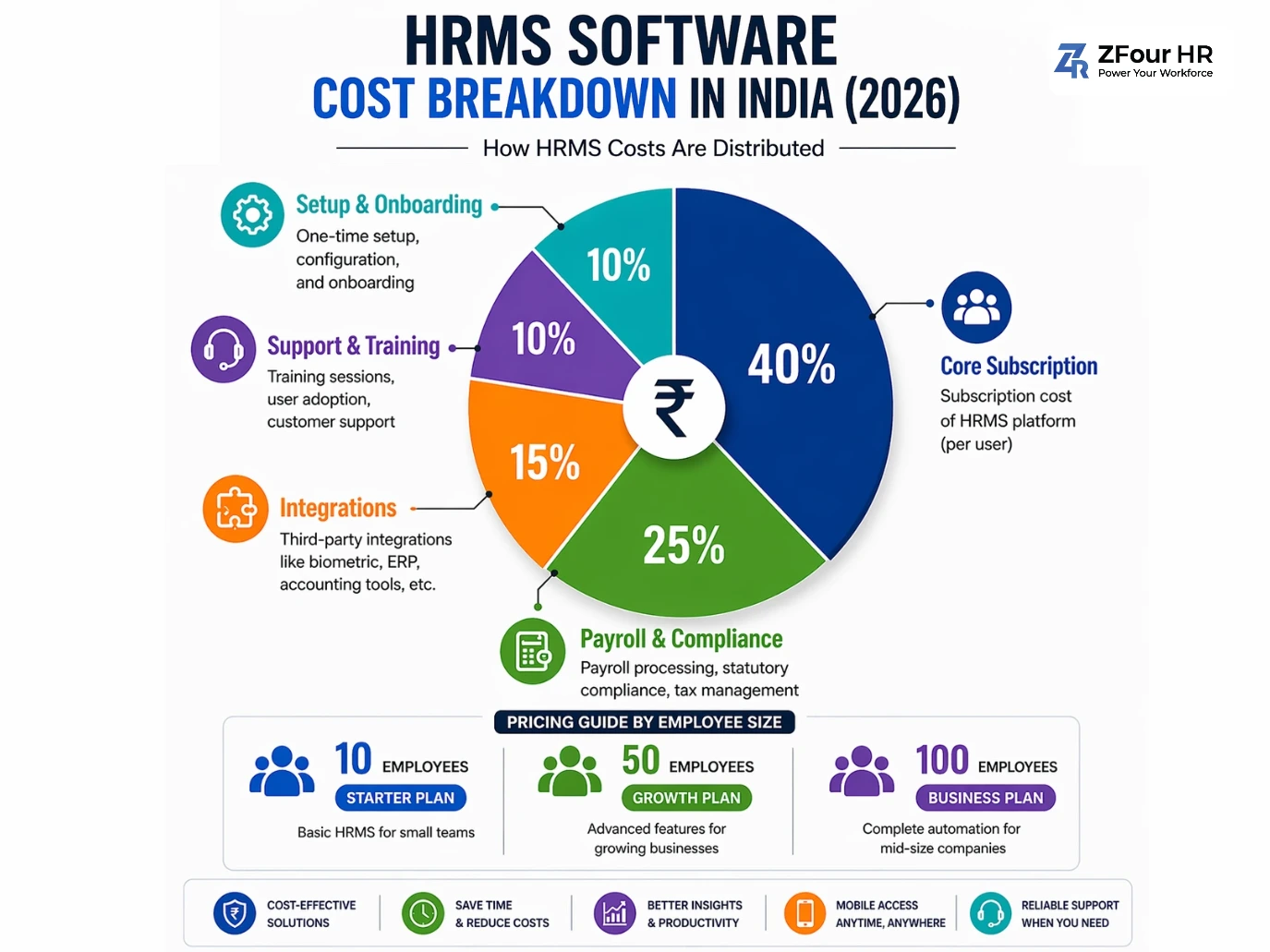
Ask About These Before Buying:
Setup Fees
Initial onboarding or configuration charges.
Training Costs
HR/admin team training sessions.
Data Migration
Moving old records from Excel or legacy software.
Integrations
Biometric devices, ERP, accounting tools, CRM.
Premium Support
Dedicated managers or faster SLAs.
Pro Tip
Ask vendors for the total first-year cost, not only the monthly price.
Manual HR Cost vs HRMS Cost
Many businesses compare software fees but ignore hidden manual costs.
Task | Manual Cost | HRMS Benefit |
Attendance tracking | Daily admin effort | Automated records |
Payroll processing | Repetitive monthly work | Faster salary runs |
Leave approvals | Delays & follow-ups | Instant workflow |
Employee records | Misplaced data risk | Central storage |
Reports | Spreadsheet effort | One-click dashboards |
Compliance tasks | Error risk | Better control |
Real ROI of HRMS
Businesses often gain:
- Time savings
- Fewer payroll mistakes
- Faster approvals
- Better reporting
- Lower admin dependency
Best HRMS Software Options by Budget in India
Companies often compare these platforms depending on size and goals.
Keka
Known for broader HR workflows and mid-size company usage.
greytHR
Popular among SMEs for payroll and compliance workflows.
Zoho People
Useful for companies already using Zoho tools.
Darwinbox
Often considered by larger organizations.
ZFour
A practical option for growing businesses seeking payroll, attendance, and people management in one system.
Why Growing Businesses Choose ZFour
ZFour is suited for companies that need a practical, business-friendly HRMS.
Why It Appeals to SMEs
- Reliable pricing option
- Payroll + attendance together
- Easy employee data management
- Scalable workflows
- Friendly for growing teams
- Support-focused experience
If your business is moving away from manual HR, book a free demo with ZFour to explore the right solution.
How to Choose the Right HRMS Based on Budget
Use this simple checklist.
Small Budget
Choose:
- Core payroll
- Attendance
- Leave management
- Easy setup
Medium Budget
Choose:
- Reports
- Compliance workflows
- Mobile app
- Approval automation
Higher Budget
Choose:
- Multi-location tools
- Advanced dashboards
- Integrations
- Custom workflows
- Dedicated support
Always Ask Vendors:
- Is pricing per employee or flat fee?
- Is payroll included?
- Any setup charges?
- How long is onboarding?
- Can it scale after hiring growth?
1. How much does HRMS software cost in India?
Pricing depends on employee count, modules, payroll complexity, and support level.
2. Is HRMS expensive for small businesses?
Not always. Many vendors offer entry-level plans for small teams.
Farheen
Senior HR & Payroll Subject Matter Expert
Certified HR Specialist & Payroll Compliance Expert with 10+ years in enterprise workforce management.