HRMS GuidesReading time10 min read488 views

HRMS Dashboard for Small Businesses | ZFour HRMS

Explore how an HRMS dashboard helps small businesses manage workforce data, attendance, leave, payroll, reports, and HR workflows in one place.

Farheen Ahmed

Author

Farheen Ahmed

Last Update

10 June 2026

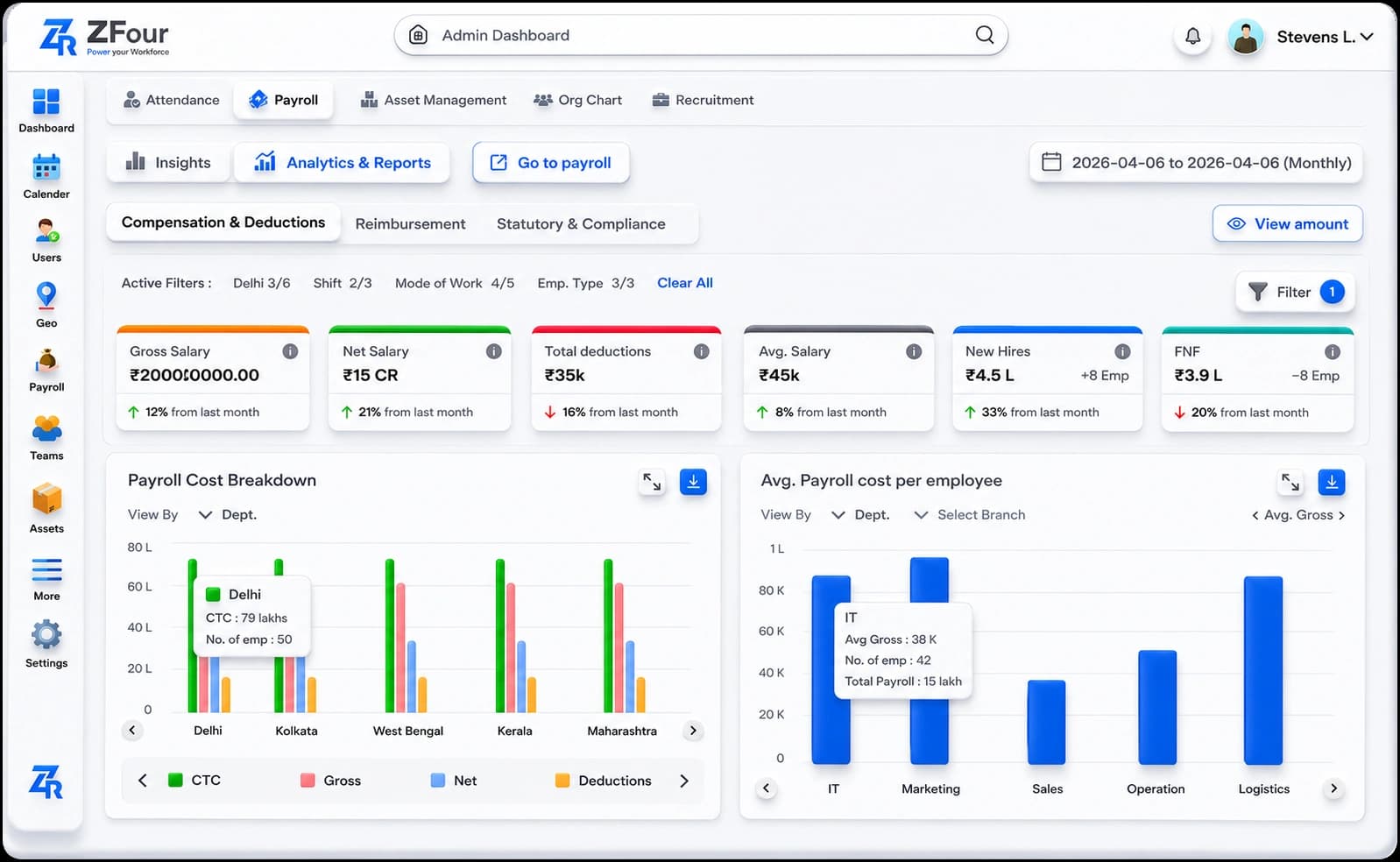
HRMS dashboard for small businesses showing employee, attendance, leave, payroll and workforce data

Small businesses often manage HR information across spreadsheets, emails, attendance systems, payroll records, and individual employee files. As the workforce grows, finding accurate HR information quickly can become more difficult.

An HRMS dashboard for small businesses brings relevant workforce information into a centralized digital view. Depending on the HRMS and its configuration, a dashboard may help HR teams and managers monitor attendance, leave, employee information, payroll-related data, recruitment activity, performance workflows, and HR reports.

The goal is not simply to display more data. A useful HRMS dashboard helps small businesses see important workforce information in one place, identify items that need attention, and make more informed HR decisions.


Quick Answer: What Is an HRMS Dashboard?

An HRMS dashboard is a centralized interface within an HR management system that presents relevant employee, workforce, and HR-process information in an easy-to-review format.

Depending on the software and user permissions, an HRMS dashboard may display:

  • Employee and workforce information

  • Attendance and working-hour data

  • Leave balances and requests

  • Payroll-related information

  • Recruitment activity

  • Performance workflows

  • HR requests and approvals

  • Reports and workforce metrics

The information available on the dashboard depends on the HRMS modules, configuration, data available, and the user's role.


Why Do Small Businesses Need an HRMS Dashboard?

Small businesses may not have large HR departments or dedicated teams for every HR function. HR responsibilities can therefore be spread across a small number of people.

An HRMS dashboard can provide a centralized view of information that might otherwise be distributed across spreadsheets, emails, documents, and separate systems.

For example, instead of checking multiple files to understand attendance and leave activity, an authorized HR user may be able to review the relevant information from a centralized dashboard.

This can make routine HR monitoring more structured and reduce the need to manually consolidate information.

If you're evaluating HR technology more broadly, see our guide to HR systems for small businesses in India for a broader look at HR systems, features, and implementation considerations.


What Can an HRMS Dashboard Show?

The exact dashboard depends on the HRMS platform and the organization's configuration. However, common dashboard areas include:

Dashboard Area

What Small Businesses Can Monitor

Employee Information

Employee records, departments, roles, and workforce information

Attendance

Attendance status, working hours, absences, and available attendance records

Leave

Leave balances, requests, approvals, and leave activity

Payroll

Available payroll information, payroll status, and related records

Recruitment

Candidate activity and recruitment workflow status

Performance

Goals, reviews, feedback, and performance-related workflows

HR Requests

Employee requests, approvals, and pending actions

Reports

Workforce reports and available HR metrics

Compliance

Relevant records, reminders, and compliance-related information where supported

Announcements

HR or organization-wide communications where the feature is available

Important: A dashboard should show information relevant to the user's role. Employees, managers, HR teams, and administrators may see different information based on permissions.

For official information related to provident fund services and employer/employee EPF processes, businesses can refer to the Employees' Provident Fund Organisation (EPFO).


Key HRMS Dashboard Metrics for Small Businesses

A dashboard becomes more useful when it helps users focus on meaningful workforce indicators rather than simply displaying large amounts of data.

1. Employee Headcount

Headcount provides a basic view of the organization's workforce.

Businesses may use it to understand:

  • Total employees

  • Department-wise workforce

  • New joiners

  • Exits

  • Workforce changes over time

2. Attendance

Attendance information can help managers understand workforce availability and identify attendance-related issues that may require attention.

Depending on the system, this may include:

  • Present employees

  • Absences

  • Working hours

  • Late arrivals

  • Attendance regularization

  • Attendance trends

3. Leave Activity

Leave information can help HR teams monitor employee availability and pending requests.

Relevant indicators may include:

  • Leave requests

  • Approved leave

  • Pending approvals

  • Leave balances

  • Leave trends

4. Recruitment Activity

For growing businesses, recruitment information can provide visibility into the hiring pipeline.

Depending on the HRMS, a dashboard may show:

  • Open positions

  • Candidate stages

  • Interview activity

  • Pending recruitment tasks

  • Hiring status

5. Payroll Information

Payroll-related dashboard information can help authorized users monitor relevant payroll workflows.

Depending on the system, this may include:

  • Payroll processing status

  • Employee salary information

  • Payroll-related records

  • Payslip availability

  • Payroll reports

For businesses specifically comparing payroll and attendance capabilities, see our HRMS software for payroll and attendance.

6. Performance Activity

A performance dashboard can provide visibility into recurring performance processes.

Possible indicators include:

  • Goal-setting status

  • Review-cycle progress

  • Feedback activity

  • Pending reviews

  • Performance records

Performance information should be interpreted in context rather than treated as a complete measure of employee contribution.

7. Pending HR Actions

A useful dashboard can highlight items that need attention.

Examples include:

  • Pending approvals

  • Employee requests

  • Incomplete processes

  • Upcoming HR activities

  • Outstanding tasks

This can help HR teams prioritize work instead of manually searching through multiple systems.


HRMS Dashboard vs Spreadsheet-Based HR Tracking

Many small businesses begin HR management with spreadsheets because they are inexpensive and familiar. However, spreadsheets can become increasingly difficult to manage as employee numbers and HR processes grow.

HRMS Dashboard

Spreadsheet-Based Tracking

Centralized HR information

Information may be spread across multiple files

Role-based access may be available

Access often depends on file permissions

Can connect multiple HR workflows

Processes may require manual consolidation

Dashboard views can summarize information

Reporting may require manual formulas and updates

Workflow notifications may be available

Reminders often require manual follow-up

Employee self-service may be available

Employees may depend more heavily on HR

Data can be updated through connected workflows

Manual data entry can create inconsistencies

This does not mean spreadsheets are unsuitable for every small business. A spreadsheet may work for a very small workforce or a simple process. The need for an HRMS generally increases as HR processes become more complex and the business grows.


Benefits of an HRMS Dashboard for Small Businesses

1. Centralized Workforce Visibility

An HRMS dashboard can bring information from different HR processes into one interface.

This can make it easier for authorized users to review workforce information without switching between multiple files or systems.

2. Less Manual Data Consolidation

When HR information is stored across separate spreadsheets, HR teams may need to combine information before preparing reports.

A centralized HRMS can reduce some of this manual consolidation when the relevant modules and workflows are connected.

3. Faster Identification of Pending Actions

Dashboards can highlight pending requests, approvals, or workflow activities.

This can help HR and managers identify tasks that require attention.

4. Better Employee Self-Service

When employee self-service features are available, employees may be able to access information or submit routine requests themselves.

Examples include:

  • Leave applications

  • Attendance information

  • Payslips

  • Employee requests

  • Permitted profile updates

This can reduce some routine queries directed to HR.

5. More Structured Reporting

HR dashboards can provide a structured way to review workforce information and generate available reports.

The quality of those reports still depends on accurate underlying data and appropriate system configuration.

6. Support for Data-Informed Decisions

A dashboard can make workforce information easier to review, helping HR teams and managers identify trends and areas requiring further investigation.

However, dashboard metrics should support decision-making rather than replace professional judgment.


What Makes a Good HRMS Dashboard for an SME?

A dashboard doesn't need dozens of widgets to be useful. For a small business, clarity and relevance are often more important.

Simple Navigation

Users should be able to find frequently used HR information without unnecessary complexity.

Relevant Metrics

The dashboard should prioritize information that supports the organization's actual HR workflows.

Role-Based Access

Different users should only have access to information appropriate to their roles and permissions.

Clear Reporting

Charts, summaries, and reports should make important information easier to understand rather than creating unnecessary complexity.

Mobile Accessibility

Mobile access can be useful for managers and employees who need to review HR information away from a desktop, provided the HRMS supports it.

Integration Capability

Where integrations are supported, connecting HR information with other business systems can reduce duplicate data entry and improve workflow continuity.

Scalability

The HRMS should be capable of supporting the organization's changing workforce and HR requirements as it grows.

Security Controls

Because HR systems contain sensitive employee information, businesses should evaluate the provider's available security measures, access controls, authentication, and data-management practices.


What Small Businesses Assume vs. What Actually Determines Readiness


Assumption: "We need at least 30-40 employees before this makes sense." Reality: The threshold is how many separate places HR information currently lives, not headcount. A 12-person business splitting attendance, leave, and payroll across three different tools already has the reconciliation problem a dashboard solves — regardless of team size.

Assumption: "We should buy the software first, then figure out what to track." Reality: This gets the order backwards. A dashboard configured around a vendor's default view shows whatever that vendor assumed mattered — not the two or three things your business specifically needs to catch early.

Deciding that first, in a fifteen-minute conversation with whoever currently answers "where do things stand," should come before any vendor conversation.

Assumption: "More visible metrics means better decisions." Reality: A dashboard showing twelve metrics nobody asked for gets ignored the same way a spreadsheet nobody updates does.

The businesses that actually use their dashboard tend to track three or four things consistently, not everything available.

Assumption: "Feature comparison between platforms is the hard part." Reality: Once you know specifically what you're trying to catch early — attendance patterns before a compliance issue, pending approvals before a dispute — comparing platforms against that specific need is usually the easy part.

The hard part is doing the internal conversation first, which most businesses skip.


HRMS Dashboard for Small Business: What Should You Track?

Small businesses do not need to track every available HR metric. A practical dashboard can focus on indicators connected to daily HR operations.

Metric

Why It Matters

Headcount

Shows current workforce size and changes

Attendance

Helps monitor workforce availability

Leave

Provides visibility into employee availability and requests

Pending Approvals

Highlights actions requiring manager or HR attention

Recruitment Pipeline

Shows the status of ongoing hiring activity

Payroll Status

Helps authorized users monitor payroll workflows

Performance Reviews

Shows progress of review-related activities

Employee Requests

Helps HR identify outstanding requests

Workforce Reports

Supports broader HR analysis

The right metrics depend on the organization's size, industry, HR processes, and management requirements.


How ZFour HRMS Can Support Dashboard-Based HR Management

ZFour HRMS provides centralized HR technology covering workforce processes such as employee management, attendance, leave, payroll, performance, and employee self-service.

Depending on the selected modules, user roles, and configuration, organizations can use centralized HR information and reporting capabilities to monitor relevant workforce activities.

For example, ZFour's HR analytics and reporting capabilities can provide access to workforce information and reporting across areas such as attendance, payroll, and employee performance, subject to the features and configuration available to the organization.

Businesses can explore ZFour HR analytics and reporting software to understand the available reporting capabilities.

For users who want to learn how to navigate the ZFour dashboard itself, rather than why dashboards are useful for small businesses, see the ZFour HRMS Dashboard Training guide.

This distinction is important: this article focuses on dashboard value and metrics for small businesses, while the training guide focuses on using the ZFour dashboard and its modules.


HRMS Dashboard Implementation Tips for Small Businesses

Even a good dashboard can provide limited value if the underlying HR processes are poorly managed.

Keep Employee Data Updated

Dashboard information is only as useful as the data behind it. Establish a process for maintaining accurate employee records.

Define Ownership

Decide who is responsible for reviewing attendance, leave, payroll-related information, and pending HR actions.

Use Appropriate Permissions

Limit access to sensitive employee information according to job responsibilities.

Avoid Information Overload

Only display metrics that users actually need. Too many dashboard elements can make important information harder to identify.

Review Metrics Regularly

A dashboard should support regular HR reviews rather than become another system that nobody checks.

A change in attendance, leave, or workforce metrics may indicate something worth investigating, but a dashboard number alone may not explain the underlying cause.


Common Mistakes to Avoid When Using HRMS Dashboards

Tracking Too Many Metrics

More data does not necessarily mean better decision-making.

Ignoring Data Quality

Incorrect or outdated employee information can affect dashboard results.

Giving Excessive Access

HR dashboards can contain sensitive information. Access should be aligned with employee roles and responsibilities.

Treating Dashboard Data as the Complete Picture

Metrics can identify areas that require attention, but HR decisions often require additional context.

Choosing Software Based Only on Dashboard Design

A visually attractive dashboard is not enough. Businesses should evaluate the underlying HR workflows, reporting, integrations, permissions, usability, and support.


Conclusion

An HRMS dashboard for small businesses can provide a centralized view of workforce information and help HR teams monitor everyday processes more efficiently.

The most useful dashboards do more than display numbers. They help users identify relevant information, follow pending actions, review workforce trends, and access reports without unnecessarily switching between multiple systems.

For small businesses, the right approach is to focus on the metrics and workflows that matter most rather than trying to automate or measure everything at once.

As HR requirements grow, a centralized HRMS can bring employee management, attendance, leave, payroll, performance, self-service, and reporting into a more structured environment.

Explore ZFour HRMS to evaluate how its available HR modules and reporting capabilities can support your organization's workforce management requirements.

Farheen Ahmed

Farheen Ahmed

HR Tech Content Strategist at ZFour Technology Private Limited

Research-driven content on HRMS, payroll, attendance management, employee management, and modern HR technology for Indian businesses.

Small Business/SMEHrmsHR Technology

Comments (0)

Leave a Comment

Loading comments...

Frequently Asked Questions

An HRMS dashboard is a centralized interface that displays relevant HR and workforce information. Depending on the system, it may include attendance, leave, payroll, employee, recruitment, performance, and reporting information.

Ready to Transform Your Workforce?

Let's discuss your business goals and show you how ZFour Hrms can help automate HR, improve compliance, and empower your people.

No spamPersonalized demoResponds within 1 day