 10 min read
Managing employee attendance sounds simple until you're running an office with 50, 100, or 500 people across different shifts and departments. In Noida's fast-growing business districts, from IT parks in Sector 62 to manufacturing units in Greater Noida, attendance isn't just about knowing who showed up. It feeds directly into payroll, compliance records, and daily HR decisions.
When attendance is tracked manually through registers or basic sign-in sheets small mistakes compound quickly. A missed entry, a wrong timestamp, or a proxy sign-in can throw off salary calculations and create confusion that takes HR hours to untangle.
This is why many offices in Noida are adopting biometric attendance systems. These systems verify identity through fingerprint, face, or other physical recognition methods, removing the guesswork and manual effort from daily attendance tracking.
This guide covers what a biometric attendance system actually does, why it matters specifically for Noida's office environments, the different types available, how to choose the right one, and what to watch out for when making the switch.
What Is a Biometric Attendance System?
A biometric attendance system is a device or software that records employee attendance using a unique physical identifier finger print, face, iris, or palm scan instead of a signature or manual entry.
Because biometric traits are unique to each person, the system confirms that the employee marking attendance is actually present, not signing in on someone else's behalf.
What it typically does:
Records exact login and logout time
Verifies identity through fingerprint or face scan
Stores attendance data in software or the cloud
Prevents proxy attendance
Generates attendance reports automatically
Connects with HR and payroll systems
It works for offices of any size, though the right type of system depends on headcount, budget, and how the office operates day to day covered in Section 7.
For a broader overview of biometric attendance machines and their features, see this guide to biometric attendance machines in India
Quick Overview
Aspect | Details |
|---|---|
What it does | Verifies employee identity and records attendance automatically using biometric data |
Common methods | Fingerprint, face recognition, iris scan |
Best for | Offices with growing headcount, multiple shifts, or multiple branches |
Where it's used in Noida | IT companies, corporate offices, factories, schools, hospitals, startups |
Key integration | HR software and payroll systems |
Main problem it solves | Proxy attendance, manual errors, and payroll mismatches |
Why Offices in Noida Need Biometric Attendance
Noida is one of the NCR's largest office hubs, with a wide mix of IT companies, BPOs, manufacturing units, schools, hospitals, and startups operating across sectors like 62, 63, and 125, as well as the industrial belt in Greater Noida.
This mix creates a specific challenge: offices here often manage large teams, multiple shifts, and sometimes multiple branches — all of which make manual attendance harder to sustain as headcount grows.
For a Noida-based office specifically, biometric attendance matters because:
Large IT and corporate teams need attendance data that syncs cleanly with payroll cycles
Factories and manufacturing units need accurate shift and overtime tracking across rotating schedules
Multi-branch companies need a system that works consistently whether the office is in Sector 62 or Greater Noida Phase II
Growing offices need attendance data that scales without adding proportional HR workload
Common Attendance Problems Without Biometric Systems
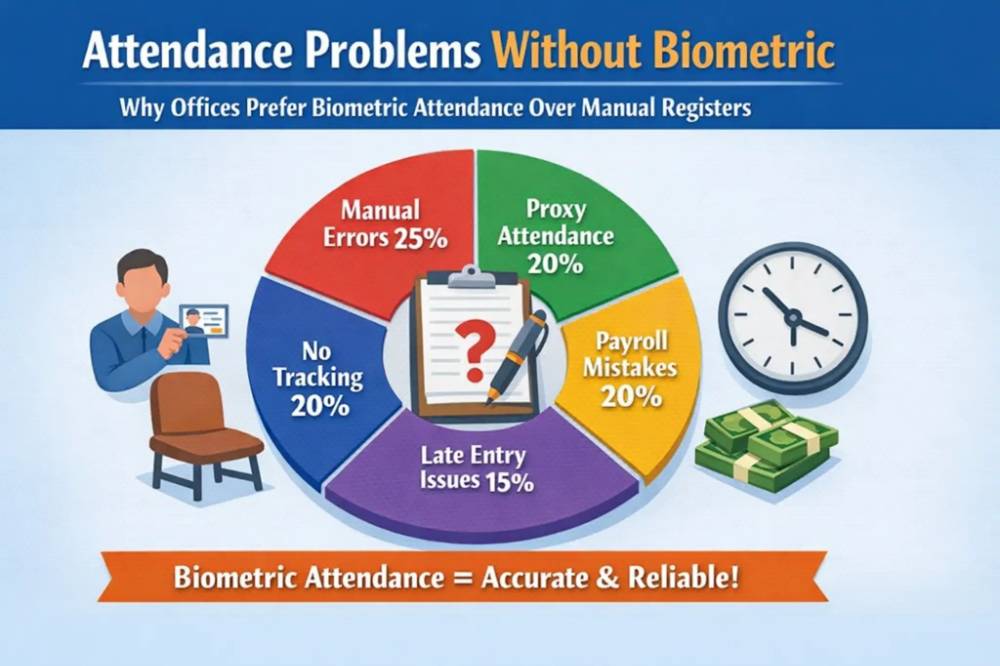
Offices relying on registers or manual sign-in sheets tend to run into the same recurring issues:
Problem | Effect |
|---|---|
Employees forget to sign the register | Missing attendance records |
Wrong or rounded time entries | Inaccurate working-hour calculations |
Proxy or fake attendance | One employee signs in for another |
Lost or damaged registers | Permanent loss of attendance history |
Manual calculation by HR | Time-consuming, error-prone payroll prep |
Delayed reporting | Slower response to attendance issues |
These aren't signs of a poorly run office — they're structural limitations of tracking attendance by hand once a team grows beyond a very small size.
How a Biometric Attendance System Works
The process is straightforward and largely automatic once set up:
Employee scans their fingerprint, face, or other biometric identifier at the device
The system verifies identity against stored biometric data
Attendance is logged with an exact timestamp for login and logout
Data syncs to attendance software or a cloud dashboard in real time
Reports generate automatically — daily, weekly, or monthly, depending on what HR needs
Attendance data feeds into payroll, where working hours, overtime, and leave are calculated based on actual recorded time
The main shift from manual attendance is that steps 3 through 6 happen without someone manually transcribing or reconciling data from a register.
Types of Biometric Attendance Systems
Different offices need different systems, depending on size, security requirements, and how staff work.
Fingerprint Attendance System The most common and affordable option. Easy to install and fast to use. Well suited to small and medium offices, schools, clinics, and shops.
Face Recognition Attendance System Contactless and fast, making it practical for larger staff counts. Common in IT companies, corporate offices, and multi-branch setups. Many systems now include mask detection.
Iris Scan Attendance System The highest security option, offering very accurate identity verification. Used mainly in government offices, high-security facilities, and research centers, where cost is secondary to security.
Cloud-Based Attendance System Attendance data is stored and accessed online, making it useful for offices with remote staff or multiple branches. This approach is increasingly common across IT companies, startups, and larger offices that need real-time access from anywhere — including via mobile apps for field staff and GPS-based logging for employees working outside a fixed office location.
Mobile Attendance System Built specifically for field staff, sales teams, and remote employees who don't work from a fixed location. GPS tracking confirms location alongside identity.
Manual vs. Biometric Attendance
Feature | Manual Attendance | Biometric Attendance |
|---|---|---|
Accuracy | Low | High |
Security | Low — proxy entry possible | High — identity-verified |
Payroll calculation | Manual | Automatic |
Reports | Difficult to compile | Instant |
Remote access | Not available | Available (cloud-based systems) |
Time tracking | Prone to error | Accurate, timestamped |
HR workload | High | Lower |
This comparison isn't about manual attendance being unworkable at every scale — a very small office with a handful of employees can manage it for a while. The gap widens as headcount, shifts, or branch count increase.
Benefits of Biometric Attendance for Office Staff
Biometric attendance changes the experience for both HR and employees, not just one side.
For HR:
No manual register to maintain or reconcile
Attendance reports available on demand instead of built by hand
Fewer disputes over recorded hours, since data is timestamped and identity-verified
For employees:
Attendance is recorded fairly and consistently for everyone
Salary calculations are based on actual verified hours, reducing pay disputes
Leave and working-hour records are clear and accessible, rather than dependent on a register someone else maintains
The shared effect is fewer disagreements about attendance data, since both sides are working from the same verified record instead of a manually maintained log.
Industry Use Cases in Noida
Industry | Typical Attendance Need |
|---|---|
IT companies | Multiple shifts, remote work, cloud-based attendance |
Corporate offices | Fixed timing, payroll integration, face recognition |
Schools and colleges | Staff and teacher attendance tracking |
Hospitals | Shift duty and night-shift accuracy |
Factories | Worker attendance, shift rotation, overtime tracking |
Government offices | High discipline and secure, auditable records |
Startups | Lightweight setup, cloud or mobile attendance |
The common thread is that as soon as an office has more than a handful of staff, shift variation, or a remote/field component, manual attendance stops being a reliable system of record.
Key Features to Look For
Not every biometric system includes the same capabilities. Before choosing one, check for:
Must-have features:
Fingerprint or face scan verification
Cloud storage for attendance data
Payroll integration
Shift management
Leave management
Report generation
Multi-user support with a software dashboard
Advanced features (useful depending on your setup):
Mobile attendance app
GPS tracking for field staff
API integration with existing HR/payroll tools
Multi-branch support
AI-based face recognition with mask detection
How to Choose the Right Biometric Attendance System
The right system depends on office size, staff count, and how your teams actually work — not on picking the most feature-heavy option available.
Office Size | Recommended System | What to Check |
|---|---|---|
Small (5–20 employees) | Fingerprint machine | Basic attendance recording is usually enough |
Medium (20–100 employees) | Fingerprint + software | Payroll integration and reporting become important |
Large (100+ employees) | Face recognition + cloud | Needs HRMS integration and multi-user support |
Multi-branch | Cloud-based system | Requires an online dashboard and multi-device support |
Field staff | Mobile attendance | GPS tracking is essential |
Beyond size, also confirm:
Software support — does it include a dashboard, reporting, and leave/shift management, or just the hardware?
Payroll integration — can it connect directly with your payroll process for automatic working-hour and overtime calculation?
Cloud support — is data accessible remotely, with backup included?
Service support — is installation, training, and ongoing customer support included?
Cost Factors
Biometric attendance system pricing depends on the type of device, whether software is included, and the level of cloud or HR integration.
System Type | Typical Cost Level | Best Suited For |
|---|---|---|
Fingerprint machine | Low | Small offices |
Face recognition system | Medium | Corporate offices |
Cloud attendance system | Medium to high | Multi-branch companies |
HRMS + biometric integration | Higher | Large offices needing full automation |
A cheaper device without software, cloud backup, or support can end up costing more in the long run through manual workarounds and lost data. It's worth weighing total cost — hardware plus software plus support — rather than device price alone.
Biometric + HR & Payroll Integration
A biometric device on its own only solves half the problem. Its real value shows up when attendance data connects directly to HR and payroll systems.
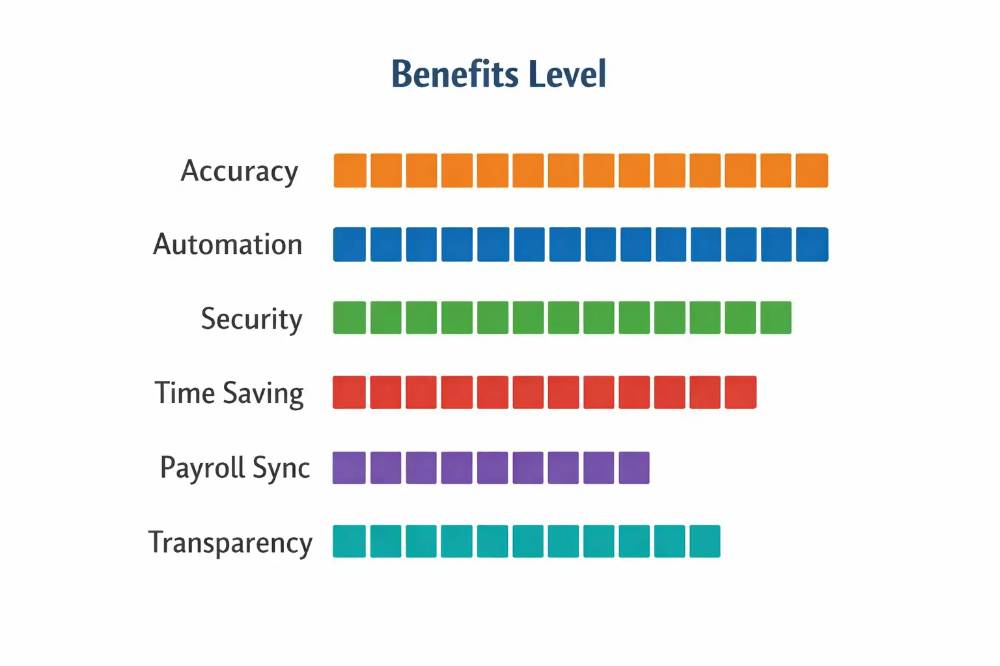
When integrated:
Attendance data syncs automatically into payroll calculations
Working hours and overtime are calculated from actual recorded time, not manual estimates
Leave records update automatically alongside attendance
Reports — daily, monthly, or audit-related — generate without HR rebuilding them from raw data
This connection is what turns attendance tracking from a standalone task into part of a smoother payroll process. A system that only tracks entry and exit, without integration into HRMS software or payroll software, still leaves HR doing manual reconciliation at month-end.
Security & Privacy
Biometric data is sensitive by nature — unlike a password, a fingerprint or face scan can't be changed if compromised. This makes security a genuine consideration when choosing a system, not an afterthought.
Look for:
Secure storage of biometric data, ideally encrypted
Access control, so only authorized personnel can view or export attendance records
Cloud backup, to prevent data loss from device failure
Admin-level login controls, separating who can view records from who can modify them
Offices should also be transparent with employees about what biometric data is collected and how it's stored, since this is personal identity data and reasonable to be cautious about.
Common Mistakes to Avoid
Buying a device without software. A standalone fingerprint machine with no dashboard or reporting still leaves HR doing manual work.
Skipping payroll integration. Attendance data that doesn't connect to payroll defeats much of the purpose.
No cloud backup. Offline-only systems risk losing attendance history if a device fails.
Choosing the cheapest option without checking support. Installation help, training, and ongoing support matter once the system is in daily use.
Not matching the system to office size. A basic fingerprint machine won't scale well for a 200-person, multi-shift operation, just as an expensive iris-scan setup may be unnecessary for a 10-person office.
Why Choose ZFour Biometric Attendance
Many offices in Noida use biometric attendance systems like ZFour to keep attendance accurate, reduce manual HR work, and maintain reliable records for payroll.
ZFour's biometric attendance system is built to integrate directly with HR and payroll functions, so attendance data doesn't sit in isolation — it feeds into working-hour calculations, leave records, and reporting without manual re-entry. This is particularly relevant for growing Noida offices that need attendance tracking to scale alongside headcount and shift complexity, without adding proportional administrative work.
For offices currently weighing a move from manual or basic attendance tracking to a connected system, evaluating a platform like ZFour against the criteria in Section 12 is a reasonable starting point.
Conclusion
Biometric attendance is increasingly used for office attendance management in Noida. Fingerprint and face recognition systems remove the manual effort and error risk that come with registers, while cloud and mobile options extend that accuracy to remote and field staff.
The right system depends on office size, staff count, and how directly attendance needs to connect with payroll and HR processes — not on choosing the system with the most features.
If your office is still relying on manual or register-based attendance, evaluating a biometric system against your actual team size and payroll needs is a practical next step toward more accurate, less manual staff management.
Related reading: Attendance Management System in India, HRMS Software in Noida

Farheen Ahmed
HR Tech Content Strategist at ZFour Technology Private Limited
Research-driven content on HRMS, payroll, attendance management, employee management, and modern HR technology for Indian businesses.


