10 min read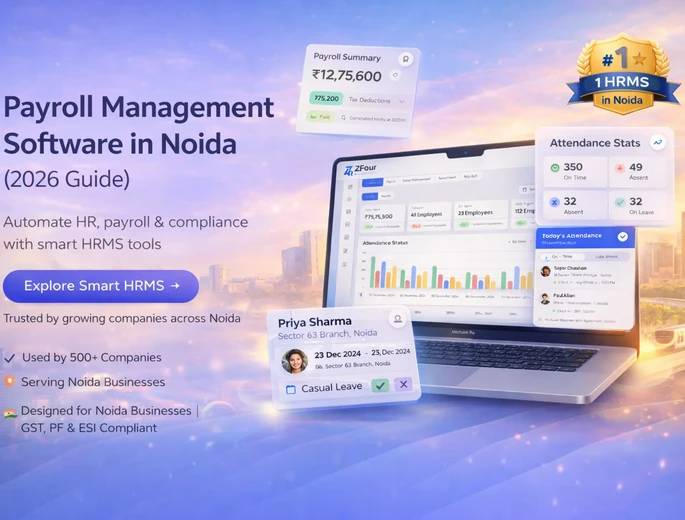
Key Takeaways
Payroll management software automates salary calculation, statutory compliance (PF, ESI, TDS), and payslip generation removing the manual errors that cost growing companies the most.
Noida's fast-scaling SME and startup base makes local compliance support and response speed during payroll-critical windows more valuable than a long feature list alone.
Pricing models differ significantly by vendor flat tiers, per-employee rates, or custom enterprise quotes so always compare total cost at your actual headcount, not headline pricing.
A simple payroll cost estimate (below) can show you exactly what manual processing is costing your HR team in hours per month.
Payroll management software is a digital system that automates employee salary processing, statutory deductions, and payslip generation, helping Noida businesses stay accurate and compliant with Indian regulations including Provident Fund (PF), Employee State Insurance (ESI), and Tax Deducted at Source (TDS) — without manual calculation.
If you're evaluating payroll software for a small business in Noida or comparing cloud-based payroll software in India more broadly, this guide covers how it works, what to look for, and a full vendor-by-vendor comparison.
How Payroll Management Software Works

Payroll software pulls in employee data attendance, leaves, and salary structure then automatically calculates net pay, applies statutory deductions, and generates payslips for disbursement.
The typical cycle looks like this:
Step | What Happens | Who's Involved |
|---|---|---|
1. Data collection | Attendance, leave balances, and salary structure sync in automatically | System (automated) |
2. Calculation | Tax rules, PF/ESI deductions, and variable pay or overtime are applied | System (automated) |
3. Review | HR verifies the run and catches exceptions before approval | HR team |
4. Approval | Final sign-off before disbursement | HR/Finance lead |
5. Disbursement + payslips | Salaries are paid out and digital payslips generated automatically | System (automated) |
This removes the manual recalculation step that causes most payroll errors — miscounted leave days, outdated tax slabs, or a transposed number in a spreadsheet formula.
This is different from an automated payroll processing software running as a bolt-on add-in versus a full HRMS with payroll and attendance integration — the latter removes an entire manual reconciliation step between two systems, which matters more as headcount grows.
Why This Matters More for Noida Businesses Specifically
Noida's business base — spanning IT companies, manufacturing units, and service startups concentrated in areas like Sector 62, Sector 63, and Noida Extension — has grown quickly enough that manual payroll now creates real operational risk, not just inconvenience.
If you're searching for payroll software Sector 62 Noida or a similar hyperlocal variant, the underlying need is the same regardless of sector: manual payroll processes commonly break down in three ways as a company scales and payroll becomes more complex:
Calculation errors compound as salary structures get more varied (different tax regimes, variable pay, reimbursements).
Compliance risk increases PF, ESI, and TDS rules change periodically, and manual tracking makes it easy to miss an update. The EPFO's official circulars page and ESIC's notification page are worth bookmarking regardless of which software you choose, since rule changes apply whether or not your system auto-updates.
Trust erodes when salary errors or delays happen repeatedly, even if unintentional.
An HR and payroll software for startups in Noida typically needs to solve for speed of setup and low HR headcount more than enterprise-scale customization worth keeping in mind as you compare vendors below.
Payroll Software vs. Payroll Outsourcing
Before comparing specific tools, it's worth settling a more fundamental question: should you run payroll in-house with software, or outsource it entirely to a payroll service provider?
Factor | Payroll Software (In-House) | Payroll Outsourcing |
|---|---|---|
Control over data | Full, real-time control | Dependent on provider's turnaround |
Cost at a small scale | Lower subscription-based | Often higher per-employee cost |
Cost at a large scale | Scales predictably with employee tiers | Can scale more favorably with volume discounts |
Compliance ownership | Software assists; your team still reviews. | The provider takes on more compliance responsibility. |
Speed of changes (raises, new hires) | Immediate self-serve | Dependent on the provider's processing calendar |
Best for | Companies wanting visibility and control | Companies wanting to fully hand off the function |
For many Noida SMEs, payroll management software can offer a practical balance of cost and control compared with fully outsourcing payroll.
Key Features to Expect
Feature | What It Does |
|---|---|
Automated salary calculation | Computes net pay including deductions, without manual formulas |
Statutory compliance software (PF, ESI, TDS) | Supports configured statutory payroll calculations and compliance workflows |
Attendance & leave integration | Pulls attendance/leave data directly into payroll runs |
Employee self-service (ESS) portal | Lets employees view payslips, apply for leave, and update details themselves. |
Reporting & analytics | Real-time visibility into payroll cost, compliance status, and trends |
Payslip generation & distribution | Auto-generates and distributes digital payslips each cycle |
Multi-location/multi-branch support | Manages payroll across different offices or states with varying rules |
If you're also managing time and attendance separately, it's worth reading alongside our guide to time tracking software for Noida businesses the two functions overlap enough that running them on disconnected systems usually recreates the exact reconciliation problem payroll software is meant to solve. For attendance specifically, see our attendance software guide for Noida companies.
Who Is This For?
A payroll management system for SMEs like this is worth adopting if:
You're processing payroll for 15+ employees and still doing it manually or via spreadsheets.
Your team has varied salary structures (different tax regimes, incentives and reimbursements) that make manual calculation risky.
You've had compliance concerns or errors with PF, ESI, or TDS filing in the past.
You're scaling quickly and need a system that grows with headcount without adding proportional HR workload.
You're specifically searching for affordable payroll software in Noida because your current process spreadsheets, a generic accounting tool, or a part-time consultant isn't holding up anymore.
If you're under 10-15 employees with simple, uniform salary structures, a lighter tool (or even a well-built spreadsheet template) may still be sufficient for now — but plan to migrate before manual tracking becomes the bottleneck, not after.
The Real Cost of Manual Payroll
Most businesses underestimate how much manual payroll actually costs not in software fees avoided, but in hours spent and errors made. Here's a simple way to estimate it for your own team:
Manual payroll cost estimate:
Input | Example (30-employee company) |
|---|---|
HR hours spent per payroll cycle | 8-12 hours |
Payroll cycles per year | 12 (monthly) |
Total HR hours/year on payroll | 96-144 hours |
Average fully-loaded HR hourly cost | ₹400-600/hour |
Estimated annual cost of manual processing | ₹38,400 - ₹86,400/year |
That figure doesn't include the cost of compliance errors a single missed PF deadline or TDS filing mistake can trigger penalties well beyond the software cost you'd have paid to prevent it.
Want your own number? Multiply your HR team's hours per cycle × your cycles per year × your team's hourly cost. If that number is close to or higher than what payroll software would cost annually, the switch pays for itself often within the first quarter.
Full Vendor Comparison
A note on pricing before you compare: vendor pricing changes frequently and often depends on employee count, modules selected, and negotiated annual vs. monthly billing. Treat the figures below as a starting orientation, not a quote always confirm current pricing directly on the vendor's site or via a sales call before budgeting.
Software | Best For | Pricing Model | Local Noida Support | Compliance Depth | Best Use Case |
|---|---|---|---|---|---|
ZFour HRMS | Noida SMEs | From ₹50/employee/month | Yes, local. | Strong | Startups/SMEs wanting integrated payroll + attendance + ESS with hands-on local support |
Savvy HRMS | Small and mid-sized businesses | Flat tiers from ₹4,500/month + per-employee rate | Yes, Delhi NCR | Strong | SMBs wanting an easy-to-use HRMS for employee management, attendance, leave, and payroll |
Keka HR | Growing mid-size teams | Per-employee monthly contact for exact rate | Remote | Strong | Mid-sized companies wanting advanced HR + payroll analytics together |
Zoho Payroll | Small businesses on Zoho | Free tier + paid per-employee tiers | Limited | Moderate | Small teams already using other Zoho apps |
SalaryBox | Startups, very small teams | Low-cost per-employee | Limited | Basic | Startups with basic, straightforward payroll needs |
Pocket HRMS | Enterprises | Custom quote | Remote | Strong | Larger organizations needing AI-driven HR analytics alongside payroll |
Vendor-by-Vendor Breakdown
ZFour HRMS
Strengths: Built for Indian SMEs, ZFour combines payroll, attendance, leave, and employee self-service in one platform, with native PF, ESI, PT, and TDS compliance and Form 16 generation. It supports biometric, GPS, and geofenced attendance that syncs directly into payroll, integrates with Tally, SAP, Zoho, and QuickBooks, and offers transparent pricing from ₹50 per employee per month. With a Delhi NCR-based team, Noida businesses get local support and can go live in about 7 days.
Trade-off: A newer brand with fewer third-party reviews than long-established national platforms, so businesses that rely heavily on public ratings may want to take a live demo before deciding.
Best fit: Noida-based startups and SMEs that want affordable, compliance-first payroll with integrated attendance, fast implementation, and responsive local support.
Savvy HRMS
Strengths: Savvy HRMS is a Modern HRMS provider with features for employee management, attendance, payroll software in Noida, leave, and other core HR processes, making it suitable for businesses looking to manage HR operations from one platform.
Trade-off: May have less brand recognition and a smaller ecosystem than established HRMS platforms such as greytHR, so businesses should evaluate integrations, support coverage, and feature depth based on their specific requirements.
Best fit: Small and mid-sized businesses looking for an easy-to-use HRMS to streamline everyday employee management, attendance, leave, and payroll processes.
Keka HR
Strengths: Modern interface, strong analytics, and broader HR functionality beyond payroll alone.
Trade-off: Positioned toward mid-size and larger teams pricing and complexity can be more than a small team needs.
Best fit: Growing companies that want payroll bundled with fuller HR tooling.
Zoho Payroll
Strengths: Tight integration if you're already using other Zoho products; accessible entry pricing.
Trade-off: Fewer advanced payroll features than dedicated HRMS platforms; better suited to smaller-scale needs.
Best fit: Small businesses already inside the Zoho ecosystem.
SalaryBox
Strengths: Mobile-first, low-cost, fast to set up.
Trade-off: Limited depth for companies planning to scale past a very small team.
Best fit: Early-stage startups with simple, uniform payroll needs.
Pocket HRMS
Strengths: AI-driven analytics and automation, strong reporting for larger organizations.
Trade-off: More complexity and cost than most SMEs need.
Best fit: Enterprises with dedicated HR teams that can use advanced analytics fully.
How to Choose the Right Payroll Software
If you're running a payroll software comparison in India for 2026, evaluate HR payroll software against these five factors in order of importance for most Noida SMEs:
Compliance accuracy — does it stay current with PF, ESI, and TDS rule changes without manual intervention?
Support responsiveness — local support generally means faster resolution during payroll-critical windows.
Ease of use for your HR team — a powerful system nobody uses correctly creates new errors, not fewer.
Integration — does it connect with your existing attendance and leave systems, or create a new manual reconciliation step?
Scalability — will it still fit at 2x your current headcount, or will you be migrating again in a year?
Taking a live demo before committing is worth the time investment feature lists rarely reveal how a system actually feels to use day to day.
Implementation Roadmap
Switching payroll software for small business operations doesn't need to be disruptive if it's sequenced well:
Week 1 — Data audit: Collect current salary structures, PF/ESI numbers, and historical payslips for migration.
Week 1-2—Configuration: Set up salary structures, tax rules, and approval workflows in the new system.
Week 2 — Parallel run: Run the new system alongside your existing process for one cycle to catch discrepancies before fully switching.
Week 3 — Go-live: Process a live payroll cycle fully on the new system, with your vendor's support team on standby.
Ongoing—Review cycle: Check compliance updates and system performance quarterly, not just at renewal time.
Most straightforward SME migrations complete within 2-3 weeks using this sequence.
Common Mistakes to Avoid
Choosing on price alone, without checking compliance depth or support responsiveness, the cheapest option often costs more in error correction.
Skipping the parallel run and switching cold, which makes it hard to catch configuration errors before they hit real paychecks.
Ignoring integration with attendance and leave systems, which recreates the manual reconciliation problem the software was meant to remove.
Not budgeting for the true cost factor in employee count growth over the next 12-24 months, not just your current headcount.
Staying on Top of Payroll Compliance
Want a working reference instead of re-reading this guide every quarter? The core details — PF, ESI, and TDS deadlines, common filing mistakes to avoid, and how to build a repeatable compliance workflow — are covered in our Payroll Compliance in India 2026 guide.
This pairs well with a free ZFour HRMS demo if you want to see how much of this can simply be automated away.
For most Noida SMEs, the decision comes down to a trade-off between local, hands-on support and the scale of feature depth offered by larger national platforms. If compliance accuracy and responsive support during payroll-critical periods matter most, a locally focused solution like ZFour HRMS is worth evaluating first. If you need deeper analytics or already run on a broader ecosystem (like Zoho), that may outweigh the value of local support.
Ready to see it in practice? Book a free ZFour HRMS demo to evaluate how the platform can support your payroll workflows.

Farheen Ahmed
HR Tech Content Strategist at ZFour Technology Private Limited
Research-driven content on HRMS, payroll, attendance management, employee management, and modern HR technology for Indian businesses.