 5 min read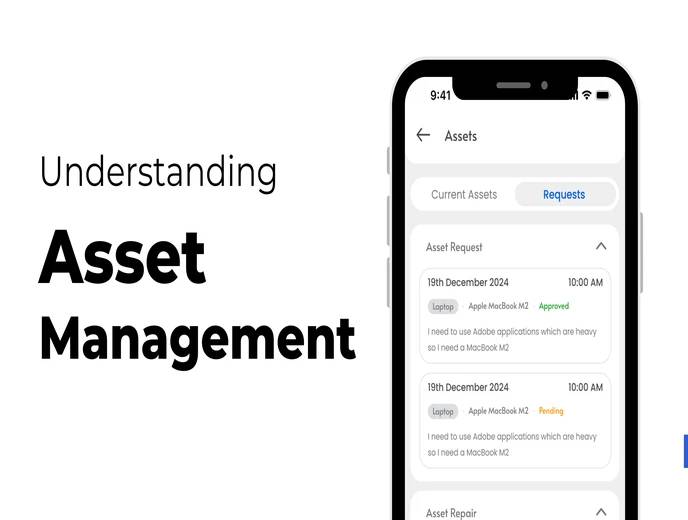
Company assets — laptops, phones, furniture, vehicles, software licenses — represent real cost and real risk if they're not tracked properly. When asset records live in spreadsheets or aren't tracked at all, businesses lose visibility into what they own, who's using it, and when it needs maintenance or replacement.
This guide explains what asset management actually involves, why it matters beyond just "knowing what you own," and how ZFour HRMS supports asset tracking as part of a broader HR workflow.
Quick Answer: What Is Asset Management in ZFour HRMS?
Asset management in ZFour HRMS covers:
Centralized asset tracking — a single dashboard showing all company assets, their location, and condition
Employee asset assignment — tracking which assets are allocated to which employees, and when
Maintenance alerts — automated notifications for scheduled or preventive maintenance
Lifecycle tracking — records from purchase through disposal or write-off
Reporting — digital records for audits, planning, and management review
The goal is to reduce the manual effort and record-keeping gaps that come from tracking assets through spreadsheets or informal handoffs.
What Counts as a Company Asset?
Depending on the business, tracked assets typically include:
IT equipment — laptops, desktops, monitors, mobile devices
Office equipment and furniture — desks, chairs, printers, shared equipment
Vehicles — company cars, delivery vehicles, field equipment
Software and digital assets — licenses, subscriptions, digital tools assigned to specific users or teams
Why Asset Management Often Breaks Down Without a System
Asset management as a discipline isn't unique to any one industry — it's formalized in international standards like ISO 55000, which defines asset management as the coordinated activity an organization undertakes to realize value from its assets across their full lifecycle, from acquisition through disposal. While most small and mid-sized businesses won't pursue formal ISO certification, the underlying principle is the same: assets create value only when they're tracked, maintained, and accounted for consistently.
Asset tracking tends to work reasonably well when a company is small — a handful of laptops, one shared spreadsheet, one person who remembers who has what. It becomes harder to sustain as headcount grows, especially when:
Multiple people are responsible for issuing or approving asset assignments
Employees join, leave, or change roles frequently, and asset handoffs aren't consistently logged
Assets move between departments or locations without a corresponding record update
Maintenance schedules exist only in someone's memory rather than a tracked system
The common failure pattern: an asset goes missing, breaks down unexpectedly, or an employee leaves without returning company property, and there's no reliable record of who had it, when it was issued, or its maintenance history.
The Business Cost of Poor Asset Tracking
Issue | Hidden Cost | Business Impact |
|---|---|---|
No centralized record | Time spent searching for asset information | Slower decision-making, duplicate purchases |
Missed maintenance | Reactive repairs instead of preventive care | Higher repair costs, unplanned downtime |
Unclear asset assignment | Difficulty tracking who has what | Assets lost during employee transitions |
No lifecycle tracking | Assets kept past useful life, or replaced too early | Inefficient capital spending |
Manual audit prep | Hours spent compiling records before an audit | Delayed compliance reporting |
How ZFour HRMS Supports Asset Management
Centralized Asset Dashboard
All company assets are visible in one place, including current assignment, condition, and location. This removes the need to check multiple spreadsheets or ask different departments to determine what the company owns and where it is.
Employee Asset Assignment
Assets can be assigned to specific employees, with a record of when they were issued. This makes it straightforward to check what an employee is responsible for, and to reconcile returns when someone changes roles or leaves the organization.
Maintenance Alerts
Instead of relying on someone remembering that a piece of equipment is due for servicing, the system can send automated reminders for scheduled or preventive maintenance, reducing the likelihood of unexpected breakdowns.
Lifecycle Tracking
Each asset's record can span from acquisition to disposal, making it easier to evaluate whether an asset is being used efficiently, when it's approaching end-of-life, and what its total cost of ownership has been over time.
Reporting for Audits and Planning
Digital, exportable records reduce the manual work of compiling asset information before an audit or a budgeting cycle, since the data is already centralized rather than scattered across departments.
Manual Asset Tracking vs. HRMS-Based Asset Management
Area | Manual Process | HRMS-Based Process |
|---|---|---|
Asset visibility | Scattered spreadsheets, memory-dependent | Centralized dashboard |
Employee assignment | Informal, often undocumented | Tracked with assignment records |
Maintenance | Reactive, dependent on someone remembering | Automated reminders |
Lifecycle tracking | Rarely tracked systematically | Recorded from purchase to disposal |
Audit preparation | Manual compilation, time-consuming | Exportable, centralized records |
Offboarding reconciliation | Easy to miss returned assets | Clear record of what's assigned to whom |
The core value isn't the software itself — it's having a single, reliable source of truth that doesn't depend on one person's memory or a spreadsheet that only one department updates.
Best Practices for Asset Management
Assign a clear owner for the asset register. Even with software in place, someone needs to be responsible for keeping records accurate and following up on discrepancies.
Reconcile assets during onboarding and offboarding. New hires should have their issued equipment logged immediately; departing employees should have their returns confirmed before final settlement.
Don't wait for a problem to check maintenance schedules. Preventive maintenance is generally less costly than reactive repairs after equipment fails.
Periodically audit physical assets against digital records. Software only reflects reality if the underlying data is kept current — an occasional physical spot-check helps catch drift between records and actual asset location.
Final Thoughts
Asset management is easy to underinvest in because the cost of doing it poorly — lost equipment, missed maintenance, slow audit prep — tends to show up gradually rather than all at once. A centralized system doesn't eliminate the need for someone to own the process, but it removes the dependency on scattered spreadsheets and institutional memory that makes manual tracking fragile as a business grows.
Looking to bring your asset tracking into one system?

Farheen Ahmed
HR Tech Content Strategist at ZFour Technology Private Limited
Research-driven content on HRMS, payroll, attendance management, employee management, and modern HR technology for Indian businesses.


