18 min read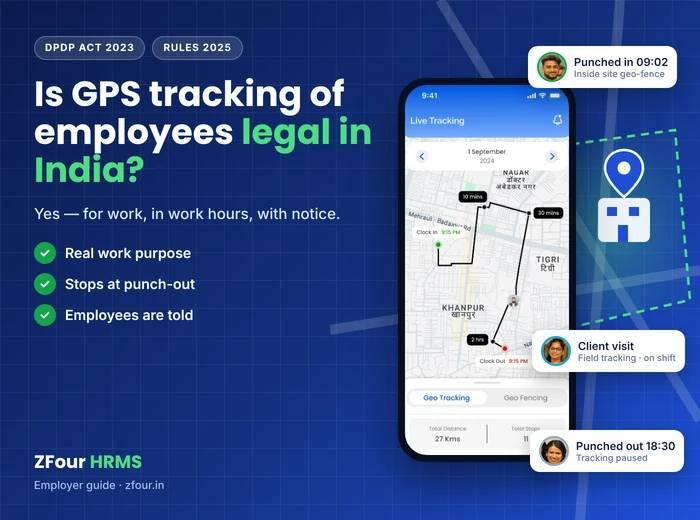
Quick answer
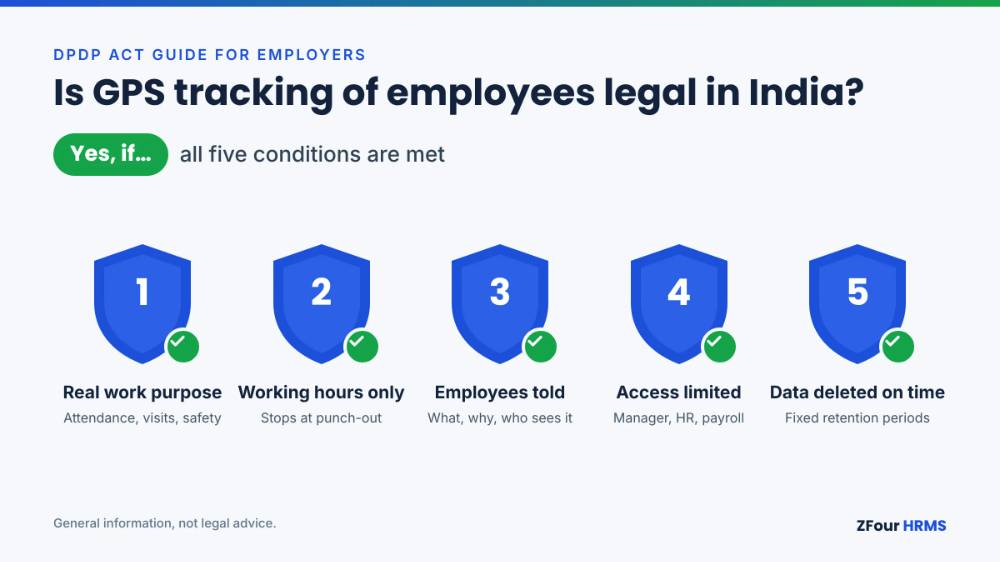
Yes. Indian employers can track employees' location with GPS when it serves a genuine work purpose — attendance, field visits, safety, travel claims — and stays within working hours. The Digital Personal Data Protection (DPDP) Act, 2023 allows employment-related processing of personal data without separate consent, but it is not a licence for round-the-clock surveillance. Tell employees what you track and why, limit tracking to shifts and to the roles that need it, protect the data, and delete it when you no longer need it.
This article explains the law in general terms for HR and business owners. It is not legal advice for your company; take advice on your specific policy.
Key takeaways
Privacy is a fundamental right in India (Puttaswamy, 2017). Workplace monitoring should have a legitimate aim and be proportionate to it.
Section 7(i) of the DPDP Act lets employers process personal data for employment purposes without consent — but only for genuine employment purposes.
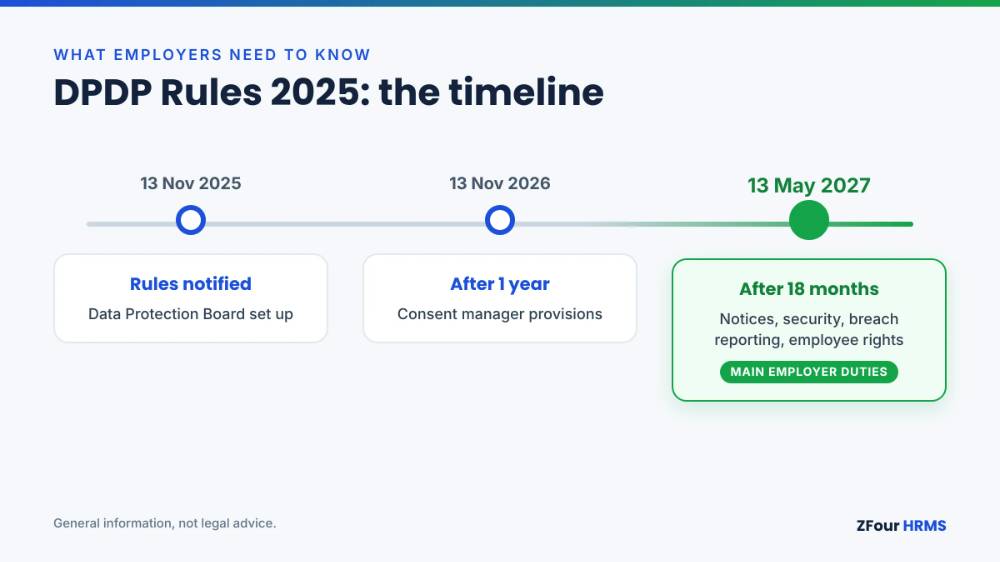
The DPDP Rules, 2025 were notified on 13 November 2025. Most employer duties — notices, security safeguards, breach reporting, employee rights — apply from 13 May 2027.
Location at punch-in and punch-out, and live tracking of field staff during shifts, are low-risk when done transparently. Tracking after hours or tracking office staff continuously is high-risk.
A written location-tracking policy, a plain-language notice in the employee's language and automatic switch-off at punch-out cover most of the risk.
Who this guide is for
This guide is for founders, HR heads and operations managers in Indian businesses that use, or are considering, GPS attendance or field tracking: factories with gate attendance, security agencies with guards at client sites, distribution and FMCG companies with sales reps, service companies with field engineers, logistics and delivery firms, and retail chains with store staff. It also helps employees who want to know what their employer may and may not do.
The question we hear most from HR teams is simple: "Can we make GPS attendance mandatory?" The short answer is yes, for work purposes, done properly. The rest of this guide explains what "done properly" means in practice.
The short legal answer: three rules
Rule 1: Privacy is a fundamental right
In Justice K.S. Puttaswamy (Retd.) v. Union of India (2017), a nine-judge bench of the Supreme Court held that privacy is a fundamental right protected by the Constitution. The judgment is about the State, but its reasoning shapes how courts, regulators and employees think about any intrusion into privacy. Lawyers commonly summarise its test for a permissible intrusion in four parts:
Legality — there is a lawful basis for it.
Legitimate aim — it serves a genuine purpose.
Proportionality — it goes no further than needed for that purpose.
Safeguards — there are procedural protections against misuse.
The DPDP Act does not expressly apply this four-part test to every private employer's monitoring, but it is a sound way to design a tracking programme you can defend.
Rule 2: The DPDP Act allows employment use without consent, within limits
The DPDP Act, 2023 is India's main data protection law. It allows personal data to be processed either with consent or for certain "legitimate uses". One of those legitimate uses, in section 7(i), is processing for the purposes of employment or for safeguarding the employer from loss or liability — for example, preventing corporate espionage or protecting confidential information.
For employee location tracking in India, attendance, payroll, access control and verifying that field visits happened all fall comfortably within employment purposes. Location tracking with no real employment purpose — following an employee home, monitoring weekend movements — does not. And a consent clause buried in an appointment letter doesn't make intrusive monitoring acceptable, because consent under the Act must be free, specific and informed.
Rule 3: The DPDP Rules phase in employers' duties
The DPDP Rules, 2025 were notified on 13 November 2025. They phase in:
Phase | From | What applies |
|---|---|---|
Immediately | 13 November 2025 | Setting up the Data Protection Board and related provisions |
After one year | 13 November 2026 | Consent manager provisions |
After 18 months | 13 May 2027 | Most operational duties: notices, security safeguards, breach reporting, data principals' rights, retention and erasure |
So most obligations bite from 13 May 2027. That is not a reason to wait: tracking policies, app settings and employee communications take months to change, and practices set up now will be the ones examined later.
The law in more detail
Key terms in the DPDP Act
Term | Meaning | In a tracking context |
|---|---|---|
Data Principal | The individual the data is about | The employee being tracked |
Data Fiduciary | Whoever decides why and how data is processed | The employer |
Data Processor | Whoever processes data on the fiduciary's behalf | The HRMS or tracking software provider |
Personal data | Any data about an identifiable individual | Location points, routes, punch times linked to an employee |
Personal data breach | Unauthorised processing, loss or disclosure | Location history leaked or accessed by someone without a need |
The employer remains responsible for what its software provider does with employee data, which is why vendor choice and contracts matter.
What employers must do as Data Fiduciaries
Once the operational provisions of the DPDP Rules, 2025 apply, an employer's obligations as a Data Fiduciary processing employee location data are, in summary:
Give notice describing the personal data, the purpose and how to exercise rights. Under section 5, the notice must be available in English or, on request, in any language in the Eighth Schedule of the Constitution — Hindi, Marathi, Tamil, Bengali and others.
Use the data only for the stated purpose. Location collected for attendance shouldn't quietly become a productivity score.
Keep data accurate, especially where it affects pay — a wrong location reading should not cost someone a day's wages without a way to correct it.
Protect the data with reasonable security safeguards: access controls, encryption and logging.
Report breaches to affected employees and to the Data Protection Board without delay, and send the Board a detailed report within 72 hours of becoming aware of the breach (Rule 7 of the DPDP Rules, 2025).
Erase data when the purpose is served and no law requires keeping it.
Provide a grievance contact and respond to employees who exercise their rights.
Penalties
The DPDP Act sets maximum penalties by type of failure. The highest apply to failures employers can easily fall into:
Failure | Maximum penalty |
|---|---|
Failing to take reasonable security safeguards | ₹250 crore |
Failing to notify a personal data breach | ₹200 crore |
Other breaches of the Act or Rules | ₹50 crore |
These are ceilings, not automatic fines; the Board considers the nature, gravity and duration of the breach. But for a small business, a breach of employee location data plus an inadequate response is a real risk.
Older rules on sensitive data, including biometrics
Many businesses combine GPS attendance with biometric or face-recognition attendance. Until 13 May 2027, the Information Technology (Reasonable Security Practices and Procedures and Sensitive Personal Data or Information) Rules, 2011 treat biometric information as sensitive personal data. From that date, section 44(2) of the DPDP Act removes section 43A of the IT Act, and the SPDI Rules fall away with it. Either way, biometric templates and face images deserve the strongest protection you have: restricted access, encryption and no reuse beyond attendance.
Labour law requires attendance records
Labour laws, including the Labour Codes in force since 21 November 2025, require employers to keep records of attendance, working hours and overtime. Verified punch-in location supports these records and makes overtime and wage calculations defensible. That is a clear employment purpose — and a strong argument for punch-based location verification, as opposed to continuous tracking.
What counts as "location data"?
Not every location feature carries the same legal risk. What matters is how much is collected, how often, and whether collection continues outside working hours.
Point-in-time checks record one or two locations a shift, at punch-in and punch-out. These are geo-tagging, geo-fencing, selfie with location, and Wi-Fi or IP restriction. They are the easiest to justify because each reading is tied directly to attendance.
Continuous tracking, meaning live location and route history, can record hundreds of points a shift. It is justified for field roles whose work involves moving between sites. It needs the tighter limits set out in this guide: shift hours only, named roles only, and short retention.
That difference is why most businesses should use point-in-time checks for everyone, and live tracking only for roles that genuinely need it. Our guide to geo-fencing attendance explains how boundaries are set.
What's clearly fine, and what's risky
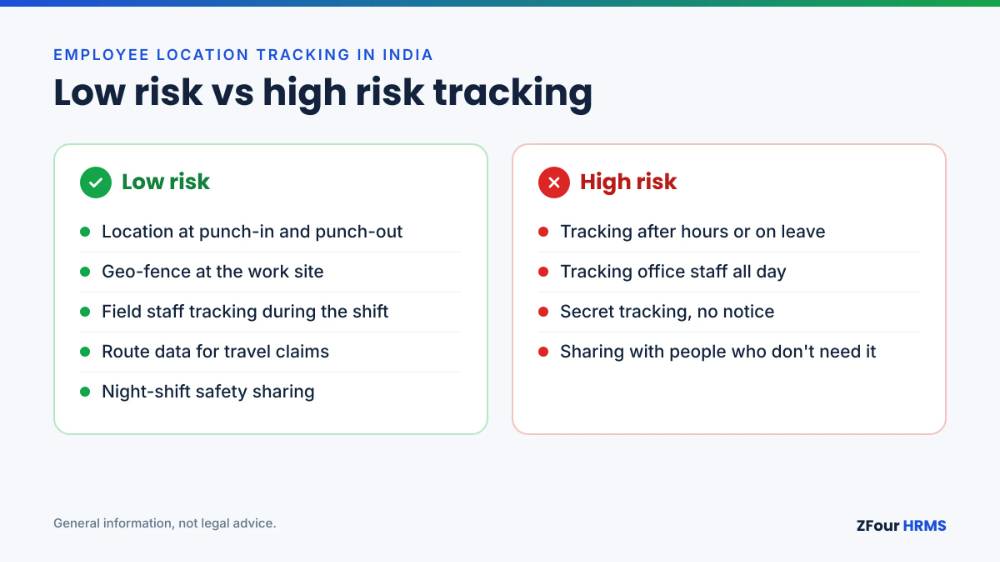
Practice | Risk | Why |
|---|---|---|
GPS check when an employee punches in and out | Low | Direct link to attendance; a single location per punch |
Geo-fence that only allows punch-in inside the site | Low | Prevents proxy attendance; no continuous tracking |
Live tracking of field staff during shift hours | Low to medium | Justified for field, delivery and service roles; must stop at shift end |
Visit verification and kilometre-based travel claims | Low | Tied to pay and reimbursement |
Location sharing for lone or night-shift workers' safety | Low | Safety is a legitimate aim; tell employees how it's used |
Tracking after shift hours, on weekly offs or on leave | High | No work purpose; collects private-life data |
Continuous tracking of office staff who never work in the field | Medium to high | Hard to justify when punch-in location already proves attendance |
Using location history to discipline employees for personal stops during breaks | Medium to high | Goes beyond the stated purpose unless the policy says so and it is proportionate |
Sharing location history with people who don't need it | High | Breaks purpose limitation and access controls |
Secretly enabling tracking without telling employees | High | No notice, no transparency, likely to fail any proportionality test |
Company phone or personal phone?
Most Indian SMEs don't give every field employee a company phone, so tracking employees on a personal phone is the norm. That's workable, but it raises the bar on restraint.
On a company phone
The device is a work tool, so it is easier to justify tracking during work hours. Even so, switch tracking off outside shifts and avoid collecting anything other than what the policy describes.
On a personal phone (BYOD)
Track only through a work app, never through device-level tools that can see the rest of the phone.
Collect location only while the employee is on shift, and stop automatically at punch-out.
Never access contacts, photos, messages or other apps.
Tell employees exactly what the app collects, and let them see their own location records.
Consider a small phone or data allowance for field staff who are required to use their own phone for work.
App store rules on background location
If your tracking app collects location in the background (when the app is not open on screen), Google Play requires a prominent in-app disclosure explaining what is collected and why, before the app asks for background location permission, and reviews whether background location is necessary for the app's core function. Make sure your HRMS vendor's app meets these requirements; an app that is pulled from the store or blocked from background location will break attendance on the first day of the month.
Special situations
Women on night shifts
The OSH Code allows women to work night shifts with their consent and with safety arrangements in place, such as transport. Location sharing during the shift and the journey can be part of those arrangements. Make the purpose explicit — safety, not supervision — and limit who can see the data, for example the transport desk and a named safety officer.
Security guards at client sites
Guards are deployed at client premises, often across many sites. Geo-fenced attendance at each site, with QR checkpoint scans during patrols, proves presence for client billing and protects the agency in disputes. Because the site is the workplace, the purpose is clear. Avoid tracking guards' movements after duty, and tell clients which data they will and won't receive.
Field sales and service staff
Sales reps and service engineers are the clearest case for field staff tracking: visits, routes and distance travelled are part of the job, and travel claims depend on them. Track only during working hours, use route data for visits and reimbursements, and avoid turning location history into minute-by-minute productivity scoring unless the policy says so and it is proportionate.
Delivery partners and gig workers
Many delivery workers are engaged through platforms rather than as employees. The Code on Social Security covers gig and platform workers for social security, but whether DPDP's employment-purpose ground applies depends on the relationship. Platforms generally rely on consent and contract for location tracking. If you engage delivery staff directly as employees, the guidance in this article applies.
Contract workers deployed by an agency
When a contractor's workers punch in on your system, decide in writing who is the Data Fiduciary for their attendance data — you, the contractor, or both — and who answers their questions. Share only what each party needs: you need attendance at your site; the contractor needs it for payroll.
Office and hybrid staff
Punch-in location (or office Wi-Fi) is enough to confirm attendance. For work-from-home days, recording that the employee marked attendance from their registered home location is usually sufficient; continuous tracking at home is hard to justify.
Writing your employee tracking policy
The checklist
Purpose in writing — attendance, field-visit verification, travel claims, safety. Nothing vague such as "productivity monitoring".
Who is tracked — list roles (field sales, service engineers, delivery, guards). Office staff: punch-in location only.
When — only between shift start and end; tracking switches off automatically at punch-out.
What is collected — punch location, or route during the shift for field roles. No contacts, photos or other app data.
Notice to employees — plain language, in the employee's language, before tracking starts.
Access — the reporting manager, HR and payroll only, with role-based permissions in the software.
Retention — a fixed period for route history; punch records as long as labour law requires attendance records.
Security — encryption, data hosted in India where possible, access logs.
Corrections — how an employee disputes a wrong reading that affects pay.
Grievance contact — a named person employees can ask or complain to.
Review — yearly, and again before 13 May 2027.
Sample notice (adapt with your lawyer)
Location data at [Company]
We use the [App] attendance app to record where you mark attendance and, if you work in the field, your location during working hours.
What we collect: your location when you punch in and out; for field roles, your location and route between punch-in and punch-out.
Why: to record attendance and working hours, verify client visits, calculate travel reimbursement, and support your safety on night shifts.
When: only between punch-in and punch-out. Tracking stops automatically when you punch out. We never track you on weekly offs or leave.
Who can see it: your reporting manager, HR and payroll.
How long we keep it: route history for [X] months; attendance records for the period labour law requires.
Your rights: you can see your own records in the app, ask us to correct a wrong record, and contact [Name, email, phone] with any question or complaint.
This notice is available in Hindi and other languages on request.
Suggested retention periods
These are practical starting points, not legal requirements; confirm them with your adviser.
Data | Suggested retention | Reason |
|---|---|---|
Punch-in/out time and location | As long as attendance records must be kept under labour law | Statutory records and wage disputes |
Route history | 3–6 months, or until travel claims for the period are settled | Reimbursement and visit verification |
Selfie images at punch-in | Short period, e.g. 30–90 days, unless a dispute is open | Proxy prevention; images are more sensitive |
Biometric templates | Until the employee leaves, then delete | Attendance only |
Access logs | 1 year | Security and breach investigation |
Other monitoring HR teams ask about
Location is rarely the only monitoring question. The same principles — a real purpose, proportionate means, notice and limited access — apply to all employee monitoring under the DPDP Act, including the other tools employers commonly use.
Selfie attendance
A photo at punch-in, matched against the employee's profile, prevents one person marking attendance for another. Selfie attendance raises a bigger privacy question than GPS, because photos are more sensitive than coordinates. Keep them for a short period, restrict who can view them, and don't use them for anything other than verifying attendance.
Face-recognition and biometric devices
Fingerprint and face devices at factory gates are common and generally accepted as attendance tools. The risk is in storage: templates should be encrypted, never exported for other uses, and deleted when the employee leaves. Ask your vendor where templates are stored and who can access them.
CCTV
Cameras in production areas, warehouses and entrances are usually justified for safety and security. Keep them out of washrooms, changing rooms and rest areas, display signage, and limit how long footage is kept.
Email, laptop and screen monitoring
For office and IT teams, monitoring company email and devices for security purposes — data-leak prevention, malware — can fall within employment purposes. Keystroke logging and continuous screen recording are far more intrusive and need a documented justification and a less intrusive alternative considered first.
WhatsApp and personal messages
Don't access employees' personal messaging. If work communication runs on WhatsApp, set clear rules for work groups instead of monitoring personal chats.
Rolling out tracking without backlash
Most resistance to GPS attendance comes from surprise and suspicion, not from the technology. A rollout that explains itself avoids most of it.
Start with the why. Explain the problem it solves for employees as well as the company: no more disputes over attendance, faster travel reimbursement, fewer manual registers.
Show the switch-off. Demonstrate that tracking stops at punch-out. This single point removes most objections.
Use the employee's language. Share the notice and a short video in Hindi or the local language.
Pilot with one team. Start with a field team whose manager supports it, fix problems, then extend.
Answer questions in writing. Publish a one-page FAQ: what's tracked, who sees it, what happens if the phone has no signal, how to correct a wrong punch.
Involve worker representatives where you have a union or works committee, before rollout rather than after.
Review after 30 days. Check that the data is used only as described, and tell employees what you found.
Illustrative examples
These are illustrative scenarios to show how the principles apply. They are not ZFour customer case studies.
A distribution company with 60 sales reps
Reps start their day at the first outlet, not the office. The company uses geo-tagged punch-in at the first visit, live tracking only during working hours, and route-based kilometre claims. Disputes about fuel claims fall because both sides can see the route; reps get reimbursed faster because claims no longer wait for manual approval.
A security agency with guards at 80 sites
Guards punch in inside a geo-fence at each client site and scan QR checkpoints during patrols. Live tracking is off; the agency doesn't need it because the geo-fence and checkpoints prove presence. The agency shares site attendance reports with each client, but not guards' personal details.
A factory with 400 shift workers
Workers punch in by biometric device at the gate, and supervisors on the shop floor use the mobile app with a geo-fence covering the plant. No one is tracked continuously. The factory's main benefit is accurate overtime, because punch times feed directly into overtime calculation.
What to do if an employee complains
Treat a complaint about tracking as a chance to check your own practice, not as a disciplinary matter.
Acknowledge it in writing and name who will look into it.
Check the facts: what was collected, when, and who accessed it. Your software's access logs should answer this.
Compare against the policy. If tracking ran outside shift hours or someone without a need viewed the data, fix the setting and tell the employee what you changed.
Correct records that were wrong, especially where they affected pay or attendance.
Reply within a fixed time, such as 7 working days, and keep a record of the complaint and outcome.
A clear, fast response to the first complaint usually prevents the second, and it is exactly the kind of grievance handling the DPDP Act expects employers to have in place.
Ten questions to ask your HRMS or tracking vendor
The employer is responsible for employee data even when a vendor processes it. Before you switch on tracking, get written answers to these:
Does location collection stop automatically when the employee punches out?
Can live tracking be enabled for selected roles only, rather than everyone?
How often does the app record location during live tracking, and can we change it?
Where is the data stored — in India? Which cloud provider and region?
Is location data encrypted in transit and at rest?
Can we set different access permissions for managers, HR and payroll?
Can we set retention periods and delete route history automatically?
Does the app meet Google Play and Apple requirements for background location disclosure?
Can employees see their own location and attendance records in the app?
How will you notify us of a data breach, and how quickly?
If a vendor can't answer the first two clearly, the product was designed for surveillance rather than attendance.
How ZFour HRMS approaches location tracking
ZFour HRMS is built around the two-level model this guide recommends:
Everyone: location at punch-in and punch-out. Geo-tagging and geo-fencing are included in every plan. GPS is active for about 3 seconds per punch, so there's no background tracking and little battery use.
Field roles only: live tracking during shifts. Real-time field tracking is an optional add-on at ₹100 per field user per month, switched on only for the people who need it, with route history for visits and kilometre claims.
Data is stored on servers in India (AWS Mumbai), access is controlled by role, and the employee app works in Hindi and English. See field staff location tracking or read our guide to field employee attendance tracking.
Get the Field Attendance Policy Kit
An editable GPS tracking policy, an employee notice in English and Hindi, and a retention schedule, all in Word.
Download the free kitSee shift-bound GPS tracking in action → Pick a demo time
Sources
Justice K.S. Puttaswamy (Retd.) v. Union of India (2017), Supreme Court of India
DPDP Rules, 2025 — Rule 7, intimation of personal data breach
King Stubb & Kasiva — Can employers monitor employees under the DPDP Act? (September 2026)
King Stubb & Kasiva — What happens to the SPDI Rules after DPDP enforcement

Farheen Ahmed
HR Tech Content Strategist at ZFour Technology Private Limited
Research-driven content on HRMS, payroll, attendance management, employee management, and modern HR technology for Indian businesses.