 7 min read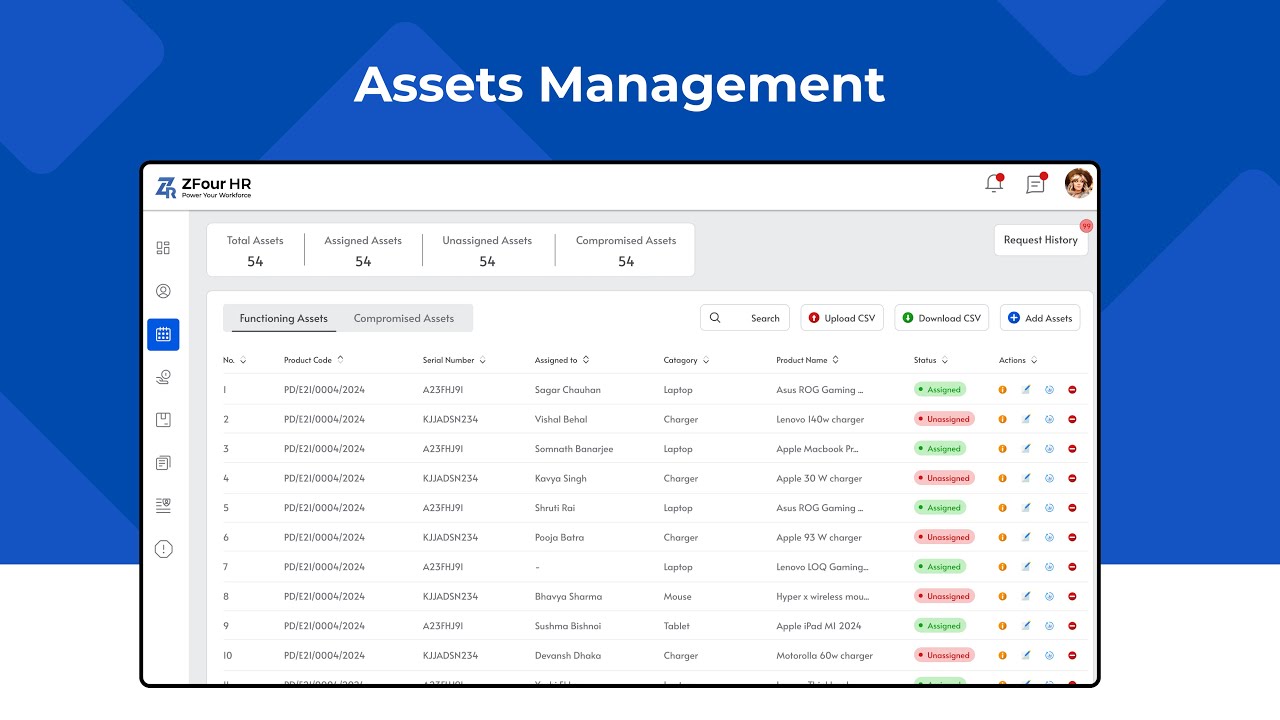
Keeping track of company assets such as laptops, mobile phones, office equipment, access cards, and other business property can become difficult when everything is managed through spreadsheets or manual records.
As an admin, you may need to answer simple but important questions:
Which employee currently has a particular laptop?
When was the asset assigned?
Is the asset still in use?
Has an employee returned the asset after leaving?
Which assets are currently available?
This is where asset management in an HRMS can make the process easier. Instead of maintaining separate Excel sheets or paper records, organizations can manage employee and asset information through a centralized digital system.
Asset Management in HRMS at a Glance
Question | Answer |
|---|---|
What is it? | A system for recording and tracking company assets assigned to employees. |
What can be tracked? | Laptops, phones, access cards, equipment and other company property. |
Who uses it? | HR teams, administrators and authorized managers. |
When is it useful? | During onboarding, asset assignment, transfers and employee offboarding. |
Main benefit | Centralized visibility of employee-assigned assets and their status. |
Quick Answer: What Is Asset Management in HRMS?
Asset management in an HRMS is the process of recording, assigning, tracking, updating, and managing company-owned assets associated with employees.
Depending on the system and configuration, organizations can maintain records for assets such as laptops, mobile devices, access cards, office equipment, and other company property.
For businesses looking to centralize HR operations, asset management can work alongside other HRMS functions such as attendance, payroll, employee records, and employee self-service.
What Is an Asset Management Portal?
An asset management portal is a centralized digital interface where authorized users can maintain information about company assets and their allocation.
Instead of searching through multiple spreadsheets, an admin can use a structured system to understand:
Which assets are available
Which assets are assigned
Which employee has an asset
Asset categories and details
Asset status
Assignment and return information
This becomes particularly useful as the number of employees and company assets increases.
Why Is Employee Asset Tracking Important?
Manual asset tracking can become difficult as an organization grows. An Excel spreadsheet may work for a small number of assets, but maintaining accurate records becomes harder when equipment is frequently assigned, transferred, replaced, or returned.
A digital asset management process can provide better visibility and more consistent records.
1. Know Which Employee Has Each Asset
Admins can maintain employee-wise asset records instead of searching through multiple spreadsheets.
For example, an employee record can show the equipment assigned to that person, making it easier to verify responsibility and ownership records.
2. Simplify Asset Assignment
When an employee joins the organization, the admin can record the assets issued to them.
This creates a clear record of what was provided and when it was assigned.
3. Track Asset Returns
Asset tracking is especially important when employees transfer departments or leave the company.
A structured record helps admins check whether assigned equipment has been returned and update its status accordingly.
4. Maintain Centralized Records
Instead of keeping separate files for different departments, organizations can maintain asset information in one centralized system.
This makes it easier for authorized users to find and update records.
5. Improve Administrative Efficiency
Digital asset tracking can reduce repetitive manual work and make information easier to access when admins need it.
It can also reduce dependence on outdated spreadsheets and disconnected records.
What Information Should Be Recorded for Company Assets?
An effective asset management process should capture enough information to identify and manage each asset.
Depending on the organization's requirements, this may include:
Asset name
Asset category
Asset type
Serial number
Asset identification number
Vendor information
Purchase details
Current status
Assigned employee
Assignment date
Return date
Relevant notes or remarks
The exact information an organization records will depend on its internal process and the capabilities of its HRMS.
How Does the Asset Management Process Work?
A basic employee asset management workflow can be divided into five stages.
Step 1: Add the Asset
When the company purchases new equipment, the admin records the asset and its relevant details.
For example:
Laptop → Dell → Serial Number → Asset ID → Available
Step 2: Assign the Asset
When an employee needs the equipment, the admin assigns the asset to that employee.
The record can then show:
Laptop → Assigned → Employee Name
Step 3: Track the Asset
Admins can check which assets are assigned, available, or otherwise recorded in the system.
This provides better visibility into the organization's inventory.
Step 4: Update the Asset
Asset information may need to be updated when equipment is transferred, replaced, repaired, or otherwise changes status.
Keeping records updated helps maintain accurate information.
Step 5: Record the Return
When an employee returns company equipment, the admin can update the asset record.
For example:
Laptop → Returned → Available
This creates a clearer record of the asset lifecycle.
“Watch how ZFour HRMS asset management works”
Want to see the process in action? Watch how ZFour HRMS asset management works to understand how assets can be managed through the system.
Common Asset Categories in an Organization
Organizations may manage many different types of assets.
IT Assets
Laptops
Desktop computers
Monitors
Mobile phones
Tablets
Headsets
Keyboards and mice
Office Equipment
Printers
Projectors
Office furniture
Access cards
Other workplace equipment
The categories can vary depending on the organization's requirements.
Manual Asset Tracking vs Digital Asset Management
Many organizations start with spreadsheets because they are simple to set up. However, manual tracking can become difficult as the number of employees and assets increases.
Area | Manual Tracking | Digital Asset Management |
|---|---|---|
Asset records | Spreadsheets or documents | Centralized digital records |
Assignment tracking | Manual updates | Recorded against employees |
Asset returns | Manual verification | Status can be updated digitally |
Searching records | Can take time | Faster access to information |
Reporting | Often requires manual preparation | Based on available system records |
Scalability | Becomes harder with growth | Better suited to growing organizations |
For businesses that are already moving away from spreadsheets, understanding the broader benefits of HRMS software can help when evaluating which HR processes should be digitized.
How Asset Management Fits Into an HRMS
Asset management does not have to operate as a completely separate administrative process. A modern HRMS can bring employee information and workforce processes into a centralized environment.
ZFour HRMS's current product information specifically describes field team and asset tracking, including asset tracking with exit-clearance checks. This makes asset management particularly relevant during employee onboarding, asset assignment, employee transfers, and exits.
For example:
Employee joins → Asset assigned → Employee uses asset → Employee exits → Asset return checked
This type of workflow can help HR and admin teams maintain a clearer record of company assets throughout the employee lifecycle.
How ZFour HRMS Can Help With Asset Tracking
ZFour HRMS is designed to centralize HR and workforce management processes for Indian businesses.
Its current product information describes asset tracking with exit-clearance checks, alongside employee information, attendance, payroll, workforce tracking, and other HR processes.
For organizations using these capabilities, admins can connect asset information with employee-related workflows instead of maintaining completely separate manual records.
This can be particularly useful for organizations with:
Field employees
Multiple locations
Large workforces
Company-issued laptops and mobile devices
Frequent employee onboarding and exits
Equipment that needs to be returned during offboarding
You can also explore ZFour HRMS features to understand how asset tracking fits alongside attendance, payroll, employee self-service, analytics, and other workforce management functions.
Asset Management and Employee Self-Service
Asset management can also form part of a broader employee self-service ecosystem.
An Employee Self-Service (ESS) portal allows employees to handle certain HR activities independently, such as checking attendance, applying for leave, accessing payslips, and updating relevant information.
When employee information and asset records are maintained within the same HR environment, HR and admin teams can have a more complete view of the employee lifecycle.
Best Practices for Employee Asset Management
Keep Asset Information Updated
Update records whenever an asset is assigned, transferred, returned, replaced, or otherwise changes status.
Use Unique Asset Identifiers
Using a unique asset ID or serial number can make individual assets easier to identify.
Record Asset Assignments
Record which employee receives an asset and when it was issued.
Establish a Return Process
Create a defined process for recovering company equipment when employees leave or change roles.
Review Asset Records Regularly
Periodic reviews can help identify missing information, outdated records, or assets that require attention.
How Asset Tracking Supports Employee Offboarding
Employee exits are one of the situations where accurate asset records become especially important.
Before an employee's exit is completed, the organization may need to verify:
Which assets were assigned to the employee
Which assets have been returned
Whether any equipment is still outstanding
Whether the asset record needs to be updated
Whether the relevant internal clearance process is complete
A structured process can help HR and admin teams avoid relying on memory or separate spreadsheets.
ZFour's current product information specifically references asset tracking with exit-clearance checks, making this an important use case for organizations managing company-issued equipment.
Conclusion
Managing company assets becomes increasingly difficult when employee records and equipment information are maintained across separate spreadsheets and manual documents.
An asset management system within an HRMS can help organizations centralize asset records, track employee assignments, manage returns, and maintain better visibility throughout the asset lifecycle.
For growing businesses, connecting employee information with asset tracking can create a more structured process for onboarding, daily administration, transfers, and employee exits.
If your organization is looking to move beyond spreadsheets and bring HR processes into one system, explore ZFour HRMS to learn more about its HR, workforce, and asset-tracking capabilities.

Farheen Ahmed
HR Tech Content Strategist at ZFour Technology Private Limited
Research-driven content on HRMS, payroll, attendance management, employee management, and modern HR technology for Indian businesses.


