 22 min read
As businesses in Noida continue to grow, HR teams are expected to manage larger workforces, hybrid work models, multiple office locations, and evolving statutory compliance requirements without increasing administrative overhead. Many organizations still rely on spreadsheets, emails, and manual approvals for payroll, attendance, leave management, employee records, and onboarding—processes that become increasingly time-consuming and error-prone as the business expands.
HR automation software helps organizations replace repetitive manual tasks with automated workflows, enabling HR teams to improve operational efficiency, reduce payroll and attendance errors, strengthen compliance, and deliver a better employee experience. From automated leave approvals and attendance tracking to payroll processing and employee self-service, modern HR automation platforms centralize critical HR functions within a single system.
For businesses operating in Noida's IT parks, manufacturing hubs, startups, healthcare organizations, educational institutions, and service sectors, choosing the right HR automation software requires more than comparing features. Organizations should evaluate implementation support, integration capabilities, security, scalability, compliance management, and long-term business requirements before making a decision.
This guide explains how HR automation software works, the key features to look for, benefits for businesses in Noida, implementation best practices, and practical factors to consider when selecting the right solution for your organization.
Why HR Automation Matters for Businesses in Noida
Noida has evolved into one of North India's fastest-growing business hubs, with a diverse mix of IT companies, startups, manufacturing units, educational institutions, healthcare organizations, BPOs, and service-based businesses. As organizations expand their workforce, managing HR operations manually becomes increasingly difficult. Payroll processing, attendance tracking, leave approvals, employee records, onboarding, and statutory compliance often require significant administrative effort and are more susceptible to errors when handled through spreadsheets or disconnected systems.
HR automation software helps businesses standardize and streamline these processes through configurable digital workflows. Instead of relying on manual data entry and repetitive approvals, organizations can automate routine HR tasks, improve data accuracy, reduce administrative workload, and provide employees with faster access to essential HR services.
For businesses operating in Noida and Greater Noida, HR automation also supports better workforce management across different business environments. For example, IT companies may prioritize hybrid attendance, employee self-service, and performance tracking, while manufacturing organizations often require shift scheduling, overtime management, biometric attendance integration, and workforce compliance. A flexible HR automation platform should be capable of supporting these different operational requirements within a single system.
As businesses continue to adopt digital transformation initiatives, HR automation is becoming an important investment for improving operational efficiency, supporting compliance, enhancing employee experience, and preparing organizations for long-term growth.
Who Is This Guide For?
Selecting the right HR automation software depends on your organization's workforce size, operational complexity, compliance requirements, and long-term business goals. Whether you're replacing manual HR processes or upgrading from an existing system, understanding your business needs is the first step toward choosing the right solution.
This guide is particularly useful for:
Startups looking to automate HR operations from the beginning and reduce dependence on spreadsheets.
Small and Medium Enterprises (SMEs) aiming to streamline payroll, attendance, leave management, and employee records while improving operational efficiency.
IT and Technology Companies managing hybrid or remote teams that require digital onboarding, employee self-service, and flexible attendance tracking.
Manufacturing and Industrial Businesses handling shift scheduling, overtime calculations, biometric attendance, and workforce compliance.
Healthcare, Retail, Hospitality, and Educational Institutions coordinating multiple departments, locations, and employee schedules.
HR Managers, Payroll Professionals, Business Owners, and Decision-Makers evaluating HR automation platforms to improve productivity, support compliance, and scale HR operations.
Whether your organization has 20 employees or 2,000, this guide will help you understand how HR automation software can simplify routine HR tasks, improve employee experience, reduce manual effort, and support business growth through more efficient workforce management.
What is HR Automation Software?
Quick Answer
HR automation software is a digital solution that automates repetitive Human Resources (HR) tasks such as payroll processing, attendance tracking, leave management, employee onboarding, document management, performance reviews, and statutory compliance. It centralizes HR operations, reduces manual work, improves accuracy, and enhances the employee experience through automated workflows and self-service capabilities.
What Does HR Automation Software Do?
A modern HR automation platform helps organizations:
Automate payroll calculations and payslip generation
Track employee attendance, shifts, and overtime
Manage leave requests and approval workflows
Maintain centralized employee records
Simplify onboarding and offboarding processes
Enable Employee Self-Service (ESS) for routine HR tasks
Support statutory compliance, including payroll-related reporting
Generate HR reports and workforce analytics
Improve collaboration between HR, payroll, finance, and management teams
Why Businesses Use HR Automation Software
Organizations adopt HR automation software to:
Reduce repetitive manual HR tasks
Minimize payroll and attendance errors
Save time through automated workflows
Improve compliance with labour and payroll regulations
Enhance employee experience through self-service access
Increase HR productivity and operational efficiency
Support business growth with scalable HR processes
Make better workforce decisions using real-time reports and analytics
Core HR Functions Covered
HR Function | Purpose |
|---|---|
Employee Management | Centralize employee information |
Attendance Management | Track attendance, shifts, and overtime |
Leave Management | Automate leave applications and approvals |
Payroll Processing | Calculate salaries, deductions, and payslips |
Employee Self-Service (ESS) | Allow employees to manage routine HR tasks independently |
Performance Management | Support goal setting and performance reviews |
Recruitment & Onboarding | Simplify hiring and employee onboarding |
Compliance Management | Assist with statutory reporting and documentation |
HR Analytics | Generate workforce insights and business reports |
How HR Automation Software Works
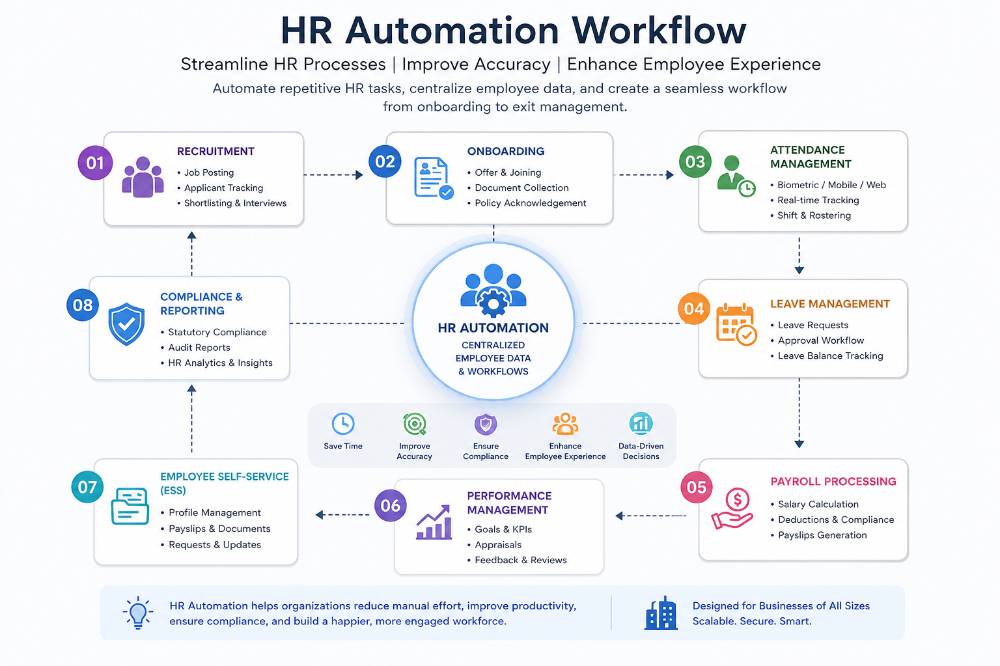
HR automation software connects different HR processes into a single digital workflow, reducing manual intervention and ensuring information flows seamlessly across departments. Instead of managing separate spreadsheets or disconnected systems, employee data is updated automatically across payroll, attendance, leave management, and compliance modules.
Typical HR Automation Workflow
Employee Joins the Organization
            ↓
Digital Onboarding & Document Verification
            ↓
Employee Profile Creation
            ↓
Attendance & Shift Tracking
            ↓
Leave Requests & Approval Workflow
            ↓
Payroll Processing & Salary Calculation
            ↓
Statutory Compliance (PF, ESI, TDS, etc.)
            ↓
Payslip Generation & Employee Self-Service
            ↓
HR Reports, Analytics & Workforce Insights
How Each Stage Supports HR Operations
Employee Onboarding
Digitally collect employee information and required documents.
Create employee profiles without repetitive manual data entry.
Standardize onboarding across departments and locations.
Attendance & Time Tracking
Record attendance through biometric devices, mobile applications, or web portals.
Monitor shifts, overtime, and working hours automatically.
Reduce manual attendance reconciliation.
Leave Management
Employees submit leave requests online.
Managers review and approve requests through predefined workflows.
Leave balances are updated automatically.
Payroll Processing
Calculate salaries using attendance, leave, overtime, and statutory deductions.
Generate payslips and payroll reports with reduced manual effort.
Improve payroll accuracy and consistency.
Compliance Management
Maintain payroll-related statutory records.
Support calculations for applicable deductions and compliance reporting.
Reduce the risk of manual compliance errors.
Employee Self-Service (ESS)
Employees can:
Download payslips
Apply for leave
View attendance records
Update personal information
Access HR documents
This reduces routine HR queries and improves employee experience.
HR Analytics & Reporting
Generate reports on workforce trends, attendance, payroll, leave, and employee performance.
Support data-driven HR planning and business decision-making.
Business Outcomes of HR Automation
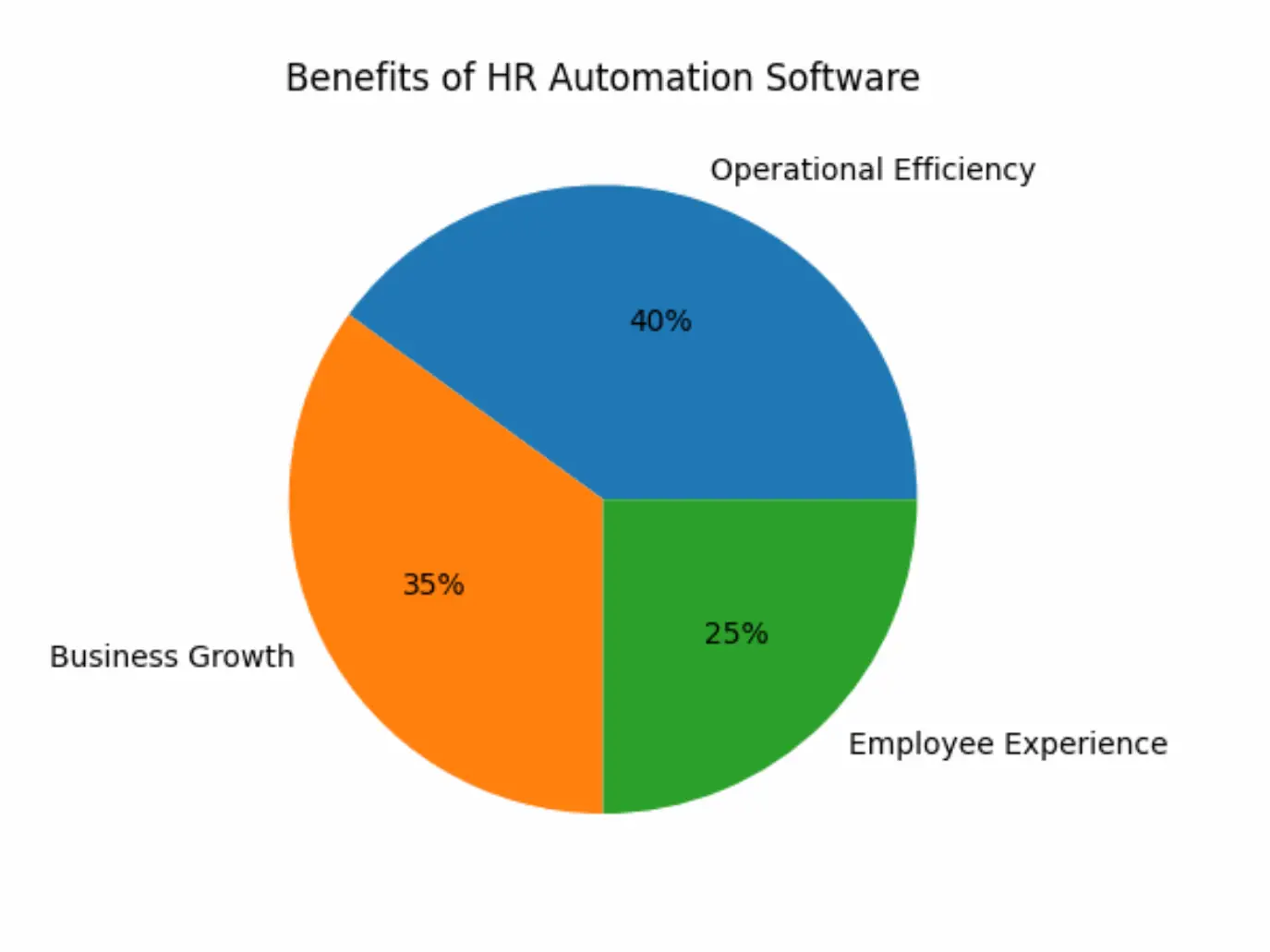
Organizations implementing HR automation software can benefit from:
Reduced manual HR administration
Faster payroll processing
Improved attendance accuracy
Streamlined leave approvals
Better workforce visibility
Enhanced employee experience
Stronger compliance management
More informed decision-making through HR analytics
Key Features to Look for in HR Automation Software
The effectiveness of an HR automation platform depends on how well it supports your organization's daily HR operations, compliance requirements, and future growth. While feature availability varies by vendor, the following capabilities are commonly considered essential when evaluating HR automation software.
Core Features of HR Automation Software
Feature | Business Benefit |
|---|---|
Employee Information Management | Centralizes employee records, organizational structure, and employment history in a secure digital database. |
Payroll Automation | Automates salary calculations, statutory deductions, payslip generation, and payroll processing to improve accuracy and reduce manual effort. |
Attendance & Time Tracking | Records attendance, shifts, overtime, and working hours through biometric devices, mobile apps, or web-based systems. |
Leave Management | Enables employees to apply for leave online while automating approval workflows and leave balance calculations. |
Employee Self-Service (ESS) | Allows employees to access payslips, attendance records, leave balances, and personal information without depending on HR teams. |
Recruitment & Onboarding | Supports candidate tracking, document collection, digital onboarding, and employee induction processes. |
Performance Management | Helps organizations manage goal setting, performance reviews, feedback, and employee development. |
Compliance Management | Assists with payroll-related statutory calculations, compliance documentation, and regulatory reporting. |
HR Analytics & Reporting | Generates workforce insights, attendance reports, payroll summaries, and HR dashboards for informed decision-making. |
Workflow Automation | Automates routine HR approvals, notifications, reminders, and repetitive administrative tasks. |
Essential Features Every Business Should Prioritize
When comparing HR automation software, look for solutions that provide:
A centralized employee database for accurate record management.
Automated payroll integrated with attendance and leave data.
Flexible attendance tracking for office, hybrid, and remote employees.
Employee Self-Service (ESS) to reduce routine HR queries.
Configurable approval workflows for leave, expenses, and HR requests.
Real-time dashboards and HR analytics for workforce visibility.
Integration with biometric devices, payroll systems, and business applications.
Secure role-based access controls and data protection features.
Mobile accessibility for employees and managers.
Scalable architecture that supports business growth.
Why These Features Matter
The right HR automation software should simplify day-to-day HR operations while supporting long-term organizational growth. Features such as payroll automation, attendance management, employee self-service, compliance management, and workflow automation help reduce administrative workload, improve operational efficiency, and enhance the overall employee experience. Instead of selecting software based solely on the number of available features, organizations should evaluate how effectively those features align with their HR processes and business objectives.
Benefits of HR Automation Software
HR automation software delivers value across the entire organization—not just to HR departments. By automating repetitive processes and centralizing workforce data, it helps employees, managers, and business leaders work more efficiently while improving accuracy and operational visibility.
Benefits for Employees
HR automation software improves the employee experience by providing faster access to HR services and reducing dependency on manual processes.
Employees can:
Access payslips, tax documents, and HR records anytime through Employee Self-Service (ESS).
Apply for leave and monitor approval status online.
View attendance records, work schedules, and leave balances in real time.
Update personal information without submitting manual forms.
Receive faster responses to routine HR requests through automated workflows.
Access HR services securely from desktop or mobile devices.
Benefits for HR Teams
Automation enables HR professionals to spend less time on repetitive administrative work and more time on strategic initiatives such as employee engagement, workforce planning, and talent development.
HR teams benefit from:
Reduced manual payroll processing and attendance reconciliation.
Faster leave approvals through automated workflows.
Centralized employee records with improved data accuracy.
Simplified statutory compliance and payroll documentation.
Automated reminders, notifications, and approval processes.
Real-time HR reports and workforce analytics for better decision-making.
Reduced paperwork and repetitive administrative tasks.
Benefits for Business Owners and Management
For business leaders, HR automation provides better visibility into workforce operations while supporting scalability, compliance, and business growth.
Organizations can achieve:
Improved operational efficiency through standardized HR processes.
Better workforce planning using real-time HR data and analytics.
Reduced payroll and attendance errors.
Stronger compliance with payroll and labour-related requirements.
Faster onboarding and employee lifecycle management.
Better collaboration across HR, payroll, finance, and management teams.
Scalable HR operations that support business expansion.
Business Impact at a Glance
Area | How HR Automation Helps |
|---|---|
Productivity | Reduces repetitive administrative tasks and improves workflow efficiency. |
Accuracy | Minimizes manual errors in payroll, attendance, and employee records. |
Employee Experience | Provides faster access to HR services through self-service capabilities. |
Compliance | Supports statutory calculations, documentation, and reporting. |
Decision-Making | Delivers real-time workforce insights through dashboards and analytics. |
Business Growth | Supports scalable HR processes as workforce size increases. |
Key Takeaway
The greatest value of HR automation software lies in its ability to simplify routine HR operations while creating a better experience for employees and providing management with accurate, real-time workforce information. Rather than replacing HR professionals, automation enables them to focus on strategic activities that contribute to organizational growth and employee development.
HR Automation Software vs Manual HR Processes
Many organizations begin by managing HR operations through spreadsheets, emails, paper documents, or disconnected software. While these methods may work for small teams, they often become inefficient as the workforce grows. HR automation software helps organizations standardize processes, reduce manual effort, and improve operational accuracy.
HR Automation vs Manual HR Management
HR Activity | Manual HR Process | HR Automation Software |
|---|---|---|
Employee Records | Maintained across spreadsheets or paper files | Centralized digital employee database |
Attendance Tracking | Manual registers or spreadsheets | Automated attendance through biometric devices, mobile apps, or web portals |
Leave Management | Email requests and manual approvals | Online leave requests with automated approval workflows |
Payroll Processing | Manual salary calculations and spreadsheets | Automated payroll calculations, deductions, and payslip generation |
Compliance | Manual preparation of statutory reports | Automated compliance support and payroll documentation |
Employee Communication | Emails and paper forms | Employee Self-Service (ESS) portal with digital notifications |
Reporting | Time-consuming manual report preparation | Real-time dashboards and HR analytics |
Data Accuracy | Higher risk of human error | Improved consistency through automated workflows |
Challenges of Manual HR Management
Organizations relying on manual HR processes commonly face:
Time-consuming payroll preparation and attendance reconciliation.
Increased risk of payroll and data entry errors.
Delayed leave approvals and employee requests.
Difficulty maintaining accurate employee records.
Limited visibility into workforce performance and HR metrics.
Greater administrative workload for HR teams.
Challenges managing compliance documentation and reporting.
Inefficient communication across departments.
Advantages of HR Automation
By replacing repetitive manual activities with automated workflows, organizations can:
Standardize HR processes across departments and locations.
Improve payroll and attendance accuracy.
Reduce administrative effort through workflow automation.
Provide employees with self-service access to routine HR services.
Generate real-time workforce reports and business insights.
Strengthen compliance through centralized documentation and audit-ready records.
Scale HR operations more efficiently as the organization grows.
Which Approach Is Better?
Manual HR management may be suitable for very small organizations with limited HR requirements. However, as employee numbers increase, manual processes often become difficult to manage efficiently. HR automation software helps organizations improve operational efficiency, reduce repetitive administrative work, and build scalable HR processes that support long-term business growth.
Industry-Specific Use Cases of HR Automation Software
Every industry has unique workforce management requirements. The right HR automation software should be flexible enough to support different business models, workforce sizes, attendance policies, and compliance obligations. Below are some common examples of how HR automation helps organizations across various industries.
HR Automation for IT & Technology Companies
IT companies often manage hybrid workforces, flexible schedules, remote employees, and project-based teams. HR automation software helps simplify workforce management while improving employee experience.
Common HR automation use cases:
Hybrid and remote attendance tracking
Employee Self-Service (ESS) for leave and attendance
Digital onboarding and document management
Performance reviews and goal tracking
Automated payroll processing
Workforce analytics and productivity reporting
HR Automation for Manufacturing Businesses
Manufacturing organizations typically manage multiple shifts, overtime calculations, contract workers, and large workforces. HR automation software improves operational efficiency while supporting workforce compliance.
Common HR automation use cases:
Shift scheduling and rotation management
Biometric attendance integration
Overtime calculation
Payroll linked with attendance
Workforce compliance documentation
Employee lifecycle management
HR Automation for Healthcare Organizations
Hospitals, clinics, and healthcare providers require continuous workforce availability while managing complex staff schedules and regulatory requirements.
Common HR automation use cases:
Doctor and nursing staff scheduling
Shift and roster management
Attendance monitoring
Payroll automation
Leave planning
Employee document management
HR Automation for Retail & Hospitality
Retail stores, restaurants, hotels, and hospitality businesses often operate across multiple locations with rotating shifts and seasonal hiring.
Common HR automation use cases:
Multi-location attendance tracking
Employee scheduling
Payroll for shift-based employees
Leave management
Employee onboarding
Workforce reporting
HR Automation for Educational Institutions
Schools, colleges, universities, and training organizations manage teaching staff, administrative employees, and support teams with different attendance and payroll requirements.
Common HR automation use cases:
Faculty attendance management
Leave approvals
Payroll processing
Employee records
Performance tracking
HR reporting
HR Automation for Startups and Growing Businesses
Startups often operate with lean HR teams and rapidly expanding workforces. HR automation software helps establish structured HR processes without increasing administrative workload.
Common HR automation use cases:
Digital employee onboarding
Automated payroll
Attendance management
Employee Self-Service
HR document management
Scalable workforce management
Choosing HR Automation Software Based on Your Industry
Industry | Key HR Automation Requirements |
|---|---|
IT & SaaS | Hybrid attendance, ESS, performance management, remote workforce support |
Manufacturing | Shift management, biometric integration, overtime tracking, compliance |
Healthcare | Staff scheduling, attendance, payroll, document management |
Retail & Hospitality | Multi-location workforce, shift scheduling, payroll automation |
Education | Faculty management, leave, payroll, HR reporting |
Startups & SMEs | Employee onboarding, payroll, attendance, scalable HR processes |
Key Takeaway
While the core purpose of HR automation software remains the same across industries, implementation priorities differ based on workforce structure, operational workflows, and compliance requirements. Organizations should evaluate HR automation platforms based on their industry-specific needs rather than selecting software solely because it offers the largest number of features.
Compliance, Security & Data Privacy in HR Automation
When evaluating HR automation software, organizations should look beyond features such as payroll and attendance management. Since HR platforms store sensitive employee information—including salary records, identification documents, tax details, and personal data—security, privacy, and compliance should be key evaluation criteria.
A well-designed HR automation platform helps organizations maintain accurate records, automate statutory processes, and protect confidential employee information while supporting day-to-day HR operations.
Key Compliance Areas Supported by HR Automation Software
A modern HR automation solution can help organizations manage routine compliance-related activities such as:
Payroll processing and statutory salary calculations
Provident Fund (PF) record management
Employee State Insurance (ESI) related processes
Tax deduction (TDS) calculations and payroll reporting
Leave and attendance records
Employee document management
Audit-ready HR reports and workforce documentation
Digital record keeping for payroll and HR operations
Note: Compliance requirements vary depending on business location, industry, workforce size, and applicable labour regulations. Organizations should verify that the selected HR automation platform supports their specific statutory and operational requirements.
Essential Security Features to Look For
Before selecting HR automation software, evaluate whether the platform provides:
Role-based user access to protect sensitive HR information.
Secure authentication and user access controls.
Data encryption during storage and transmission.
Audit logs to monitor important system activities.
Automated data backup and recovery mechanisms.
Secure cloud infrastructure with regular maintenance.
Configurable user permissions for HR, managers, finance teams, and employees.
Questions to Ask Your HR Automation Vendor
During product evaluation, consider asking:
Question | Why It Matters |
|---|---|
How is employee data protected? | Helps evaluate data security practices. |
Does the platform support role-based access? | Limits access to confidential HR information. |
Are audit logs available? | Improves transparency and supports internal reviews. |
How are backups managed? | Protects business continuity and reduces data-loss risks. |
Can the software integrate with existing payroll or attendance systems? | Simplifies implementation and reduces duplicate work. |
How frequently is the platform updated? | Ensures ongoing improvements and regulatory support. |
Best Practices for Secure HR Automation
Organizations can strengthen HR data security by:
Granting employees access only to information relevant to their roles.
Reviewing user permissions regularly.
Maintaining accurate employee records.
Using strong authentication practices for administrative users.
Training HR teams on secure handling of employee information.
Monitoring system activity and reviewing audit logs periodically.
Key Takeaway
Choosing HR automation software is not only about improving efficiency—it also involves protecting employee information, supporting compliance, and maintaining reliable HR records. Evaluating security features, compliance capabilities, and data management practices alongside core HR functionality helps organizations select a platform that supports both operational efficiency and long-term business continuity.
How to Choose the Best HR Automation Software
Selecting HR automation software is a long-term business decision that can influence operational efficiency, employee experience, compliance, and workforce productivity. Instead of choosing software based solely on price or the number of available features, organizations should evaluate how well the platform aligns with their HR processes, workforce size, integration requirements, and future growth plans.
HR Automation Software Evaluation Checklist
Before making a decision, compare each platform using the following criteria:
Evaluation Criteria | Why It Matters |
|---|---|
Ease of Use | An intuitive interface improves user adoption and reduces training time. |
Payroll Automation | Automates salary processing, deductions, and payslip generation while improving payroll accuracy. |
Attendance & Leave Management | Integrates attendance, shift management, overtime, and leave workflows within a single platform. |
Employee Self-Service (ESS) | Enables employees to manage routine HR activities independently. |
Compliance Support | Assists with payroll documentation, statutory calculations, and compliance-related records. |
Integration Capabilities | Connects with biometric devices, accounting software, ERP systems, and business applications. |
Reporting & Analytics | Provides dashboards and workforce insights to support informed decision-making. |
Security & Access Controls | Protects employee information through secure authentication, encryption, and role-based permissions. |
Scalability | Supports business growth without requiring frequent software changes. |
Customer Support & Implementation | Reliable onboarding, training, and post-implementation support contribute to long-term success. |
Questions to Ask Before Choosing HR Automation Software
During vendor evaluation, consider asking:
Does the platform support our current workforce size and future growth?
Can it integrate with our existing payroll, attendance, or accounting systems?
How long does implementation and employee onboarding typically take?
Does the software support hybrid, remote, and shift-based workforce management?
What training and implementation support are included?
How frequently is the software updated with new features and improvements?
Are reporting and analytics flexible enough for business decision-making?
What security measures protect employee and payroll data?
Common Evaluation Mistakes to Avoid
Organizations should avoid making decisions based only on feature comparisons or pricing. Some common evaluation mistakes include:
Selecting software without understanding long-term business requirements.
Ignoring implementation timelines and employee training needs.
Overlooking integration capabilities with existing business systems.
Focusing only on initial cost instead of long-term business value.
Choosing complex software that employees may struggle to adopt.
Not involving HR, payroll, finance, and IT teams during the evaluation process.
Decision Framework
Use the following table to identify the type of HR automation platform that best matches your business requirements.
Business Requirement | Recommended Focus |
|---|---|
Growing startup | Easy implementation, payroll, attendance, and scalability |
Small & Medium Business | Integrated HR, payroll, leave management, and compliance |
Hybrid workforce | Mobile access, Employee Self-Service, and attendance tracking |
Manufacturing business | Shift management, biometric integration, overtime, and workforce compliance |
Multi-location organization | Centralized reporting, workflow automation, and role-based access |
Rapid business expansion | Scalable architecture, analytics, and automation capabilities |
Key Takeaway
The best HR automation software is not necessarily the one with the most features—it is the one that aligns with your organization's operational workflows, compliance requirements, workforce structure, and future business goals. Evaluating usability, implementation support, integration capabilities, security, and scalability alongside core HR functionality can help organizations make a more informed and sustainable technology investment.
HR Automation Software Implementation & Pricing Guide
Implementing HR automation software involves more than installing a new system. A successful implementation requires planning, data preparation, workflow configuration, employee training, and ongoing support to ensure the platform aligns with your organization's HR processes.
Organizations that prepare employee data, define approval workflows, and involve key stakeholders early in the implementation process often experience smoother adoption and better long-term outcomes.
Typical HR Automation Implementation Process
Business Requirement Analysis
            ↓
HR Process Review & Planning
            ↓
Employee Data Collection & Cleanup
            ↓
Software Configuration & Workflow Setup
            ↓
System Integration (Payroll, Biometric, ERP, etc.)
            ↓
Testing & User Acceptance
            ↓
Employee Training
            ↓
Go-Live
            ↓
Post-Implementation Support & Optimization
Key Stages of Implementation
Stage | Purpose |
|---|---|
Requirement Analysis | Understand business goals, workforce structure, and HR challenges. |
Data Preparation | Organize employee records, attendance data, payroll information, and leave balances before migration. |
System Configuration | Configure organizational structure, departments, approval workflows, leave policies, and payroll settings. |
Integration | Connect the HR automation platform with biometric devices, payroll systems, accounting software, or ERP applications where required. |
Testing | Verify payroll calculations, attendance tracking, leave workflows, and reports before deployment. |
Training | Train HR teams, managers, and employees to ensure smooth adoption. |
Go-Live & Support | Launch the platform and monitor operations while providing implementation support and continuous improvements. |
What Influences the Cost of HR Automation Software?
The cost of HR automation software varies depending on the organization's requirements rather than a single fixed price.
Common pricing factors include:
Number of employees using the platform.
Modules required (Payroll, Attendance, Leave, Performance, Recruitment, etc.).
Level of workflow customization.
Integration with biometric devices, ERP, accounting, or third-party applications.
Implementation and employee training requirements.
Customer support and service levels.
Cloud-based or on-premise deployment preferences.
Common Pricing Models
Pricing Model | Best Suited For |
|---|---|
Per Employee Per Month (PEPM) | Small and medium-sized businesses with predictable workforce growth. |
Monthly or Annual Subscription | Organizations looking for recurring cloud-based software access. |
Custom Enterprise Pricing | Large organizations requiring advanced customization, integrations, and dedicated implementation support. |
Tips for Planning Your HR Automation Budget
Before selecting a platform, consider the following:
Compare the overall value rather than choosing software based only on price.
Include implementation, training, and ongoing support in your budget planning.
Evaluate scalability to ensure the software can support future business growth.
Confirm whether additional modules or integrations involve separate costs.
Request a personalized demonstration to understand which features are included in your selected plan.
Key Takeaway
A successful HR automation implementation depends on careful planning, clean employee data, effective training, and ongoing support. Similarly, evaluating software based on long-term business value, scalability, and operational requirements rather than initial pricing alone helps organizations make a more informed investment decision.
Expert Tips, Common Mistakes & Future Trends
Expert Tips for Successful HR Automation Implementation
Implementing HR automation software is not only about deploying new technology it also involves improving business processes, preparing employees for change, and ensuring the system aligns with organizational goals. The following best practices can help organizations maximize the value of their HR automation investment.
Best Practices
Define clear HR objectives before selecting any software.
Map existing HR workflows to identify repetitive manual tasks.
Clean employee and payroll data before migration.
Configure approval workflows based on your organization's policies.
Train HR teams, managers, and employees before the system goes live.
Start with core HR modules and expand gradually as business needs evolve.
Regularly review reports and employee feedback to optimize HR processes.
Keep the software updated to benefit from new features, security improvements, and compliance enhancements.
Common Mistakes to Avoid
Many implementation challenges are caused by planning issues rather than the software itself. Avoiding these common mistakes can improve user adoption and reduce implementation delays.
Organizations should avoid:
Choosing software based only on feature lists instead of business requirements.
Underestimating the effort required for employee data migration and cleanup.
Ignoring integration requirements with payroll, biometric devices, accounting systems, or ERP software.
Rolling out the software across the entire organization without conducting a pilot implementation.
Focusing only on initial pricing instead of long-term business value.
Neglecting employee training and change management during implementation.
Selecting software that cannot scale as the organization grows.
Failing to review security, access controls, and compliance capabilities before deployment.
Future Trends in HR Automation
HR automation continues to evolve as organizations adopt digital technologies to improve workforce management and employee experience. Modern HR platforms are increasingly combining automation, analytics, and intelligent workflows to simplify HR operations while supporting better business decisions.
Emerging HR Automation Trends
Artificial Intelligence (AI): Assists with employee support, HR queries, and workflow recommendations.
Predictive Workforce Analytics: Helps HR teams identify attendance patterns, workforce trends, and planning opportunities.
Employee Self-Service (ESS): Expands employee access to HR services through web and mobile platforms.
Workflow Automation: Reduces manual approvals by automating routine HR processes.
Mobile-First HR Solutions: Enables employees and managers to manage HR activities securely from anywhere.
Cloud-Based HR Platforms: Support scalability, remote access, and simplified software maintenance.
Data-Driven Decision Making: Real-time dashboards and HR analytics provide actionable workforce insights for business leaders.
Key Takeaway
Organizations that combine well-defined HR processes with modern automation tools are better positioned to improve operational efficiency, enhance employee experience, and support long-term business growth. Rather than adopting technology for its own sake, businesses should focus on implementing HR automation solutions that align with their operational requirements, workforce structure, and future goals.
Conclusion
HR automation software has become an essential tool for organizations looking to simplify HR operations, improve workforce productivity, and support long-term business growth. By automating routine processes such as payroll, attendance, leave management, employee records, onboarding, and compliance, businesses can reduce administrative effort while improving operational accuracy and employee experience.
For organizations in Noida, selecting the right HR automation platform requires more than comparing features or pricing. Businesses should evaluate implementation support, integration capabilities, security, scalability, compliance requirements, and long-term organizational goals before making a decision. Choosing a solution that aligns with existing HR workflows and future growth plans can help create a more efficient, data-driven, and employee-centric workplace.
Ready to Modernize Your HR Operations?
Implementing HR automation software is more than adopting new technology—it's about creating efficient, scalable, and employee-friendly HR processes that support sustainable business growth. Before selecting any platform, assess your organization's workforce requirements, compliance obligations, integration needs, and long-term expansion plans to ensure the solution fits your operational goals.
If you're evaluating HR automation software in Noida, compare shortlisted platforms through live demonstrations, involve HR, payroll, finance, and IT stakeholders in the evaluation process, and choose a solution that aligns with your business objectives.
If you'd like to explore how ZFour HRMS supports payroll management, attendance tracking, employee self-service, leave management, compliance, and workforce automation through a unified cloud platform, schedule a personalized product demonstration to understand how it can support your organization's HR transformation.

Farheen Ahmed
HR Tech Content Strategist at ZFour Technology Private Limited
Research-driven content on HRMS, payroll, attendance management, employee management, and modern HR technology for Indian businesses.


