18 min read
Quick answer
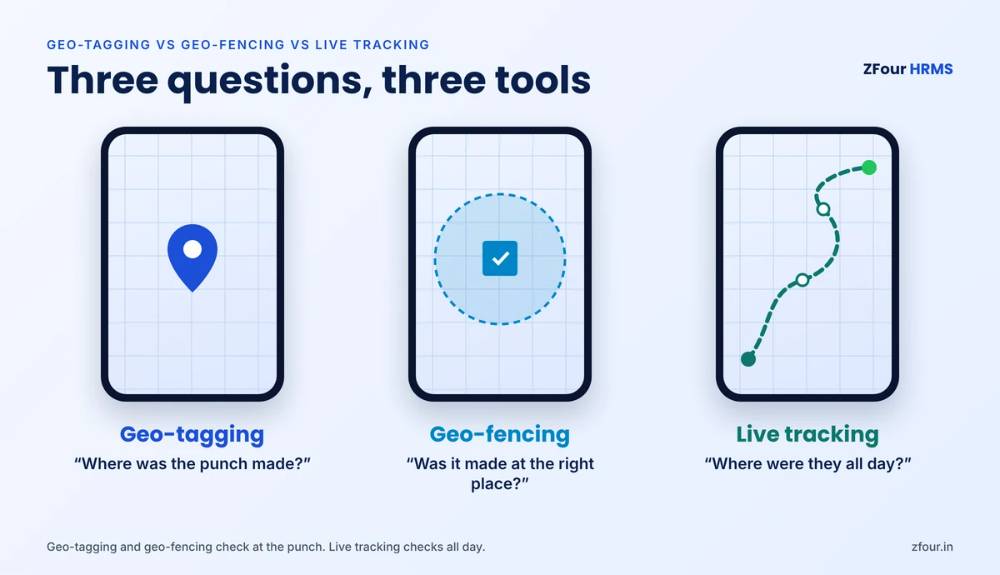
Geo-tagging, geo-fencing and live tracking all use a phone's location, but they answer different questions. Geo-tagging records where an employee was at the moment they punched in or out — a single location stamp on each attendance entry. Geo-fencing draws a virtual boundary around a workplace and only accepts the punch if the phone is inside it. Live tracking records the employee's location at intervals throughout the working day, so you can see the route, visits and distance travelled. Geo-tagging and geo-fencing check location only at the punch; live tracking checks it all day. Most fixed-site teams need geo-fencing, most field teams need geo-tagging, and only roles where the route itself is the work — sales beats, delivery, service visits, collections — need live tracking.
For the full picture, read our complete guide to GPS attendance for field employees.
Key takeaways
Geo-tagging = a location stamp on each punch. Geo-fencing = the punch only works inside a boundary. Live tracking = location recorded through the working day.
The three are layers, not rivals. Most businesses use geo-fencing or geo-tagging for everyone and add live tracking only for roles that move.
Live tracking is the most powerful and the most sensitive. It needs a clear purpose, a written policy, employee notice and tracking only during working hours.
In ZFour HRMS, geo-tagging and geo-fencing are included in every plan, with GPS active for about 3 seconds per punch. Live tracking is a ₹100-per-field-user add-on on any plan.
Choose by the question you need answered: "Did they punch at the right place?" (geo-fence), "Where did they punch?" (geo-tag) or "What did they do all day?" (live tracking).
Why the difference matters
HR teams often ask vendors for "GPS attendance" and get a demo of all three features at once. The result is predictable. Some companies switch on live tracking for every employee — including office staff who never leave the building — and then deal with complaints about privacy and battery drain. Others buy only geo-tagging for a field sales team and discover they still can't tell whether a rep visited 12 shops or sat in a café after punching in.
Picking the right layer matters for four reasons:
Accuracy of attendance. The wrong control lets proxy and remote punching through. A geo-tag tells you a punch was made 8 km from the office, but it doesn't stop it.
Employee trust. Tracking more than you need erodes trust and invites resistance. Tracking what the role genuinely requires is easy to explain.
Legal and privacy exposure. Location is personal data under the Digital Personal Data Protection Act, 2023. Collecting more of it than the purpose needs is harder to justify. (We cover this in detail in is GPS tracking of employees legal in India?)
Cost. Geo-tagging and geo-fencing are usually included in attendance software. Live tracking is usually an add-on priced per user, so tracking the wrong people costs money every month.
How phone location works (in plain language)
All three features depend on the same thing: the phone working out where it is. Understanding the basics helps you set realistic expectations and sensible rules.
The sources a phone uses
A smartphone combines several signals to estimate its location:
GPS and other satellite systems (including India's NavIC on supported phones): the most accurate outdoors with a clear view of the sky.
Wi-Fi networks: the phone recognises nearby networks and uses known positions to estimate location, which helps indoors and in dense cities.
Mobile towers: the least precise, but available almost everywhere.
The phone's operating system blends these into one estimate and an accuracy radius — the circle within which the true location most likely sits.
How accurate is it?
Under open sky, the US government's GPS programme says GPS-enabled smartphones are typically accurate to within about 4.9 metres. In practice, accuracy drops near tall buildings, inside large concrete structures, in basements and under heavy cover. A phone inside a factory shed or a mall can report a position that is off by tens of metres.
This is why good attendance systems record the accuracy radius alongside the location, and why geo-fence boundaries should be sized for real conditions rather than drawn tightly around the building outline.
Battery and data use
Location accuracy costs battery. A phone that checks GPS for a few seconds at each punch uses almost nothing. A phone that records location every few minutes all day uses noticeably more, depending on the interval, the handset and the network. This is one of the most practical differences between the three features — and one of the most common employee complaints when live tracking is set up badly.
Geo-tagging explained
What it is
Geo-tagging attaches a location to each attendance punch. When the employee taps "Punch in", the app records the time, the GPS coordinates, the accuracy radius and, usually, the address that matches those coordinates. HR and managers can then see on a map where every punch was made.
Geo-tagging does not block a punch. It records. The decision about whether the location was acceptable is made later — by a manager, by a rule in the system or during payroll review.
How it works, step by step
At the punch
The employee opens the app and taps punch in or out.
The app switches on location for a few seconds and gets a fix.
The punch is saved with time, coordinates, accuracy and (optionally) a selfie.
The app switches location off again.
After the punch
The punch appears on the attendance dashboard with a map pin.
Managers can review punches far from expected locations.
Rules can flag punches outside a radius for approval, without blocking them.
Where geo-tagging works best
Roles with no single workplace
Field sales reps, medical representatives, service engineers, auditors and merchandisers often start the day at a client location, a distributor or a market rather than an office. There's no one place to draw a boundary around. Geo-tagging gives the company a record of where each day started and ended without forcing everyone to report to a fixed site.
Work-from-home and hybrid staff
For staff who work from home some days, geo-tagging confirms that a punch came from the registered home location or the office, without restricting them to a single fence.
Businesses that want visibility before control
Some companies start with geo-tagging only, look at the data for a month and then decide where geo-fences are needed. This is a sensible, low-friction first step.
Limits of geo-tagging
It records but doesn't prevent. An employee can still punch from home; you just find out afterwards.
It needs review. Someone must look at the flags, or the data has no effect.
It says nothing about the rest of the day. A geo-tag shows where the punch happened, not whether the planned visits took place.
Geo-fencing explained
What it is
Geo-fencing sets a virtual boundary — usually a circle of a chosen radius around a workplace — and only accepts the punch when the phone is inside it. If the employee tries to punch from outside the fence, the app refuses or marks the punch for approval, depending on how the rule is set.
Where geo-tagging asks "Where were you?", geo-fencing asks "Are you where you should be?" before the punch is accepted.
How it works, step by step
Setting up the fence
HR enters the workplace location — by address, by dropping a pin or by standing at the site and capturing the coordinates.
HR sets the radius (for example, 100 metres).
HR assigns employees to one or more fences — a home site, a list of sites, or all company sites.
At the punch
The app gets the phone's location and accuracy.
It checks whether the location falls inside an assigned fence.
Inside: the punch is accepted. Outside: the punch is blocked or sent for approval, depending on the rule.
Choosing the right radius
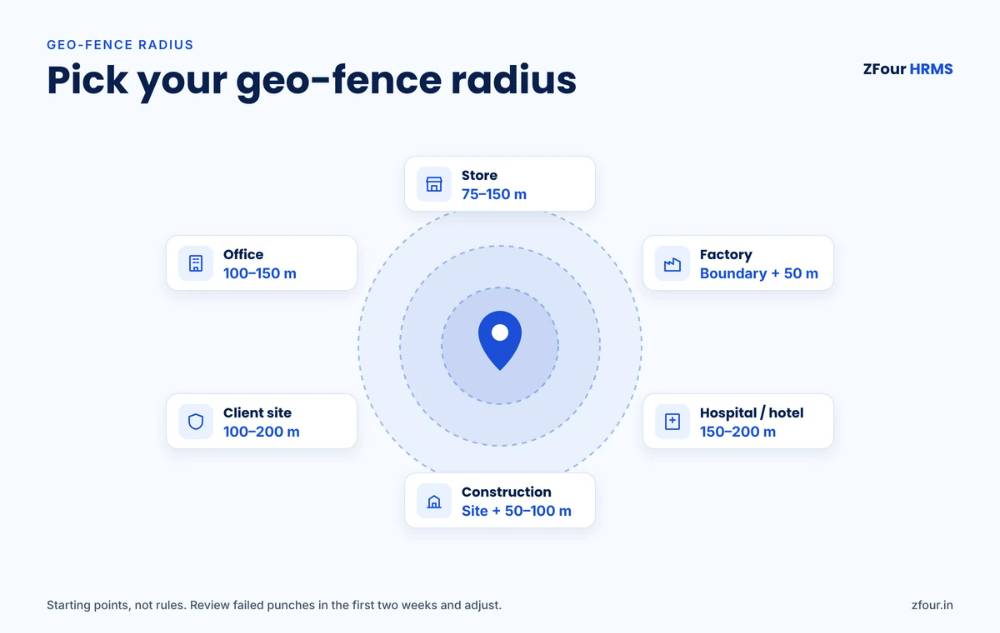
The radius is the most important geo-fencing decision, and the one most often set badly. Too tight, and honest employees fail to punch because of normal GPS drift. Too loose, and someone can punch from the tea stall down the road.
Factors that affect the radius
The size of the site
A small office in a commercial building needs a smaller fence than a 20-acre factory campus or a construction site. The fence must cover the whole area where people legitimately arrive, including parking and gates.
The surroundings
Dense city centres and tall buildings weaken GPS. Indoor-heavy sites need a larger margin.
Indoor sites and basements
Warehouses with metal roofs, basements, malls and hospital interiors can give poor fixes. Ask employees to punch near the entrance or a window, or use a QR code at the entry point as an alternative.
The risk of misuse
If staff live very close to the site, a large radius may let them punch from home. Balance the radius against what's nearby.
Suggested starting points
Site type | Suggested starting radius | Notes |
|---|---|---|
Office in a commercial building | 100–150 m | Increase if many punches fail in the first week |
Retail store or branch | 75–150 m | Include the parking area if staff arrive by vehicle |
Factory or warehouse campus | Cover the full boundary + 50 m | Use multiple fences for very large campuses |
Hospital or hotel | 150–200 m | Indoor GPS is weaker; review failed punches |
Construction site | Cover the site footprint + 50–100 m | Update as the project moves |
Client site for deployed staff (security, housekeeping) | 100–200 m | One fence per client site |
These are starting points, not rules. Review failed and flagged punches in the first two weeks and adjust.
Setting up geo-fences? Get the radius sheet and policy kit.
A one-page geo-fence radius sheet for every type of site, plus an editable location tracking policy, employee notice in English and Hindi, retention schedule and rollout checklist.
Download the radius sheet (PDF) → · Get the policy kit (Google Doc) →
Free templates for HR teams. Not legal advice.
Where geo-fencing works best
Fixed sites without biometric devices — offices, stores, branches and clinics where buying a device for every location isn't worth it.
Multi-site businesses — retail chains, restaurant groups, hospitals and banks, where staff are assigned to specific locations.
Deployed staff at client sites — security guards, housekeeping and facility staff who work at a customer's premises.
Factories as a supervisor or overflow option — alongside biometric devices at the gate.
For a closer look at geo-fencing on its own — how fences are defined, tested and rolled out — see how geo-fencing is changing attendance tracking.
Limits of geo-fencing
It proves the phone was there, not the person. Without a selfie or face match, one employee could carry a colleague's phone. Pair geo-fencing with selfie attendance to close that gap — see how to stop proxy attendance.
GPS drift causes false refusals. Plan for an approval route for genuine cases.
It doesn't suit roles that move. A fence around the office is meaningless for someone who never goes there.
Live tracking explained
What it is
Live tracking records the employee's location at regular intervals during working hours — for example, every few minutes — and shows the route on a map. Managers can see where field staff are now, where they've been, how far they've travelled and which planned visits were completed.
Live tracking starts when the employee punches in and should stop when they punch out. Tracking outside working hours is rarely justifiable and creates privacy risk.
What live tracking shows
For the manager
The employee's current or last known location.
The day's route, with stops and time spent at each.
Distance travelled, which can feed travel allowance claims.
Planned versus completed visits, if visits are scheduled in the system.
For the employee
A record of their own day — useful when a client disputes a visit or a travel claim is questioned.
Automatic distance calculation instead of manual odometer entries.
How it works, step by step
The employee punches in (usually geo-tagged, often with a selfie).
Live tracking switches on and records location at the configured interval.
Location points are uploaded when the phone has a connection; offline points are stored and sent later.
The manager views the route and visit log on the dashboard.
The employee punches out and tracking stops.
Where live tracking is worth it
Live tracking makes sense when the route is the work — when you pay people to be in many places during the day:
Field sales and distribution — reps covering beats of shops, dealers or distributors.
Pharma and medical representatives — doctor and chemist visits.
Service and installation engineers — scheduled and emergency customer visits.
Collections and loan recovery agents — visits to borrower addresses.
Last-mile delivery and logistics staff — routes and drops.
Mobile security supervisors — patrolling multiple sites.
Where live tracking isn't worth it
Office staff who work at one desk.
Factory and warehouse workers inside a fence.
Store staff at a single branch.
Anyone whose work doesn't involve moving between locations.
For these roles, geo-fencing at the punch answers every question you have. Live tracking adds cost, battery use and privacy risk with no extra benefit.
Limits of live tracking
Battery and data use are higher than punch-only GPS, especially on older or budget phones.
Gaps happen when phones lose signal, run out of battery or have aggressive battery-saving settings.
Privacy expectations are higher. It needs the clearest policy and notice of the three.
Data needs action. A route map no one reviews changes nothing. Tie tracking to visit plans, allowances or reports.
Side-by-side comparison
Geo-tagging | Geo-fencing | Live tracking | |
|---|---|---|---|
Question it answers | Where was the punch made? | Was the punch made at the right place? | Where was the employee during the working day? |
When location is captured | At each punch only | At each punch only | At intervals from punch in to punch out |
Blocks a wrong-location punch? | No — records and can flag | Yes — blocks or sends for approval | No — monitors, doesn't block |
Best for | Field roles without a fixed start point, hybrid staff | Fixed sites, multi-site teams, deployed staff | Field sales, service, delivery, collections |
Battery impact | Very low | Very low | Moderate, depends on interval and phone |
Privacy sensitivity | Low | Low | High — needs a clear policy and notice |
Typical pricing | Included in attendance software | Included in attendance software | Add-on, per tracked user |
Proves identity? | No — add a selfie | No — add a selfie | No — add a selfie at punch |
The last row is worth repeating. None of the three proves who is holding the phone. Location features answer "where"; selfie or face match answers "who".
Which one does your team need?
A simple decision path
Does the employee work at one or a few fixed locations? Use geo-fencing (with a selfie if there's no biometric device).
Does the employee start and end the day at different places with no fixed site? Use geo-tagging (with a selfie).
Is moving between many locations during the day the core of the job? Add live tracking on top of geo-tagging.
Is the employee mostly at a fixed site but occasionally travels? Use geo-fencing for normal days and an on-duty or travel request for travel days, rather than tracking them all the time.
Which layer each industry needs
Manufacturing
Biometric or face devices at the gate for shop-floor workers; geo-fenced app punches for supervisors and staff who move between plants or units. Live tracking only for sales, procurement and service staff who travel.
Retail and restaurants
Geo-fence each store or outlet and assign staff to their branch, with a selfie at the punch. Area managers who visit many stores can use geo-tagging, or live tracking if store visit coverage is a key metric.
Field sales, FMCG and distribution
Geo-tagged punches with a selfie for everyone, and live tracking for reps on beats.
Security and facility services
Geo-fence each client site and assign guards to their posts, with a selfie at the punch. Add QR checkpoints for patrol rounds. Live tracking for mobile supervisors who patrol multiple sites.
Construction and infrastructure
Geo-fence each project site and update the fence as the site moves. Site engineers who move between projects can use geo-tagging; equipment and logistics staff may justify live tracking.
Healthcare
Geo-fence hospitals and clinics, sized for weak indoor GPS. Home-care nurses and sample collection staff who visit patients are good candidates for live tracking during duty hours.
Logistics and delivery
Live tracking for drivers and delivery staff, since the route is the job. Geo-fenced punches for warehouse and hub staff.
NBFCs, banks and collections
Geo-fenced punches for branch staff; live tracking for collection agents and field officers.
Not sure which layer each team needs? Tell us your teams and sites. We'll recommend geo-tagging, geo-fencing or live tracking for each group in a 15-minute call. Get a free setup recommendation → No obligation. We'll map it to your actual sites.
The three layers together: how most companies set it up
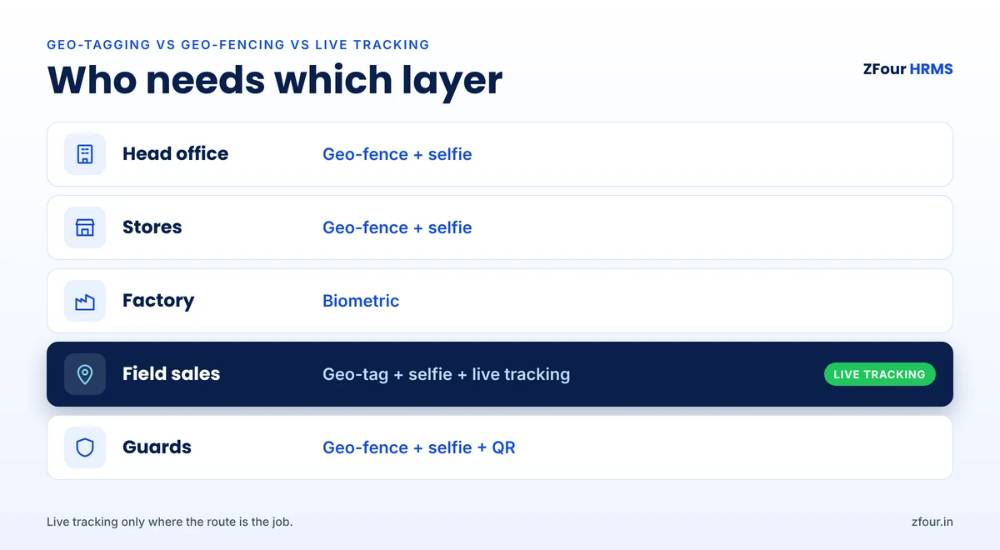
Most businesses with both office and field staff end up with a layered setup:
Employee group | Punch control | All-day control |
|---|---|---|
Head office staff | Geo-fence + selfie (or biometric device) | None |
Branch or store staff | Geo-fence for their branch + selfie | None |
Factory workers | Biometric or face device at the gate | None |
Field sales and service | Geo-tag + selfie | Live tracking during working hours |
Deployed guards and facility staff | Geo-fence for the client site + selfie | QR patrol checkpoints |
This keeps live tracking — the most sensitive and most expensive layer — limited to the people whose jobs need it, while everyone else gets strong, low-friction attendance.
Common myths
"Live tracking is just better geo-fencing"
No. They do different jobs. Geo-fencing decides whether a punch is accepted. Live tracking watches the day. A company that needs geo-fencing and buys live tracking instead still can't stop remote punching — it just watches it happen.
"A geo-fence can't be fooled"
Location can be spoofed with fake-GPS apps on some phones. Good attendance apps detect mock-location settings and flag or block those punches, and a selfie at the punch adds an identity check. No method is unbeatable, but layered checks make faking much harder than it's worth.
"Live tracking drains the battery in an hour"
Badly configured tracking on an old phone can drain the battery faster. Sensible intervals, tracking only during working hours and making sure the app is excluded from aggressive battery savers usually keep the impact manageable. Test on the phones your team actually uses.
"If we track location, we don't need a selfie"
Location features prove where the phone is. Only a selfie, face match or biometric device proves who is using it.
"Tracking is illegal in India"
Location tracking for genuine employment purposes isn't prohibited, but it must be done fairly, for a stated purpose, with notice, and without tracking outside working hours. Read our full guide to whether GPS tracking of employees is legal in India before rolling it out.
Before you switch it on: policy and rollout
Whichever layer you use, write it down before you switch it on. Location is personal data, and employees accept controls more readily when they know exactly which layer applies to their role, what is collected, and that nothing is recorded outside working hours.
A short, plain note works better than a long legal document. For example:
From 1 December, attendance for field roles will be marked in the ZFour app with a selfie and location. For sales and service roles, the app will also record location during working hours — from punch in to punch out only — to verify visits and calculate travel allowance automatically. Location is never recorded outside working hours or on leave days. You can see your own route in the app. Questions: contact HR at [email].
Then pilot with one site and one field team for a week, adjust radii and rules from the failed punches, and switch everyone over. Our complete guide has the full 30-day rollout plan, and the legal guide covers what the DPDP Act means for your policy.
Get the policy template, this notice in English and Hindi, and a 4-week rollout checklist in our free Field Attendance Policy Kit.
How much does it cost?
Two patterns are common in India:
Geo-tagging and geo-fencing are usually included in attendance or HRMS plans.
Live tracking is usually an add-on charged per tracked user per month, and is sometimes restricted to higher plans.
Because live tracking is charged per user, limiting it to roles that move keeps the monthly cost down. A company with 200 employees, of whom 40 are on the road, pays for 40 tracked users, not 200. In ZFour HRMS, live tracking is ₹100 per field user per month on any plan, excluding GST.
Live tracking at ₹100 per field user, on any plan. Geo-tagging and geo-fencing are included in every ZFour plan. Pay for live tracking only for the people who move. See pricing → · Pick a demo time → Prices exclude GST.
What happens after you set it up: an illustrative example
This is an illustrative scenario, not a customer case study.
A consumer goods distributor in western India had 160 employees: 30 at the head office, 50 in two warehouses, and 80 field sales reps covering beats across four districts. Attendance was a mix of a biometric device at the head office, registers at the warehouses and phone calls to area managers from field reps.
The company set up three layers:
Head office: kept the biometric device.
Warehouses: geo-fences around each warehouse, sized to include the loading bays and parking, with a selfie at the punch.
Field sales: geo-tagged punches with a selfie, plus live tracking during working hours linked to each rep's beat plan.
In the first month, warehouse attendance stopped showing the same-minute punches that had suggested buddy signing in the register. Field managers could see planned against completed shop visits instead of relying on calls. Travel allowance claims, previously based on self-reported kilometres, were calculated from tracked distance. The company tracked 80 users, not 160, keeping the add-on cost to the people who needed it.
How ZFour HRMS handles all three
ZFour HRMS is built for Indian businesses with mixed office, site and field teams:
Geo-tagging and geo-fencing in every plan. Set fences by address or pin, choose the radius per site, and assign employees to one or many sites.
Battery-light punch GPS. Location is active for about 3 seconds per punch, then switched off.
Selfie attendance to confirm who punched, available from the Workforce Pro plan.
Live tracking as an add-on at ₹100 per field user per month on any plan — routes, stops, distance and visit logs, from punch in to punch out only.
Hindi and English app, so field teams can use it in the language they prefer.
Data hosted on AWS Mumbai, with attendance flowing straight into payroll, PF, ESI and PT calculations.
Go-live in up to 7 business days.
Explore GPS attendance and field tracking and the attendance management system.
See all three side by side. Geo-tagging, geo-fencing and live tracking in one 30-minute demo, set up for your own sites and teams. Pick a demo time → Go live in up to 7 business days.
Sources and further reading

Farheen Ahmed
HR Tech Content Strategist at ZFour Technology Private Limited
Research-driven content on HRMS, payroll, attendance management, employee management, and modern HR technology for Indian businesses.