17 min read
Quick answer
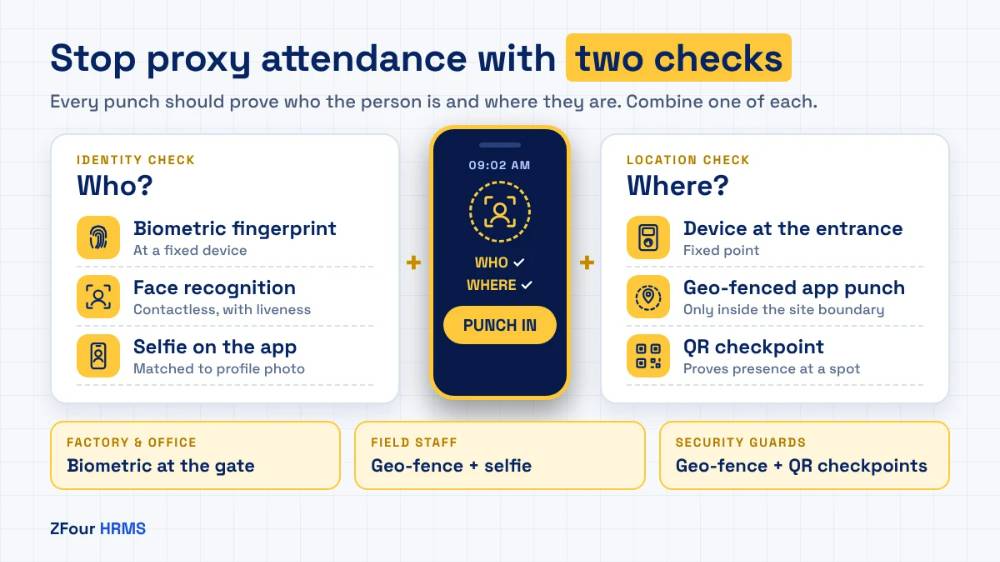
Proxy attendance — one employee marking attendance for another, or someone marking attendance from somewhere they aren’t — is stopped by tying each punch to who the person is and where they are. Biometric and face-recognition devices verify identity at a fixed point; selfie attendance verifies identity on a phone; geo-fencing verifies that the phone is inside the workplace; and QR checkpoints verify presence at a specific spot.
No single method suits every team. Office and factory staff are best covered by a biometric device or a geo-fenced app punch; field staff by geo-fencing plus a selfie; guards by geo-fencing plus site QR checkpoints.
Key takeaways
Proxy attendance is a payroll problem: every proxy day is a day’s wages paid for work not done.
The fix has two halves: verify identity (who) and verify location (where). Most methods only do one.
Paper registers and shared PINs offer almost no protection. Biometrics, face match, geo-fencing and QR checkpoints offer strong protection when combined sensibly.
Match the method to the workforce: fixed sites, field roles and multi-site guards need different combinations.
Introduce controls with a clear policy and a fair process. The goal is accurate attendance, not catching people out.
What is proxy attendance?
Proxy attendance is any attendance record that doesn’t reflect who actually worked, where and when. It takes several forms:
Buddy punching: a colleague signs the register, swipes a card or enters a PIN for an absent employee.
Remote punching: an employee marks attendance from home or on the way to work, before arriving at the site.
Ghost presence: an employee punches in at the site, leaves, and returns to punch out.
Phantom employees: a name on the attendance and payroll records with no real person behind it, sometimes created by a supervisor or contractor.
Inflated overtime: punch-out times pushed later than the real end of work.
Each form ends in the same place: wages, overtime or allowances paid for time that wasn’t worked.
Why proxy attendance matters more than it looks
It is a direct payroll cost
The proxy attendance cost is easy to estimate for your own business. Multiply the number of proxy days per month by the average daily wage:
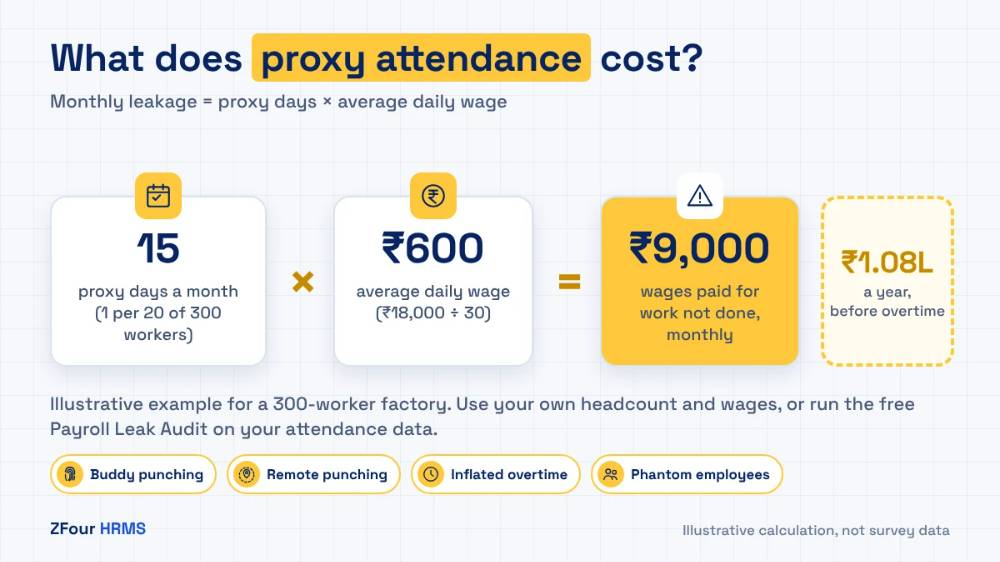
Monthly leakage = proxy days × average daily wage
For an illustrative factory of 300 workers on ₹18,000 a month (about ₹600 a day for a 30-day month), just one proxy day per 20 workers each month is 15 proxy days — around ₹9,000 a month, or about ₹1.08 lakh a year, before overtime. In field sales, where reps who skip visits also miss sales, the indirect cost is usually larger than the wage.
These figures are illustrative; use your own headcount and wages. The free Payroll Leak Audit below runs this calculation on your actual attendance data.
It damages trust
Employees who come to work every day notice when others don’t and still get paid. Supervisors who know about proxy attendance but can’t prove it lose authority. Over time, honest employees disengage.
It creates compliance exposure
Attendance records feed wage registers, overtime registers, and PF and ESI contributions. Records that don’t match reality create risk in inspections and disputes, and phantom employees on a contractor’s roll can expose the principal employer.
It distorts decisions
Staffing plans, productivity numbers and site coverage all rely on attendance data. If the data is wrong, every decision built on it is wrong too.
How to tell if you have a proxy attendance problem
Look for these signals in your existing attendance and payroll data:
Signal | What it might mean |
|---|---|
Several employees punch in within the same minute, every day | One person punching for others |
The same device or phone used to punch for different employees | Shared-device buddy punching |
Punches recorded far from the workplace, or with no location | Remote punching |
Full attendance but no matching work output (no orders, visit reports or production) | Ghost presence |
Overtime rising without a matching rise in output | Inflated punch-out times |
Employees on the roll whom supervisors can’t identify | Phantom employees |
Attendance regularisation requests concentrated in a few teams | Weak controls or manager collusion |
Contractor headcount billed above the number seen on site | Phantom or absent contract workers |
You won’t find all of these. One or two, consistently, is enough to justify tightening controls.
Measure it in your own data: a simple leak audit
You don’t need software to get a first estimate. A spreadsheet and one month of attendance export will do.
Step 1: Export one month of punches
For each employee and day, you need: employee ID, date, punch-in time, punch-out time, punch source (device, app or register) and, if available, location or device ID.
Step 2: Flag suspicious patterns
Add columns that flag:
Clustered punches: three or more employees punching within the same minute from the same device or location.
Same device, different people: the same phone or device ID used by more than one employee on the same day.
No-location or off-site punches: app punches with no location, or locations far from the assigned site.
Attendance without output: for field roles, days with attendance but no visits, orders or reports.
Long days, little work: punch-out times far beyond the shift end with no approved overtime.
Step 3: Count flagged days and price them
Count the days that carry one or more flags, and discount for genuine explanations (a team arriving together on a company bus will cluster). Multiply the remainder by the average daily wage, then add the overtime paid on flagged days.
Step 4: Decide where to act first
Rank teams by flagged days per employee. Start your controls where the rate is highest; it’s often one site, one shift or one contractor.
How much is proxy attendance costing you?
Paste last month’s attendance export into our free Payroll Leak Audit. It flags suspicious days by team and estimates the cost in minutes.
Download the free audit workbook
7 ways to stop proxy attendance, compared
Method | Verifies who? | Verifies where? | Proxy resistance | Typical cost | Best for |
|---|---|---|---|---|---|
1. Paper register or Excel | No | No | Very low | Lowest | Nowhere, ideally |
2. Card, PIN or RFID swipe | No (verifies the card) | Yes, at the reader | Low | Low | Low-risk offices as a stopgap |
3. Biometric fingerprint device | Yes | Yes, at the device | High | Device per entry point | Factories, offices, single-site teams |
4. Face-recognition device | Yes | Yes, at the device | High | Higher per device | High-volume gates, hygiene-sensitive sites |
5. Mobile app with selfie | Yes (with face match) | Only if combined with GPS | Medium to high | Low | Field staff, multi-site teams |
6. Mobile app with GPS geo-tagging and geo-fencing | Partly (the phone) | Yes | High for location | Low | Field staff, stores, sites without devices |
7. QR code checkpoints at sites | Partly | Yes, at a specific spot | High for presence at a point | Very low | Security guards, patrols, multi-point sites |
Live tracking during the shift adds a further layer for field roles: it shows not just where the punch happened but the route through the day. It is covered in our guide to geo-tagging vs geo-fencing vs live tracking.
1. Paper registers and spreadsheets
Still common in small factories, shops and construction sites. Anyone can write anyone’s name, times are easily adjusted after the fact, and there’s no reliable record of who wrote what. Registers also slow the payroll close, because someone has to type them into a spreadsheet.
Verdict: replace them. If a register must stay for legal record-keeping, generate it from a digital system.
2. Cards, PINs and RFID swipes
A card proves that the card was at the reader, not that its owner was. Cards and PINs are easily shared, which makes buddy punching trivial.
Verdict: acceptable only where proxy risk is genuinely low, or as a temporary step.
3. Biometric fingerprint devices
Fingerprint devices at entry points tie the punch to a person at a fixed location. They’re familiar to most Indian workers and work well for factories and offices with defined entrances.
Weaknesses:
Workers with worn fingerprints (construction, manual labour) can fail to register.
Devices fail, run out of power or lose network, so you need a fallback.
They only cover people who come to the device; field staff and multi-site teams are left out.
Fingerprint templates are personal data under the DPDP Act and must be stored securely.
Verdict: strong for fixed sites. Integrate the device with your HRMS so punches flow straight into payroll — manual exports from device software reintroduce errors. See biometric attendance integration.
4. Face-recognition devices
Face devices work like fingerprint devices but without contact, which helps at high-volume gates and in food, pharma and healthcare settings. Modern devices include liveness detection to resist photos.
Weaknesses: higher device cost, sensitivity to lighting and camera placement, and the same limitation to fixed points.
Verdict: a good upgrade at busy gates, with the same fixed-site limitation as fingerprint devices.
5. Mobile app with selfie verification
The employee takes a selfie in the attendance app at punch-in, and the system compares it with their profile photo. This brings identity verification to people who never pass a device: field reps, store staff and site workers.
Weaknesses:
A selfie alone doesn’t prove location; combine it with GPS.
Face-matching quality varies; check how your vendor handles poor light and failed matches.
Selfie images are personal data; keep them only as long as needed and restrict access.
Verdict: strong for field and multi-site teams when combined with geo-fencing.
6. Mobile app with GPS geo-tagging and geo-fencing
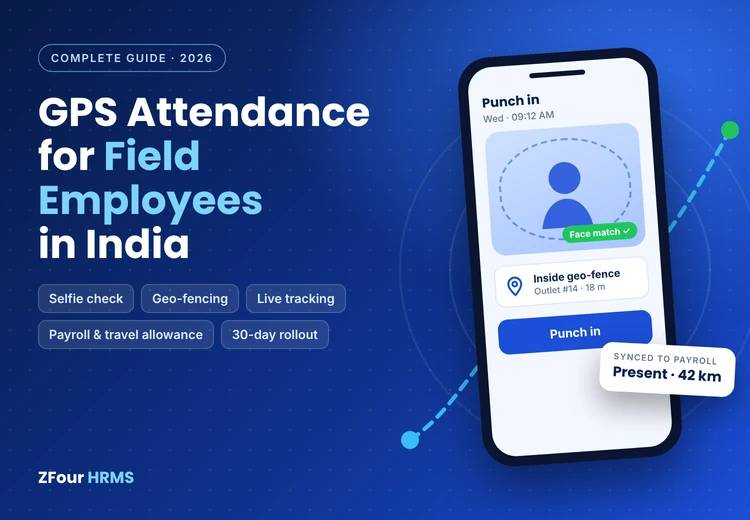
Geo-tagging records the location of each punch. Geo-fencing only allows the punch when the phone is inside a defined boundary around the office, store, factory or client site. This stops punching from home or on the way to work, and makes the location of every punch visible.
Weaknesses:
It verifies the phone, not the person: one worker could carry a colleague’s phone. Pair it with a selfie for identity.
GPS accuracy varies indoors and in dense areas, so boundaries need sensible sizing (often 100–300 metres).
Some “fake GPS” tools can spoof mock location on rooted or developer-mode phones. Ask your vendor how their app detects mock locations.
Verdict: geo-fencing attendance is the most cost-effective control for field, store and multi-site teams, and the backbone of modern field attendance.
7. QR codes at sites and checkpoints
A printed QR code fixed at a site or patrol point is scanned by the employee’s app at punch-in or during rounds. It proves presence at that exact spot, which is useful for security patrols and large sites with many points.
Weaknesses: QR codes can be photographed and scanned elsewhere unless combined with geo-fencing or rotated, and they need replacing if damaged.
Verdict: excellent for security guards and patrols, especially combined with geo-fencing.
The right combination for your workforce
The best fake attendance prevention comes from combining one identity check with one location check, chosen for the way each team works.
Workforce | Recommended combination | Why |
|---|---|---|
Factory shop floor | Biometric or face device at the gate + geo-fenced app for supervisors | Fixed entry points; supervisors move around the plant |
Office staff | Geo-fenced app punch or office Wi-Fi + biometric at entrance (optional) | Low proxy risk; keep it simple |
Field sales and service | Geo-tagged app punch at first visit + selfie + live tracking during shift | No fixed site; visits and routes matter |
Retail stores | Geo-fenced app punch at the store + selfie | Many small sites; devices at every store are costly |
Security guards | Geo-fence at each client site + QR checkpoints on patrol | Proves presence at post and on rounds; supports client billing |
Construction and project sites | Geo-fenced app punch by supervisor for crews, or face device at site entry | Temporary sites; worn fingerprints |
Delivery and logistics | App punch at hub with geo-fence + live tracking on route | Work happens on the move |
Contract labour | Same method as permanent staff, plus a monthly reconciliation of contractor billing against verified attendance | Prevents billing for absent or phantom workers |
How to prevent buddy punching in India: five questions to choose your method
If you’re unsure which combination fits a team, answer these:
Does the team work at one fixed location? Yes → a device at the entrance or a geo-fenced app punch. No → app-based methods.
Do they all have smartphones? No → a device at the site, or supervisor-led punching for the crew.
Is identity fraud (buddy punching) or location fraud (remote punching) the bigger risk? Identity → biometric, face or selfie. Location → geo-fencing or QR.
Does pay depend on where they were during the day (visits, kilometres)? Yes → add live tracking during shifts for those roles only.
Do clients need proof of presence? Yes (security, facility services) → geo-fence plus QR checkpoints, with site-wise reports.
Overtime fraud controls: the cousin of proxy attendance
Inflated overtime often costs more than outright proxy attendance, because under the Occupational Safety, Health and Working Conditions Code, 2020 (in force from 21 November 2025), overtime is paid at twice the ordinary wage rate. Common forms are staying on site without working to extend the punch-out time, colleagues punching out late for each other, and supervisors approving overtime in bulk at month end.
Controls that work:
Roster-based overtime: only hours beyond the rostered shift count, and only when approved.
Pre-approval for planned overtime, with a reason, before the shift.
Daily approval of unplanned overtime by the supervisor, not monthly.
Caps and alerts when an employee approaches statutory overtime limits or an unusual monthly total.
Matching against output: overtime on days with no extra production, deliveries or visits deserves a question.
When overtime is calculated automatically from verified punches and approved rosters, most of these problems disappear. See overtime management.
Rolling out anti-proxy controls: a 30-day plan
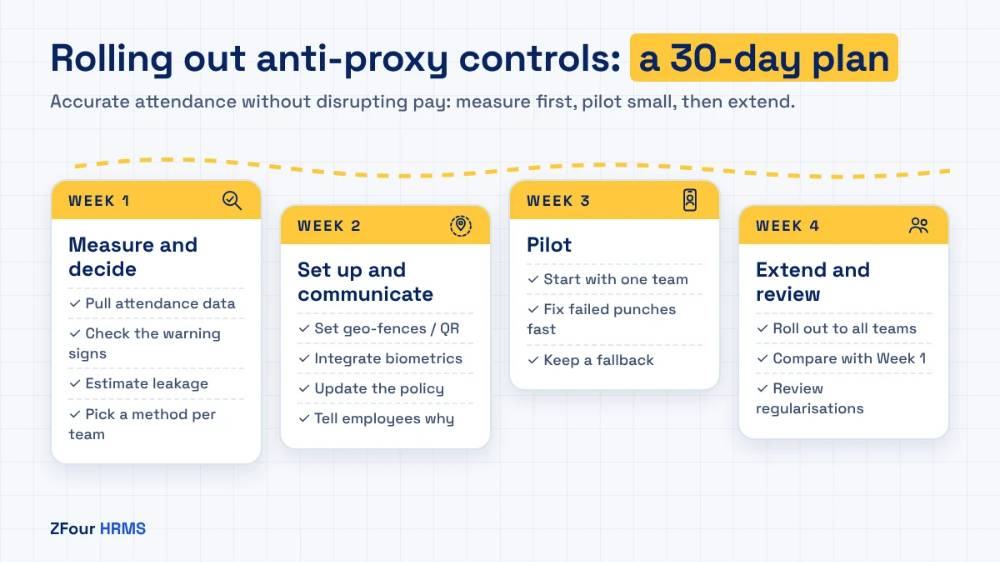
Week 1: measure and decide
Pull three months of attendance and payroll data.
Check the signals in the table above for each team.
Estimate leakage with the formula, or run the free Payroll Leak Audit.
Choose the combination for each workforce type.
Week 2: set up and communicate
Configure geo-fences for each site (and QR checkpoints where needed).
Integrate biometric devices with your HRMS so punches flow into payroll.
Update the attendance policy: methods, regularisation rules, and what happens when a punch fails.
Explain the change to employees, in their language, with the reason: fair pay for everyone who turns up.
Week 3: pilot
Start with one site or team whose manager supports the change.
Track punch failures and fix them quickly: GPS boundaries too tight, phones without location permission, devices offline.
Keep a simple fallback (supervisor-approved regularisation) so no one loses pay because of a technical issue.
Week 4: extend and review
Roll out to remaining teams.
Compare attendance, overtime and output against the baseline from Week 1.
Review regularisation requests by team and approver; repeated requests from the same people need a conversation.
Get the Field Attendance Policy Kit
A ready attendance policy and an employee announcement template you can adapt for your team. Free.
Download the kit
Write a fair attendance policy
Controls work best when the rules are clear and applied consistently. Your attendance policy should cover:
Approved methods for each workforce type.
Timekeeping: what counts as on time, grace periods and how late marks affect pay.
Regularisation: how an employee corrects a missed or failed punch, who approves, and the limit per month.
Device and phone failures: the fallback when a device or phone fails.
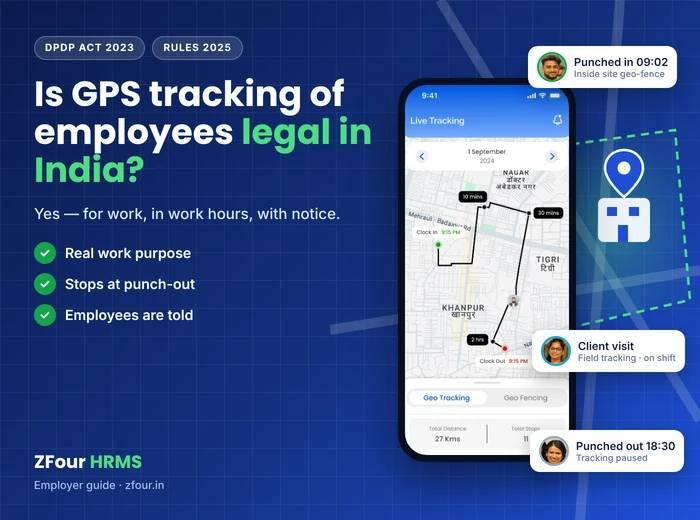
Location data: what is collected, when, and who sees it. See is GPS tracking of employees legal in India?
Consequences: how suspected proxy attendance is investigated and what happens if it’s confirmed.
What to tell employees: a short announcement
Adapt this for a notice board, WhatsApp group or team meeting, in the team’s language. Replace the words in square brackets with your own details:
From [date], attendance will be marked through [method], so everyone who comes to work is paid correctly and overtime is calculated accurately. If a punch fails, [supervisor’s name] can approve a correction the same day, so no one loses pay because of a technical problem. Each punch records who marked attendance and where. Location is recorded only when you punch in and out [and, for field roles, during working hours]. Questions: contact [name].
It opens with the two points employees care about most: you’ll be paid correctly, and here’s what happens if a punch fails.
Handling suspected proxy attendance fairly
Check the data first. A punch outside a geo-fence may be a GPS issue, not dishonesty.
Talk to the employee and hear their explanation.
Document the facts: dates, punches, locations, and what was said.
Apply the policy consistently — the same rule for a supervisor as for a new joiner.
Follow your standing orders or disciplinary procedure for any formal action, and take advice before serious action.
Most proxy attendance stops as soon as a credible control is in place; heavy-handed enforcement is rarely needed.
Contract labour attendance reconciliation
Contract workers are where proxy and phantom attendance most often hide, because the contractor keeps the attendance, raises the bill and pays the workers. As principal employer, you pay for the headcount billed and may be liable for their PF and ESI. A simple monthly reconciliation protects you:
Register every contract worker in your attendance system with a photo and ID before they start, even if the contractor runs their payroll.
Use the same punch method as for your own staff at that site — device or geo-fenced app.
At month end, compare three numbers for each contractor: worker-days billed, worker-days verified in your attendance system, and worker-days covered by the contractor’s PF and ESI challans.
Pay the verified number. Query any gap in writing before releasing payment.
Track repeat gaps by contractor and use them in renewal decisions.
Contractors who run honest operations welcome this; it settles billing disputes quickly. Those who resist it are telling you something.
Mistakes to avoid
Buying devices without integration. Biometric devices that export to Excel leave a manual step where errors and adjustments creep back in.
Geo-fences that are too tight. A 20-metre boundary around a factory guarantees failed punches and resentment. Start wider and tighten if needed.
No fallback. If a failed punch means lost pay with no recourse, employees will find workarounds.
Controls for some, not others. Exempting supervisors or head office from the method used on the shop floor undermines trust.
Ignoring contractors. Contract workers are often where phantom attendance hides. Verify them like your own staff.
Tracking more than needed. Continuous tracking of office staff to prevent proxy attendance is out of proportion; a geo-fenced punch-in is enough.
How proxy attendance looks in different industries
Manufacturing
Shift changeovers are the risk point: the outgoing shift punches out for colleagues, or the incoming shift punches in for late arrivals. Gate devices with liveness detection, and overtime approved daily by supervisors, close most gaps.
Security services
Guards absent from posts, or sites billed at full strength with fewer guards present, are the most serious issues because they risk client contracts. Geo-fenced attendance per site and QR patrol checkpoints give the agency evidence for billing and coverage.
Field sales and distribution
Attendance fraud in field sales usually means reps who mark attendance from home and visit fewer outlets than reported. Punch-in at the first outlet with geo-tagging, live tracking during the day and visit verification against the beat plan solve it, and make kilometre claims accurate at the same time.
Retail
Small teams in many stores make devices expensive and managers busy. A geo-fenced app punch with a selfie at each store is usually enough.
Construction
Labour on temporary sites, often through contractors, often with worn fingerprints. Supervisor-led geo-fenced punching for crews, or face devices at the site entrance, work better than fingerprints.
Hospitality
Multi-property groups with rotating shifts need site-level verification and easy transfer between properties. Geo-fenced app punching at each property, linked to rosters, keeps attendance accurate across branches.
What happens after proxy attendance stops
The first change is usually in payroll: overtime that was inflated falls back to realistic levels, and the payroll close gets faster because there are fewer disputes and fewer manual corrections. The second is in operations: managers can trust attendance data when planning shifts and staffing. The third is cultural: employees who always turned up stop subsidising those who didn’t.
Illustrative example: a 150-person distribution business
This is an illustrative scenario, not a ZFour customer case study.
A distributor with 40 field reps and 110 warehouse and office staff moves from a paper register and WhatsApp check-ins to geo-fenced app attendance for the warehouse and office, and geo-tagged punch-in at the first outlet plus live tracking for reps. In the first month, it finds that several reps routinely punched in from home. After the change, punch-ins happen at outlets, the number of outlet visits recorded rises, and fuel claims are calculated from tracked kilometres instead of self-reported figures.
How ZFour HRMS stops proxy attendance
ZFour HRMS combines identity and location checks in one attendance system that feeds payroll directly:
Geo-tagging and geo-fencing in every plan: every punch carries its location, and punches outside the site boundary aren’t accepted.
Selfie attendance (Workforce Pro and above) for identity verification on mobile.
Biometric device sync in every plan, for gates and offices.
Real-time field tracking as an add-on (₹100 per user per month + GST) for reps and service staff who need route and visit verification.
Overtime control (Workforce Pro and above) and roster management (Talent Master), so punches are checked against the roster and overtime is calculated, not typed.
Attendance regularisation with approvals in every plan, so corrections are visible and limited.
See GPS attendance and field tracking and the attendance management system, or read about field employee attendance tracking.
See geo-fenced selfie attendance in a 30-minute demo. Pick a demo time
Sources and notes
Overtime pay: Section 27 of the Occupational Safety, Health and Working Conditions Code, 2020, in force from 21 November 2025. See the OSH Code on the Ministry of Labour & Employment website.
Personal data (fingerprints, selfies, location): Digital Personal Data Protection Act, 2023 and DPDP Rules, 2025. See the Ministry of Electronics and IT.
PF for contract workers: principal employer responsibilities under the EPF scheme. See EPFO.
Location tracking: for the legal position, see our guide is GPS tracking of employees legal in India?
Product details: ZFour pricing, checked 27 October 2026.
Cost examples in this article are illustrative calculations, not survey data.

Farheen Ahmed
HR Tech Content Strategist at ZFour Technology Private Limited
Research-driven content on HRMS, payroll, attendance management, employee management, and modern HR technology for Indian businesses.