 4 min read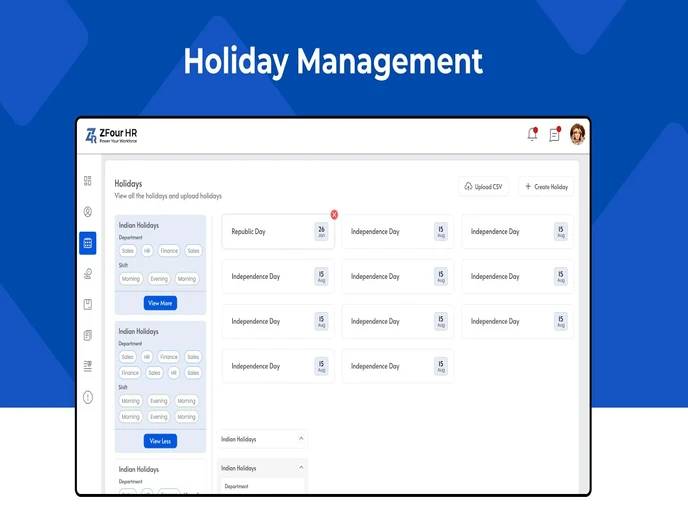
Holiday management in an HRMS goes beyond marking dates on a calendar — it directly affects attendance accuracy, payroll calculations, and whether employees have clear, consistent information about which days are non-working. When holidays aren't configured correctly, the downstream effects show up as attendance discrepancies and payroll corrections rather than as an obvious holiday-management problem.
This guide explains how admins set up and manage holidays in ZFour HRMS, why this connects directly to attendance and payroll, and what to watch for when holidays vary across branches or departments.
Quick Answer: How Do I Set Up Holidays in ZFour HRMS?
Log in as Admin and open the main dashboard.
Navigate to Holiday Management under Attendance or Settings.
Tap Add New Holiday.
Enter the holiday name, date, and type (national, regional, or optional).
Add a description if needed.
Assign the holiday to specific branches or departments if applicable.
Save — the system updates attendance and payroll sections automatically.
The exact interface and available holiday types depend on your organization's ZFour HRMS configuration.
Why Holiday Management Affects More Than the Calendar
Holiday configuration connects directly to two other HR processes, which is why getting it wrong creates problems that don't look like a holiday-management issue on the surface:
Attendance accuracy — if a holiday isn't configured correctly, the system may expect attendance on a non-working day, creating an unnecessary exception for admins to review.
Payroll calculations — holidays factor into working-day calculations for salary processing; an incorrect holiday configuration can affect pay for the relevant period.
Employee clarity — without a visible, accurate holiday calendar, employees rely on informal confirmation ("is tomorrow a working day?"), creating avoidable HR queries.
Getting holiday configuration right at the start of the year reduces the volume of corrections needed later.
Setting Up Holidays in ZFour HRMS
Step 1: Log In as Admin
Access the ZFour HRMS admin panel and open the main dashboard.
Step 2: Open Holiday Management
Navigate to Holiday Management, typically found under Attendance or Settings.
Step 3: Add a New Holiday
Tap Add New Holiday and enter:
Holiday name (e.g., "Diwali" or "Company Foundation Day")
Date and holiday type (national, regional, or optional)
A short description, if relevant
Step 4: Assign to Branches or Departments
If your organization operates across multiple locations, assign the holiday to specific branches or departments rather than applying it organization-wide by default.
Step 5: Save and Confirm
Save the entry. The system updates the relevant attendance and payroll sections automatically based on the saved configuration.
Holiday Types and Where They Apply
Holiday Type | Typical Use Case | Applies To |
|---|---|---|
National | Statutory holidays observed nationwide | All branches, unless region-specific policy applies |
Regional | State or region-specific observances | Branches in the relevant state/region |
Optional | Employee-selectable holidays within a policy | Individual employee choice, where configured |
Company-specific | Foundation day, internal events | All or selected branches/departments |
Multi-location organizations should confirm which holiday types apply to which branches before the calendar year begins, since regional holidays vary significantly across Indian states.
Manual Holiday Tracking vs. HRMS-Based Holiday Management
Area | Manual Process | HRMS-Based Process |
|---|---|---|
Holiday visibility | Shared document or email, easy to miss updates | Visible in employee portal, always current |
Branch-specific holidays | Manually maintained per location | Assigned and filtered by branch/department |
Attendance sync | Manual cross-checking required | Automatically reflected in attendance records |
Payroll impact | Manually adjusted for holiday-affected periods | Factored into payroll calculations automatically |
Update process | Requires re-circulating updated lists | Single update reflects across all connected workflows |
Best Practices for Holiday Management
Review the annual holiday list at the start of the year. Setting up the full year's calendar in advance reduces the number of individual corrections needed later, particularly for regional holidays that vary by state.
Confirm branch-specific holidays before assigning organization-wide. Applying a regional holiday to all branches by mistake can create unnecessary attendance exceptions for locations where that holiday doesn't apply.
Cross-check holidays against attendance and payroll before finalizing a pay period. Since holiday data feeds into both, a late correction after payroll processing begins is more disruptive than catching it during setup.
Keep holiday descriptions specific. A clear name and description reduce ambiguity when reviewing historical records later in the year.
Because regional and state-specific holidays vary across India, admins managing multi-location organizations should also verify observances against official state government notifications where precision matters for statutory compliance — for example, consulting the Ministry of Labour & Employment for guidance on applicable labour regulations tied to holiday and leave entitlements.
How Holiday Management Connects to Attendance and Payroll
Holiday configuration doesn't operate in isolation — it's one input among several that determine an employee's final attendance and payroll record for a given period.
For a broader look at how attendance is recorded and managed, see how to mark attendance in ZFour HRMS.
For the payroll side of this connection, see ZFour Payroll Management Software to understand how attendance and holiday data feed into salary processing.
Final Thoughts
Holiday management is a small setup task with outsized downstream effects — an incorrectly configured holiday can create unnecessary attendance exceptions and payroll corrections that take more admin time to resolve than the original setup would have taken to get right. Reviewing the calendar annually, confirming branch-specific assignments, and treating holiday data as connected to attendance and payroll rather than standalone reduces the volume of avoidable corrections later in the year.
Want to see how holiday, attendance, and payroll management work together in ZFour HRMS?
Book a ZFour HRMS demo.

Farheen Ahmed
HR Tech Content Strategist at ZFour Technology Private Limited
Research-driven content on HRMS, payroll, attendance management, employee management, and modern HR technology for Indian businesses.


