 8 min read
Choosing the right HRMS software can help businesses bring employee management, attendance, payroll, leave, performance, and other HR processes into a more organized system.
However, the right platform depends on the company's workforce, HR processes, payroll requirements, integrations, budget, and implementation needs.
ZFour HRMS, Zoho People, and Keka HR all provide HR technology for businesses, but they approach workforce management differently.
This comparison focuses specifically on ZFour HRMS vs Zoho People vs Keka HR, helping businesses evaluate their capabilities, strengths, trade-offs, and suitability for different HR requirements.
Note: Features, pricing, plans, integrations, and availability can change. Always verify the latest information directly with each provider before making a purchasing decision.
Quick Comparison: ZFour HRMS vs Zoho People vs Keka HR
There is no universal winner among the three platforms.
A practical way to look at them is:
ZFour HRMS: A broader HRMS option for businesses looking to connect payroll, attendance, leave, employee management, onboarding, and other HR workflows.
Zoho People: An HR platform focused on employee information, attendance, leave, workflow customization, analytics, and integration within the broader Zoho ecosystem.
Keka HR: An HR and payroll platform covering payroll, modern HR, performance, hiring and onboarding, timesheets, and time and attendance.
The best choice depends on the features your organization actually needs rather than a generic ranking.
ZFour HRMS vs Zoho People vs Keka HR: Feature Comparison
Feature | ZFour HRMS | Zoho People | Keka HR |
|---|---|---|---|
Employee management | Yes | Yes | Yes |
Payroll | Yes | Available through payroll integration | Yes |
Attendance | Yes | Yes | Yes |
Mobile access | Yes | Yes | Yes |
Biometric attendance | Integration available | Supported | Supported |
GPS/location attendance | Yes | Supported | Supported |
Geo-fencing | Yes | Location-based options | Supported |
Leave management | Yes | Yes | Yes |
Employee self-service | Yes | Yes | Yes |
Performance management | Yes | Yes | Yes |
Onboarding | Yes | Yes | Yes |
HR reporting | Yes | Yes | Yes |
Workflow automation | Available | Strong customization | Available |
Integrations | Available | Broad ecosystem | Available |
Payroll-attendance connection | Yes | Available through Zoho Payroll integration | Yes |
Important: The exact availability of features can depend on the product plan, configuration, integrations, and implementation. This table is intended as a high-level comparison.
Zoho People currently documents attendance with IP/location restrictions, biometric integrations, facial recognition, leave, timesheets, roster management, analytics, and workflow customization.
Keka currently documents payroll, performance, hiring and onboarding, time and attendance, biometric and GPS tracking, and payroll integration.
1. ZFour HRMS
ZFour HRMS provides an HRMS platform designed to bring core employee and workforce processes together.
Its current product information includes payroll, attendance, leave management, employee self-service, onboarding, geo-tag attendance, geo-fencing, biometric integration, and attendance regularization.
Key ZFour HRMS capabilities
Payroll management
Attendance management
Mobile attendance
Biometric integration
GPS and geo-fencing
Leave management
Shift management
Employee onboarding
Employee self-service
Performance management
HR reporting
Attendance regularization
Where ZFour HRMS can fit
ZFour HRMS may be suitable for organizations that want payroll, attendance, leave, employee management, and related HR workflows connected within one platform.
For businesses evaluating the available modules, see ZFour HRMS solutions.
2. Zoho People
Zoho People is an HR platform covering employee information, attendance, leave, timesheets, workflows, analytics, and other people-management processes.
Zoho People currently supports attendance through web and mobile check-ins, IP and location-based restrictions, biometric integrations, and facial-recognition systems. It also provides leave, timesheets, roster management, and HR analytics.
Key Zoho People capabilities
Employee information management
Attendance
Leave management
Timesheets
Roster management
Employee self-service
HR analytics
Workflow customization
Performance management
Document management
Integrations
Zoho People also supports integrations with other Zoho applications and third-party tools. Its documentation describes integrations with products including Zoho CRM, Zoho Projects, Zoho Payroll, Zoho Books, and third-party applications.
Where Zoho People can fit
Zoho People may be particularly relevant for organizations that value configurable HR workflows and integration with a wider business-software ecosystem.
3. Keka HR
Keka HR combines HR, payroll, performance, hiring and onboarding, timesheets, and time-and-attendance functionality.
Keka's current product information lists payroll, modern HR, performance management, hiring and onboarding, project timesheets, and automated time and attendance.
Its attendance platform also supports shift scheduling, overtime tracking, biometric infrastructure, and payroll integration.
Key Keka HR capabilities
Payroll
Employee management
Attendance
Leave management
Biometric attendance
GPS tracking
Shift management
Overtime management
Performance management
Hiring and onboarding
Employee engagement
Timesheets and projects
Reporting and analytics
Where Keka HR can fit
Keka HR may be relevant for organizations looking for a broad HR and payroll platform with strong time-and-attendance and performance-management capabilities.
ZFour HRMS vs Zoho People vs Keka HR: Payroll
Payroll is an important consideration when comparing HRMS platforms in India.
ZFour HRMS
ZFour HRMS connects payroll with employee and attendance-related workflows and provides payroll-management capabilities designed for Indian businesses.
For businesses evaluating payroll functionality, see the ZFour HRMS payroll solution.
Zoho People
Zoho People can integrate with Zoho Payroll. The official documentation describes employee-data synchronization, pay-period configuration, loss-of-pay data transfer, payslip access, reimbursements, investment declarations, and statutory payroll functionality through the Zoho People and Zoho Payroll integration.
Keka HR
Keka provides payroll as part of its broader HR platform and positions payroll alongside modern HR, performance, hiring, and time-and-attendance capabilities.
What should you compare?
Before selecting a payroll platform, evaluate:
Salary structures
Deductions
Statutory requirements
Payroll processing
Payslips
Attendance integration
Leave integration
Reports
Reimbursements
Full-and-final settlement
Implementation support
ZFour HRMS vs Zoho People vs Keka HR: Attendance
Attendance requirements can differ significantly between office, field, hybrid, and shift-based organizations.
Attendance Capability | ZFour HRMS | Zoho People | Keka HR |
|---|---|---|---|
Mobile attendance | Yes | Yes | Yes |
Biometric integration | Yes | Yes | Yes |
GPS/location | Yes | Yes | Yes |
Geo/location controls | Yes | Yes | Yes |
Face recognition | Configuration dependent | Supported | Available through attendance options |
Shift management | Yes | Yes | Yes |
Overtime tracking | Yes | Yes | Yes |
Attendance reports | Yes | Yes | Yes |
Payroll connection | Yes | Through Zoho Payroll | Yes |
Zoho People officially documents IP/location restrictions, biometric integrations, and facial recognition for attendance.
Keka documents biometric infrastructure, GPS tracking, shift scheduling, overtime, and payroll integration for attendance.
For ZFour HRMS attendance capabilities, see ZFour HRMS Attendance Management.
ZFour HRMS vs Zoho People vs Keka HR: Employee Self-Service
Employee self-service allows employees to complete routine HR tasks and access relevant information without depending on HR for every request.
ZFour HRMS
ZFour HRMS provides employee self-service capabilities within its HRMS, including employee access to attendance, leave, payroll, and other HR workflows.
You can learn more through the ZFour HRMS Employee Self-Service Portal guide.
Zoho People
Zoho People provides employee self-service capabilities as part of its HRIS, including access to employee information, leave, attendance, documents, and other HR processes.
Keka HR
Keka provides employee-facing functionality through its HR platform and mobile experience, including attendance, leave, payslips, and employee requests.
ZFour HRMS vs Zoho People vs Keka HR: Performance Management
Performance management can be an important differentiator when evaluating a broader HRMS.
ZFour HRMS
ZFour HRMS provides performance and appraisal functionality as part of its broader HRMS offering.
Zoho People
Zoho People provides performance-management functionality with configurable appraisal processes. Its documentation describes customizable appraisal cycles based on factors such as joining date, location, role, and designation.
Keka HR
Keka positions performance and culture as a core part of its HR platform, alongside payroll, modern HR, and hiring and onboarding.
What should businesses consider?
Look at:
Goal setting
Appraisals
Feedback
Performance cycles
Manager workflows
Employee participation
Reporting
Integration with other HR processes
ZFour HRMS vs Zoho People vs Keka HR: Integrations
Integrations matter when HR teams already use accounting, payroll, attendance, communication, or other business applications.
ZFour HRMS
ZFour HRMS supports integrations relevant to HR workflows, including biometric and workforce-management requirements.
Zoho People
Zoho People has a broad integration ecosystem, including native Zoho applications and third-party applications. Its official documentation specifically highlights integrations with Zoho CRM, Projects, Payroll, Books, and other applications.
Keka HR
Keka provides an HR platform that connects payroll, attendance, performance, hiring, onboarding, and other workforce processes.
Before choosing
Check whether the platform integrates with the systems your business already uses.
Which HRMS Should You Choose?
The answer depends on your actual requirements.
If You Prioritize | Platform to Evaluate |
|---|---|
Connected HR, payroll, attendance, and workforce workflows | ZFour HRMS |
Workflow customization and broader software integrations | Zoho People |
Payroll, performance, and integrated time & attendance | Keka HR |
This is not a universal ranking. It is a practical way to narrow the evaluation based on different priorities.
How to Choose Between ZFour HRMS, Zoho People and Keka HR
Before selecting a platform, ask these questions:
1. How many employees do you manage?
Consider your current workforce as well as expected growth.
2. What HR processes need automation?
Identify whether you need:
Payroll
Attendance
Leave
Employee self-service
Performance
Recruitment
Onboarding
Reporting
3. How complex is your payroll?
Review:
Salary structures
Deductions
Statutory requirements
Overtime
Reimbursements
Payroll reporting
4. How do employees mark attendance?
Consider whether your workforce needs:
Mobile attendance
Biometric attendance
GPS
Location restrictions
Face recognition
Shift management
5. Which integrations are essential?
Check compatibility with:
Accounting software
Attendance devices
Payroll systems
ERP platforms
Communication tools
Existing HR applications
6. How much configuration is required?
A platform with extensive customization can be useful, but your HR team should also consider the administrative effort required to configure and maintain it.
7. What support will you receive?
Ask about:
Data migration
Implementation
Training
Customer support
Payroll support
Technical assistance
Post-launch onboarding
Common HRMS Selection Mistakes
1. Choosing Based Only on a Feature List
A longer feature list does not automatically mean a better HRMS.
Focus on the features your HR team and employees will actually use.
2. Ignoring Data Migration
Employee records, payroll history, leave balances, and attendance information should be reviewed before migration.
3. Skipping a Pilot
Test important workflows with a small group before a full rollout.
4. Ignoring Compliance Requirements
Verify the statutory requirements applicable to your organization, industry, and location.
For Indian payroll-related statutory information, businesses can refer to the Employees' Provident Fund Organisation (EPFO) and Employees' State Insurance Corporation (ESIC).
5. Focusing Only on Price
Compare the complete cost of ownership, including implementation, training, integrations, support, and future requirements.
6. Not Involving Employees
HR, payroll teams, managers, and employees may use different parts of an HRMS. Include their requirements during evaluation.
ZFour HRMS vs Zoho People vs Keka HR: Final Comparison
Evaluation Area | ZFour HRMS | Zoho People | Keka HR |
|---|---|---|---|
HR management | Broad HRMS | HR platform | Broad HR platform |
Payroll | Yes | Via Zoho Payroll | Yes |
Attendance | Yes | Yes | Yes |
Employee self-service | Yes | Yes | Yes |
Leave management | Yes | Yes | Yes |
Performance management | Yes | Yes | Yes |
Onboarding | Yes | Yes | Yes |
Workflow customization | Available | Strong | Available |
Integrations | Available | Broad ecosystem | Available |
Best evaluation focus | Connected HR workflows | Customization & ecosystem | Payroll, performance & attendance |
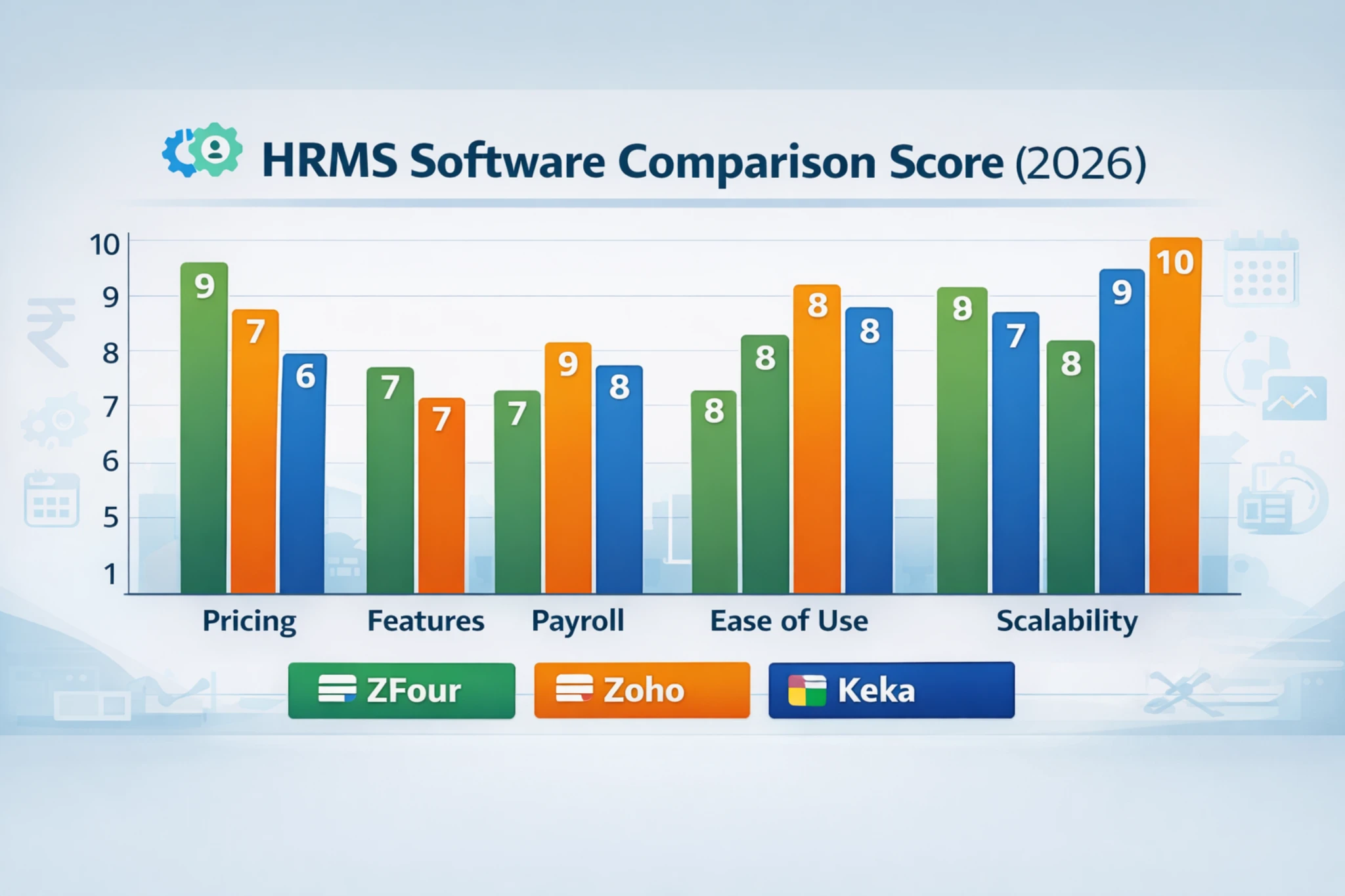
This comparison is intended as a decision framework, not a universal ranking.
Final Verdict
ZFour HRMS, Zoho People, and Keka HR are not identical products, and there is no single platform that is best for every organization.
ZFour HRMS can be considered by businesses looking for connected HR, payroll, attendance, leave, employee management, and workforce workflows.
Zoho People can be considered by organizations that place strong emphasis on configurable HR workflows, analytics, and integration with a wider software ecosystem.
Keka HR can be considered by businesses looking for a broader HR and payroll platform combining payroll, performance, hiring, onboarding, and time-and-attendance capabilities.
The best decision is the platform that matches your organization's workforce, HR processes, payroll complexity, attendance requirements, integrations, implementation capacity, and budget.
Ready to Evaluate ZFour HRMS?
Explore ZFour HRMS to review its HR, payroll, attendance, and workforce-management capabilities.

Farheen Ahmed
HR Tech Content Strategist at ZFour Technology Private Limited
Research-driven content on HRMS, payroll, attendance management, employee management, and modern HR technology for Indian businesses.


