 7 min read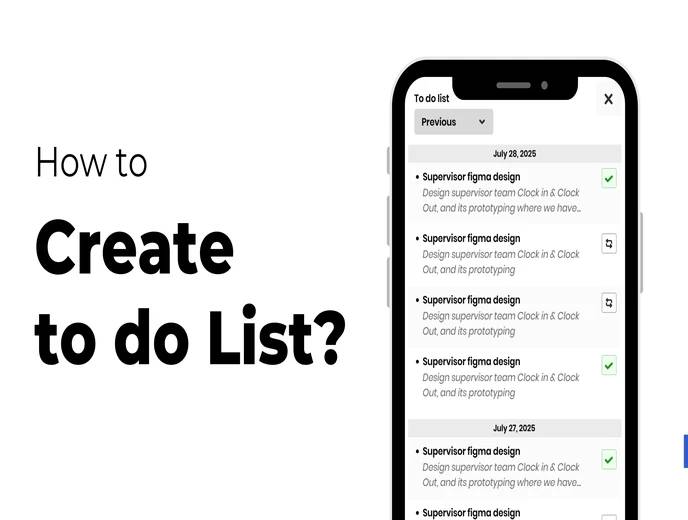
Between meetings, deadlines, and daily HR tasks, it's easy to lose track of smaller responsibilities that don't have a formal deadline reminder attached. The To-Do List feature in ZFour HRMS gives employees and HR teams a simple way to capture, organize, and track daily tasks directly within the platform they already use for other work.
This guide explains how to create and manage a To-Do List in ZFour HRMS, why lightweight task tracking matters even when a company already has formal project management tools, how to use it effectively alongside your other daily work, and what to do if the feature doesn't behave as expected.
Quick Answer: How Do I Use the To-Do List in ZFour HRMS?
Log in to your ZFour HRMS dashboard.
Open the To-Do List option from the dashboard.
Tap the ">" arrow to add a task.
Choose Add Note for a main task, or Add Sub Note to break it into smaller steps.
Mark tasks as complete, edit, or delete them as your work progresses.
Review your list daily to stay on top of pending items.
Why a Simple To-Do List Still Matters at Work
Most organizations already have some form of formal task or project tracking — a project management tool, a shared spreadsheet, or a ticketing system for structured work. A personal To-Do List inside the HRMS serves a different, narrower purpose: capturing the smaller, day-to-day responsibilities that don't warrant a formal ticket but still need to get done.
This gap matters more than it might seem, especially alongside other self-service features like applying for leave or marking attendance — small, recurring tasks that are easy to forget without a lightweight way to capture them:
Formally tracked work — assigned tasks, project deliverables, tickets with owners and deadlines
Informal commitments — a colleague asking for a quick favor, a follow-up promised in a meeting, a small administrative task like updating a document
Recurring personal reminders — things that need to happen regularly but aren't significant enough for a formal system
The second and third categories are exactly what tend to fall through the cracks without a lightweight capture tool. A formal project management system is often too heavyweight for a two-minute task, which means these smaller commitments either get remembered by luck, written on a sticky note that gets lost, or simply forgotten.
How to Create a To-Do List in ZFour HRMS
Step 1: Log In to Your ZFour HRMS Dashboard
Log in with your registered credentials and navigate to your employee dashboard.
Step 2: Open the To-Do List Option
Locate the To-Do List option on your dashboard and tap it to open your task list.
Step 3: Add a New Task
Tap the ">" arrow to see your task options: Add Note and Add Sub Note.
Add Note creates your main task. For example:
"Prepare Monthly Attendance Report"
Add Sub Note lets you break that main task into smaller steps underneath it. For example, under the task above, you might add:
Collect data from all departments
Verify attendance records
Submit final report to HR Manager
This structure keeps a larger task organized without losing track of the individual steps needed to complete it. It's particularly useful for tasks that span more than a single sitting — rather than one item that stays marked "incomplete" for several days, you can see exactly which sub-steps are done and which remain.
Step 4: Track Your Progress
As you work through your list, mark completed tasks as done, edit any task if your plans change, or delete items that are no longer relevant. Keeping the list current — rather than letting completed or outdated tasks pile up — is what keeps it genuinely useful rather than becoming clutter you learn to ignore.
Step 5: Review Your List Daily
Check your To-Do List at the start of each day. Reorder tasks by priority, add anything new, and confirm what's already been completed. A list that's reviewed daily stays a working tool; one that's checked occasionally tends to accumulate stale items that no longer reflect what actually needs attention.
Common Questions When Using the To-Do List
What if I don't see the To-Do List option on my dashboard?
This can happen if the feature isn't enabled for your account or your organization manages task tracking through a different tool. Check with your HR or system administrator.
Can I share a task with someone else, or is this only for personal use?
The To-Do List described in this guide is designed for individual task tracking. If your organization needs shared, assignable task tracking across a team, that typically requires a different workflow or a dedicated project management tool. For a broader look at other ZFour HRMS features available to employees, see the ZFour HRMS training video library.
What happens to completed tasks — are they deleted automatically?
In most configurations, completed tasks remain visible until you delete them, which allows you to review what you've accomplished before clearing the list.
Is there a limit to how many sub-notes I can add under one task?
This depends on your organization's configuration. For most day-to-day tasks, a handful of sub-notes is generally enough to stay useful — a task that needs dozens of sub-steps may be better suited to a dedicated project tool.
Getting the Most Out of the To-Do List Feature
Keep tasks specific. A task like "Finish attendance report" is easier to act on than a vague note like "Reports." Specific tasks are easier to mark complete and track progress against, and they reduce the ambiguity of returning to a list days later and not remembering exactly what the task involved.
Use sub-notes for anything multi-step. Breaking a larger task into smaller pieces makes it easier to see partial progress rather than one item that stays "incomplete" for days, which can be discouraging to look at and doesn't tell you how close you actually are to finishing.
Don't let the list grow indefinitely. Periodically review and remove tasks that are no longer relevant. A list with dozens of stale entries becomes something people stop checking altogether, which defeats the purpose of having it in the first place.
Pair it with your actual deadlines. If a task is tied to a specific deadline — a report due date, a project milestone — keep that context in the task name itself, since this helps you prioritize at a glance without needing to remember external context.
Use it as a capture tool, not just a planning tool. The most practical use of a lightweight to-do list is often capturing something the moment you think of it — a request from a colleague, a follow-up you promised — rather than trying to remember it until you have time to "properly" plan your day.
Why This Matters Beyond Personal Organization
Task management tools are a well-established part of workplace productivity research. According to a McKinsey Global Institute report on workplace productivity, employees can spend a significant share of their workweek on communication and coordination overhead — time that structured task tracking can help reduce by making priorities and progress visible without requiring a status-check conversation.
For HR teams specifically, a shared understanding of what's pending — even at the individual level — can reduce the back-and-forth of "did you get to that yet" conversations that otherwise consume time better spent on actual work. This is particularly relevant for HR roles that juggle many small, easy-to-forget administrative tasks alongside larger, formally tracked responsibilities like payroll processing or recruitment.
Final Thoughts
The To-Do List feature in ZFour HRMS won't replace a dedicated project management tool for complex, cross-team initiatives, but it gives employees and HR teams a lightweight way to track daily tasks without leaving the platform they already use for attendance, leave, and other HR functions.
The value comes from consistent use, not from the feature itself — a list that's checked and updated daily stays useful, while one that's set up once and forgotten provides little benefit regardless of how well-designed the tool is.
Want to see how ZFour HRMS supports daily productivity alongside core HR functions?

Farheen Ahmed
HR Tech Content Strategist at ZFour Technology Private Limited
Research-driven content on HRMS, payroll, attendance management, employee management, and modern HR technology for Indian businesses.


