 8 min read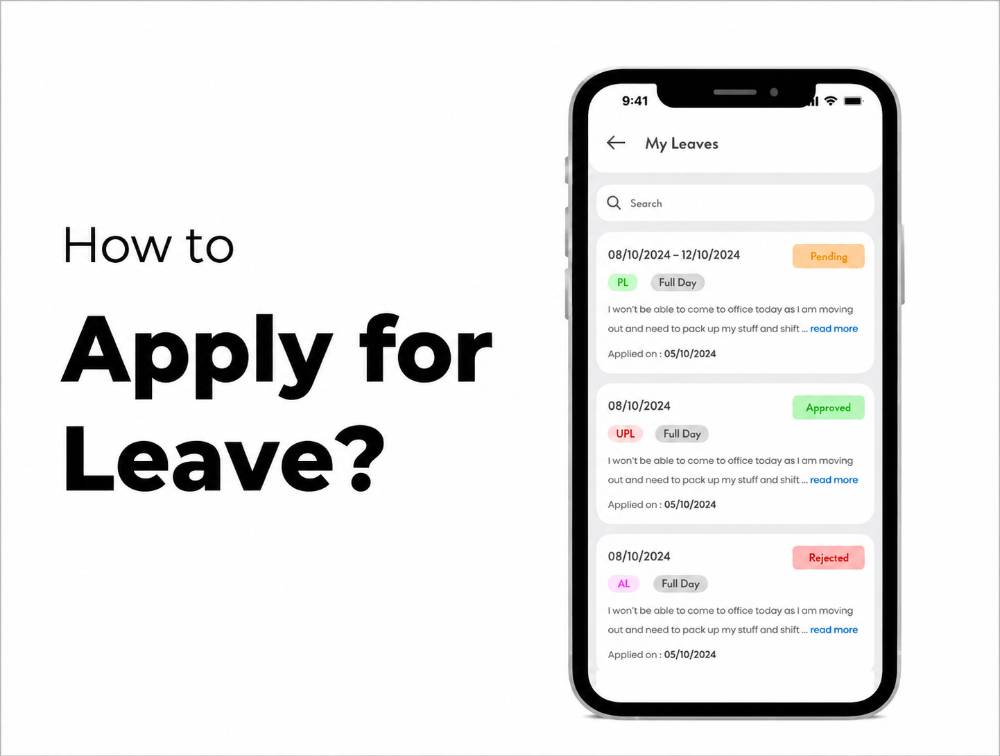
Applying for leave should not require emails, spreadsheets, or repeated messages to HR. With the ZFour HRMS mobile application, employees can submit a leave request, select the applicable leave type and dates, provide a reason, and track the request through the HRMS workflow.
This guide explains how to apply for leave in ZFour HRMS, what information you need before submitting a request, how to check your leave status, how to review your leave balance, and what happens after your request is submitted.
Quick Answer: How Do You Apply for Leave in ZFour HRMS?
To apply for leave in ZFour HRMS:
Log in to the ZFour HRMS mobile application.
Open Apply Leave from the dashboard.
Select the appropriate leave type.
Enter the leave start and end dates.
Add the reason for your leave.
Add any additional information required by your organization.
Review the details.
Tap Apply to submit the request.
Check your leave status from My Leaves / Leave Status.
Once submitted, the request goes through the approval workflow configured by your organization, typically involving the employee's reporting manager or designated approver.
Key Takeaways
What You Need to Do | ZFour HRMS Workflow |
|---|---|
Log in | Open the ZFour HRMS mobile application |
Start a request | Select Apply Leave |
Choose leave | Select the applicable leave type |
Set dates | Enter the leave start and end dates |
Explain the request | Add the reason and any required notes |
Submit | Tap Apply |
Track approval | Open My Leaves / Leave Status |
Check balance | Open the Leave Dashboard |
Need help? | Contact your HR/admin if the option or balance does not appear correctly |
Mobile Leave Application vs HRMS Web Portal
Task | Mobile App | Web Portal |
|---|---|---|
Apply for leave | Available where enabled | Available where enabled |
Check leave status | Available | Available |
View leave information | Available | Available |
Access other HRMS functions | Depends on configuration | Depends on configuration |
Best use | Quick employee actions | Broader HRMS access |
What Do You Need Before Applying for Leave?
Before submitting a request, keep the following information ready:
Type of leave you want to apply for
Start date
End date
Reason for leave
Any additional note required by your organization
Supporting document, if your company's leave policy requires one
The available leave types, approval rules, and required information can vary depending on how your organization has configured ZFour HRMS.
For a broader overview of leave workflows, you can explore the ZFour Leave Management System.
How to Apply for Leave in ZFour HRMS
Step 1: Open the ZFour HRMS Mobile App.
Open the ZFour HRMS mobile application on your smartphone.
Log in using your registered credentials.
After successful login, you will reach the HRMS dashboard, where available employee functions are displayed.
Step 2: Select “Apply Leave."
From the dashboard, locate the Apply Leave option and tap it.
This opens the leave application form.
If your dashboard looks slightly different because of your organization's configuration or app version, look for the Leave section or the option used to submit a leave request.
Step 3: Select the Leave Type
Choose the leave type that applies to your request.
Depending on your organization's configuration, this may include categories such as
Casual Leave
Sick Leave
Earned Leave
Compensatory Off
Other organization-specific leave types
Select the leave category that matches your organization's leave policy.
Step 4: Select the Leave Dates
Enter the:
From Date
To Date
Check both dates carefully before submitting.
For example, if you need leave from Monday through Wednesday, make sure Monday is selected as the start date and Wednesday as the end date.
An incorrect date can result in the wrong leave duration being submitted.
Step 5: Add the Reason for Leave
Enter a clear reason for your leave request.
For example:
Personal work
or:
Medical appointment
Your organization may have its own requirements for the information employees should provide.
Keep the reason accurate and relevant to the request.
Step 6: Add Additional Information if Required
If your organization's workflow asks for additional notes or supporting information, provide it before submitting the request.
For example, certain leave categories may require additional information or documentation according to company policy.
Step 7: Review Your Leave Request
Before submitting, check:
Leave type
Start date
End date
Reason
Additional information
Required attachment, if applicable
Reviewing the request before submission can help prevent avoidable corrections.
Step 8: Submit the Leave Request
Once all the information is correct, tap Apply.
Your request is then submitted through your organization's configured ZFour HRMS approval workflow.
What Happens After You Submit a Leave Request?
Submitting a leave request does not necessarily mean the leave is immediately approved.
The next step depends on your organization's approval workflow.
A typical process is
Employee submits request → Manager/Approver reviews → Request approved or rejected → Employee checks status
Your organization may use a different approval hierarchy.
If Your Leave Is Approved
The request status changes to approved, and the leave record is updated according to your organization's configuration.
If Your Leave Is Rejected
Check the reason or manager remarks, if provided.
If you still need the time off, contact the appropriate manager or HR team and follow your organization's leave policy.
If Your Request Is Still Pending
A pending request generally means the designated approver has not completed the approval action.
Check the request status before submitting another request for the same dates.
How to Check Your Leave Status in ZFour HRMS
After submitting your request, open the relevant My Leaves / Leave Status section to check its current status.
Depending on your organization's configuration, you may be able to see whether the request is:
Pending
Approved
Rejected
You may also see information such as application dates and manager remarks where available.
Why Check Your Leave Status?
Checking the status helps you confirm:
Whether the request was submitted
Whether it is still pending
Whether it was approved
Whether it was rejected
Whether any remarks are available
Which dates were requested
This reduces the need to repeatedly contact HR simply to ask about a submitted request.
How to Check Your Leave Balance in ZFour HRMS
Before applying for leave, it can be useful to check your available leave balance.
ZFour's Leave Dashboard provides visibility into configured leave categories and available or used balances, depending on your organization's setup.
For a detailed walkthrough, see:
How to Check Leave Balance in the ZFour HRMS Portal
Why Check Your Leave Balance First?
It helps you understand:
How much leave is available
Which leave types you can use
How much leave you have already used
Whether your requested duration may exceed the available balance
If your balance appears incorrect, contact your HR/admin team rather than submitting repeated requests.
What If Your Leave Request Is Rejected?
A rejected request does not necessarily mean there is a technical problem.
A manager may reject a request because of:
Business requirements
Team availability
Leave policy
Insufficient balance
Incorrect leave type
Missing information
Other company-specific rules
What Should You Do?
Check the request status.
Review any available manager remarks.
Speak with your reporting manager if clarification is needed.
Contact HR if there appears to be a policy or balance issue.
Submit a new request only when appropriate.
Avoid submitting duplicate requests without checking the original request first.
Common Problems When Applying for Leave
Apply Leave Option Is Not Visible
Possible reasons include:
Account permissions
Organization-specific configuration
App version
Dashboard configuration
If the option is still unavailable, contact your HR/admin team.
Leave Type Is Not Available
The available leave types depend on your organization's configured policies.
If the required leave type does not appear, ask HR to verify your leave policy and employee configuration.
Leave Balance Looks Incorrect
First check:
Previous leave requests
Approved and rejected requests
Leave type
Leave history
If the balance still appears incorrect, contact HR.
Request Remains Pending
Check whether the assigned manager or approver has reviewed the request.
If it remains pending beyond your organization's normal approval timeframe, contact the relevant manager or HR team.
Wrong Dates Were Submitted
If your organization's workflow allows changes before approval, follow the applicable correction process.
Otherwise, contact the approver or HR team rather than submitting multiple conflicting requests.
How Leave Requests Connect With HR Workflows
A leave request does not exist in isolation.
In an HRMS, a leave request can connect with:
Employee → Leave Request → Approval → Leave Balance → Attendance → Payroll
This is why digital leave management can be more useful than handling requests entirely through email or spreadsheets.
For a broader explanation of the relationship between leave and attendance, read the Leave and Attendance Management System: Complete 2026 Guide.
Best Practices for Employees Applying for Leave
Apply in Advance Where Possible
If your company requires advance notice, submit the request early.
Select the Correct Leave Type.
Choosing the correct leave category helps HR and managers process the request properly.
Check the Dates Carefully
Review the start and end dates before tapping Apply.
Add a Clear Reason
Provide the information required by your organization's leave policy.
Check Your Balance
Review your available balance before submitting when relevant.
Track the Request
Do not assume a submitted request is approved. Check the request status.
Inform Your Manager When Required
An HRMS workflow does not necessarily replace every communication requirement in your company's leave policy.
Why Digital Leave Applications Are Useful
A digital leave workflow can help employees and HR teams by providing:
Centralized leave requests
Better approval visibility
Leave status tracking
Leave balance visibility
Reduced dependence on paper forms
Better record-keeping
Connection with other HR workflows
The main benefit is a traceable request and approval process, rather than simply replacing paper with an app.
Need Help With ZFour HRMS?
If you're an employee using ZFour HRMS and need help with leave or other employee workflows, start with the relevant ZFour guide or contact your organization's HR/admin team.
For broader information about leave workflows, explore the ZFour Leave Management System.
For an overview of the employee dashboard and other HRMS functions, see the ZFour HRMS Dashboard Training.
Ready to Simplify Leave Requests?
If your organization is looking for a centralized way to manage employee leave applications, approvals, balances, and related HR workflows, explore ZFour HRMS.
Final Takeaway
Applying for leave in ZFour HRMS follows a simple digital workflow:
Log in → Apply Leave → Select Leave Type → Choose Dates → Add Reason → Review → Apply → Track Status
Before submitting, make sure the leave type, dates, and reason are correct. After submission, check the request status rather than assuming that submission means approval.
For employees, the main advantage is visibility: the request can move through the configured HRMS approval workflow without relying entirely on emails or paper forms.
Watch the ZFour HRMS Leave Application Guide.
Prefer a visual walkthrough? Watch this short video to see how to apply for leave in ZFour HRMS step by step:
Watch: How to Apply Leave in ZFour HRMS

Farheen Ahmed
HR Tech Content Strategist at ZFour Technology Private Limited
Research-driven content on HRMS, payroll, attendance management, employee management, and modern HR technology for Indian businesses.


