 4 min read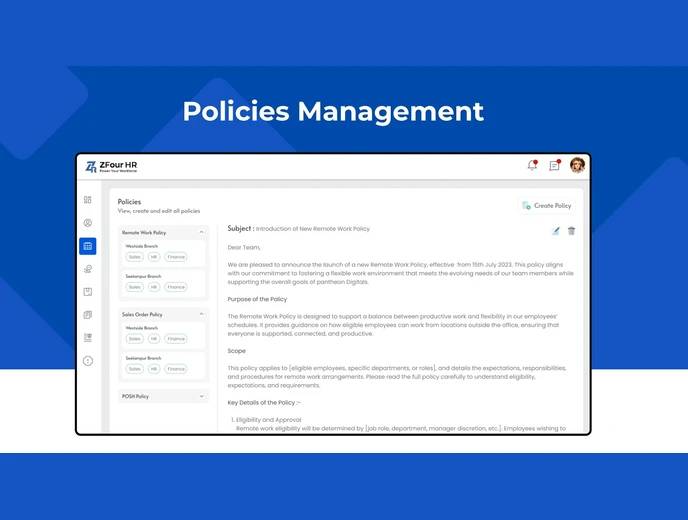
Every organization runs on written policies — attendance rules, leave guidelines, work-from-home policies, code of conduct, security procedures. The challenge isn't writing them; it's keeping them accessible, current, and confirming employees have actually seen the ones that matter. Policies Management in ZFour HRMS centralizes this, giving admins a single place to publish, update, and track policy visibility.
This guide explains how to manage policies as an admin, how employees access them, and how policy acknowledgement tracking works.
Quick Answer: How Do I Manage Policies in ZFour HRMS?
Log in to ZFour HRMS and go to the Admin section.
Open Policies Management.
To add a policy: tap Add Policy, enter the title, select a category, upload or type the content, choose visibility, and save.
To update a policy: select it, tap Edit, revise the content, and save — employees automatically see the latest version.
Employees view policies directly from their portal and can see when each was last updated.
The exact categories and acknowledgement features available depend on your organization's ZFour HRMS configuration.
Why Centralized Policy Management Matters
When policies live in scattered documents — emailed once, maybe posted on a physical noticeboard, rarely updated in a way everyone sees — two problems tend to emerge:
Employees reference outdated versions, since there's no single, authoritative source that's guaranteed current
HR can't confirm who has actually seen important policies, which becomes a real issue for policies with compliance implications (code of conduct, safety procedures, anti-harassment policies)
Centralizing policies in the HRMS addresses both: there's one current version, and where acknowledgement tracking is enabled, there's a record of who has viewed it.
Managing Policies as an Admin
Step 1: Log In and Go to Admin
Log in to ZFour HRMS and navigate to the Admin section from the main menu.
Step 2: Open Policies Management
Within Admin, select Policies Management to access the policy center.
Step 3: Add a New Policy
Tap Add Policy and:
Enter the policy title
Select a category (HR, IT, Security, etc.)
Upload a document or type the policy content directly
Choose visibility — all employees or specific teams
Save
Once saved, the policy becomes visible to the assigned audience.
Step 4: Update an Existing Policy
Policies change — a revised WFH rule, an updated leave structure. To update:
Select the policy from the list
Tap Edit
Upload the new version or revise the text
Save
Employees see the updated version automatically; there's no need to re-circulate the policy separately.
How Employees Access Policies
Employees can view policies directly from their portal without contacting HR for a copy:
Open the Policies section
Select the relevant policy
Read it online (or download it, where enabled)
Check the last-updated date to confirm they're viewing the current version
Policy Acknowledgement Tracking
For policies where confirming employee awareness matters — code of conduct, compliance policies, safety procedures — ZFour HRMS can track which employees have viewed or acknowledged a given policy.
This gives HR visibility into:
Which employees have opened a specific policy
Whether acknowledgement (where required) has been completed
Which employees still need to be followed up with
This is particularly relevant for policies tied to compliance or legal requirements, where simply publishing a policy isn't sufficient — having a record that employees were made aware of it matters if the policy is ever referenced later. SHRM's guidance on handbook acknowledgement notes that a documented acknowledgement helps establish that employees were made aware of a policy, which can matter if it's referenced in a workplace dispute later.
Manual Policy Distribution vs. Centralized Policy Management
Area | Manual Distribution (Email/Notice) | Centralized in ZFour HRMS |
|---|---|---|
Version control | Multiple copies may circulate | Single current version, always accessible |
Update visibility | Requires re-sending or re-posting | Automatically reflects for all viewers |
Acknowledgement tracking | Difficult to confirm who has read it | Trackable per employee, where enabled |
Employee access | Depends on saved emails or physical copies | Available anytime through the portal |
Category organization | Often unstructured | Organized by category (HR, IT, Security, etc.) |
Best Practices for Policy Management
Categorize policies clearly.
Consistent categorization (HR, IT, Security, Compliance) makes it easier for employees to find what they're looking for without searching through an unorganized list.
Use acknowledgement tracking for compliance-relevant policies.
For policies with legal or compliance implications, enabling acknowledgement tracking creates a record that's useful if the policy is ever referenced in a dispute or audit.
Update rather than duplicate.
When a policy changes, edit the existing entry instead of creating a new one — this keeps the acknowledgement history and version tracking intact under a single policy record.
Communicate significant updates separately.
For major policy changes, a brief announcement (via ZFeed or email) alongside the portal update ensures employees notice the change rather than assuming nothing has changed.
For a broader look at how ZFour HRMS handles internal announcements alongside policy updates, see how to explore ZFeed in ZFour HRMS.
Final Thoughts
Policies Management in ZFour HRMS solves two related problems: keeping a single, current version of every company policy accessible to employees, and — where it matters — confirming who has actually seen it. The acknowledgement tracking feature is most valuable for compliance-relevant policies specifically, not necessarily every internal document, so it's worth being selective about which policies actually need that level of tracking rather than enabling it universally.
Want to see how policy management fits into a broader HR workflow?
Book a ZFour HRMS demo.

Farheen Ahmed
HR Tech Content Strategist at ZFour Technology Private Limited
Research-driven content on HRMS, payroll, attendance management, employee management, and modern HR technology for Indian businesses.


