 4 min read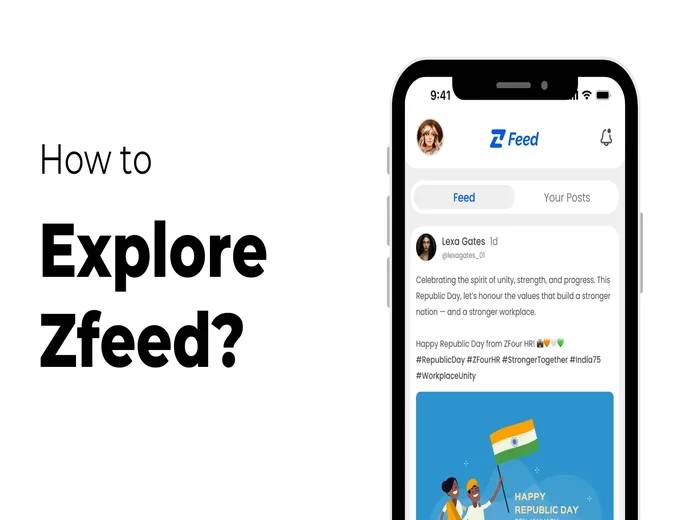
ZFeed is a built-in social feed inside the ZFour HRMS mobile application that lets employees view, share, and interact with workplace posts alongside their regular HR tasks.
This guide explains what ZFeed is, how to access it, how to use its features, how visibility and privacy work, common issues, and how it fits into a broader employee engagement strategy.
Quick Answer: How Do I Use ZFeed in ZFour HRMS?
To use ZFeed in the ZFour HRMS mobile app:
Log in to the ZFour HRMS mobile application with your employee credentials.
Tap the "Z" icon in the navigation bar to open ZFeed.
Browse posts shared by colleagues in your organization.
Tap the post/share option to create your own post.
Add text, and attach an image if needed, then submit your post.
Use the edit or delete options on your own posts if you need to make changes.
The exact layout and available options can vary depending on your organization's ZFour HRMS configuration.
Key Takeaways
Task | What to Do |
|---|---|
Access ZFeed | Log in to the mobile app and tap the "Z" icon |
View posts | Browse the feed for colleague and company updates |
Create a post | Tap the post option, add content, and submit |
Edit a post | Open your post and use the edit option |
Delete a post | Open your post and use the delete option |
Check visibility | Confirm with HR/admin what audience your posts reach |
Report an issue | Contact your HR or system administrator |
What Is ZFeed?
ZFeed brings a simple, internal social-network experience to the ZFour HRMS mobile app, separate from core HR functions like attendance, leave, and payroll.
Organizations can use ZFeed for:
Company announcements
Team or project updates
Employee achievements and recognition
General workplace discussion
Idea sharing
ZFeed is intended to complement day-to-day HR workflows, not replace formal communication channels such as email or official HR notices.
Employee-facing tools like internal social feeds are part of a broader trend toward improving day-to-day workplace connection. Gallup's research on employee engagement has consistently found that regular recognition and open communication are linked to higher engagement, which is part of why many HRMS platforms now build lightweight social features alongside core HR functions.
How to Access ZFeed
Step 1: Log In to the ZFour HRMS Mobile App
Open the ZFour HRMS mobile application and log in using your registered employee credentials.
Step 2: Open ZFeed
From the navigation bar, tap the "Z" icon. This opens ZFeed and displays the current feed of posts from your organization.
Key Features of ZFeed
View Posts from Colleagues
Browse posts shared by other employees in your organization, including announcements, project highlights, achievements, and general updates.
Share Your Own Posts
Create a post to share an update, ask a question, celebrate a milestone, or share a helpful resource with your team.
Edit or Delete Your Posts
You can edit a post after publishing it, or delete it if it's no longer relevant. Changes take effect immediately.
Who Can See Your Posts on ZFeed?
Post visibility depends on your organization's configured access and visibility settings within ZFour HRMS. In most configurations, posts are visible to employees within the same organization, but the exact scope (for example, company-wide vs. team-specific) is determined by your admin's settings.
Employees should follow their organization's communication and workplace conduct policies when posting on ZFeed, since posts may be visible to a wide internal audience. For sensitive HR matters — leave requests, payroll questions, or individual concerns — use the appropriate dedicated workflow instead of ZFeed. For example, see How to Mark Attendance in ZFour HRMS for attendance-related actions, which are handled through their own dedicated section rather than ZFeed.
ZFeed vs. Core HR Workflows
Activity | Best Handled Through |
|---|---|
Company announcements, team updates | ZFeed |
Recognition and informal engagement | ZFeed |
Marking attendance | |
Leave requests | Employee self-service |
Payroll or payslip queries | HR/Payroll section |
Attendance corrections |
Keeping this distinction clear helps ensure formal HR requests are tracked and actioned through the correct workflow, rather than posted informally on ZFeed.
Common ZFeed Issues
The "Z" Icon Is Not Visible
Check that ZFeed is enabled for your organization and that your account has the required access. If the icon is still missing, contact your HR or system administrator.
A Post Isn't Showing Up
Confirm the post was submitted successfully by checking your own profile or post history. If it still doesn't appear, this may be a temporary sync issue — try refreshing the app, or contact your admin if the problem continues.
Can't Edit or Delete a Post
Editing and deletion permissions may be time-limited or restricted by your organization's configuration. Contact your HR/admin team if you're unable to modify a post you created.
Unsure Who Can See a Post
If visibility settings are unclear, check with your HR or admin team before posting sensitive or team-specific content.
Best Practices for Using ZFeed
Keep Posts Workplace-Appropriate
Follow your organization's communication and conduct policies, since posts may be visible to a wide internal audience.
Use ZFeed for the Right Purpose
Reserve ZFeed for announcements, recognition, and general engagement — use dedicated HR workflows for attendance, leave, and payroll matters.
Check Visibility Before Posting Sensitive Content
Confirm your organization's visibility settings if you're unsure who will see a post.
Engage, Don't Just Broadcast
Regularly viewing and responding to colleagues' posts helps build the kind of two-way engagement ZFeed is designed to support.
Final Takeaway
ZFeed adds a lightweight social layer to ZFour HRMS, giving employees a simple way to stay connected with company updates and each other, alongside their core HR tasks.
Log In → Tap "Z" → Browse or Post → Edit/Delete as Needed
The exact features and visibility settings depend on your organization's ZFour HRMS configuration. For core HR actions like attendance and leave, use the dedicated workflows rather than ZFeed.
Ready to bring your team closer together?

Farheen Ahmed
HR Tech Content Strategist at ZFour Technology Private Limited
Research-driven content on HRMS, payroll, attendance management, employee management, and modern HR technology for Indian businesses.


