 11 min read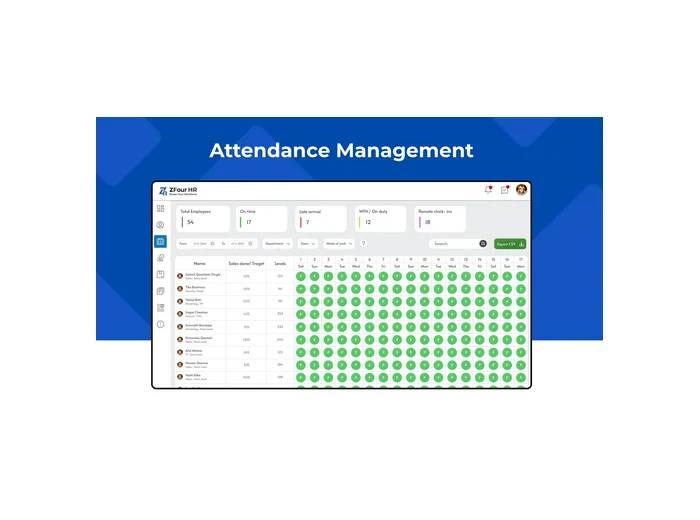
Managing employee attendance is more than checking who is present or absent.
HR admins also need to monitor attendance exceptions, review late arrivals, manage shifts, reconcile leave, handle attendance corrections, review overtime, and prepare attendance records for related HR and payroll workflows.
When these activities are handled manually, HR teams can spend significant time checking spreadsheets, following up with employees, and comparing information from different sources.
A structured attendance management process for HR admins can make these activities easier to monitor and organize.
This guide explains how admins can manage employee attendance more efficiently, what to monitor daily, how to handle attendance exceptions, and how an HRMS can support a more organized attendance workflow.
Quick Answer: How Can Admins Manage Attendance Efficiently?
HR admins can manage employee attendance efficiently by:
Setting clear attendance rules.
Monitoring attendance through a centralized dashboard.
Reviewing exceptions instead of manually checking every record.
Managing leave and attendance together.
Maintaining accurate shift and roster information.
Reviewing attendance correction requests.
Monitoring overtime and unusual attendance patterns.
Reviewing attendance reports regularly.
Preparing relevant attendance records before payroll processing.
Giving employees access to self-service attendance information where available.
The goal is not simply to automate attendance.
The goal is to create a clear workflow for monitoring, reviewing, correcting, approving, and reporting employee attendance.
Key Takeaways
Admin Task | Recommended Approach |
|---|---|
Daily attendance monitoring | Use a centralized dashboard |
Missing attendance | Review the exception before taking action |
Late arrivals | Apply configured attendance rules |
Leave-related absence | Check leave and attendance together |
Shift changes | Maintain accurate schedules and rosters |
Attendance corrections | Follow a defined approval workflow |
Overtime | Review according to company policy |
Payroll preparation | Resolve relevant attendance exceptions |
Reporting | Analyze attendance trends regularly |
Employee queries | Use self-service where available |
What Is Attendance Management for HR Admins?
Attendance management is the process of recording, monitoring, reviewing, and maintaining employee attendance information.
For an HR administrator, this can involve:
Attendance records
Working hours
Late arrivals
Early departures
Missing attendance
Shift schedules
Weekly offs
Breaks
Overtime
Leave-related attendance
Attendance corrections
Attendance reports
Payroll-related attendance information
The admin's role is not necessarily to manually inspect every employee record.
A more efficient approach is to allow routine attendance records to flow through the configured system while HR focuses on exceptions, approvals, corrections, and workforce patterns.
Attendance Management vs Attendance Administration
These terms are closely related.
Attendance management refers to the overall process of managing employee attendance.
Attendance administration refers more specifically to the day-to-day HR activities required to maintain those records.
A practical admin workflow is:
Configure → Monitor → Identify Exceptions → Review → Correct → Approve → Report
This approach helps HR teams spend less time on repetitive checking and more time on records that require action.
The Admin Dashboard: Your Daily Control Center
For HR admins, the attendance dashboard should act as a central place to review workforce attendance information.
Depending on the organization's HRMS configuration, an admin may be able to view:
Employees marked present
Employees marked absent
Employees on leave
Late arrivals
Missing attendance
Attendance exceptions
Working-hour information
Shift information
Attendance reports
ZFour's HRMS current attendance solution includes attendance-related dashboard and reporting capabilities along with shift, roster, and other attendance-management features.
What Should Admins Look for on the Dashboard?
A useful attendance dashboard should help answer practical questions such as
Which employees require attention today?
Which attendance records are incomplete?
Who has arrived late?
Which employees are on approved leave?
Are there unresolved attendance corrections?
Are any attendance patterns unusual?
Which records need HR or manager action?
The value of a dashboard is not simply showing more data.
It is helping admins identify the records that require attention quickly.
1. Set Clear Attendance Rules
Before monitoring attendance, HR teams should establish the rules that determine how attendance is treated.
These may include:
Working hours
Shift timings
Weekly offs
Grace periods
Late-arrival rules
Early-departure rules
Half-day rules
Overtime rules
Attendance correction rules
Why Attendance Rules Matter
Suppose an employee's scheduled start time is 9:00 AM.
If the company allows a 15-minute grace period, a 9:10 AM arrival may be treated differently from a 9:30 AM arrival.
The exact treatment depends on the organization's attendance policy.
Therefore, admins should first establish the policy and then configure the HRMS accordingly.
This reduces the need for HR teams to make the same attendance decision manually every day.
2. Monitor Attendance Exceptions
One of the most useful ways to reduce administrative workload is to focus on attendance exceptions.
Common examples include:
Missing attendance
Missing check-out
Late arrival
Early departure
Unapproved absence
Unexpected overtime
Attendance correction request
Duplicate or unusual attendance record
Instead of manually reviewing every employee's normal attendance, admins can prioritize records that require investigation.
Example Exception Workflow
Attendance Record → Exception Identified → Admin Review → Employee/Manager Follow-Up → Correction or Approval → Final Record
This creates a repeatable process for handling attendance issues.
3. Handle Missing Attendance Carefully
A missing attendance record does not automatically mean an employee was absent.
There can be several reasons for a missing record, including:
Employee forgot to record attendance
Technical issue
Network problem
Incorrect shift assignment
Approved leave
Another authorized exception
Before taking action, the admin should review the available information.
Recommended Admin Process
Identify the missing record.
Check the employee's assigned shift.
Review the employee's leave status.
Review available attendance information.
Contact the employee or manager when necessary.
Follow the organization's correction process.
Record the applicable approval or outcome.
This reduces the risk of treating every missing record as an unexplained absence.
4. Manage Late Arrivals and Early Departures
Late arrivals and early departures are common attendance exceptions.
Depending on company policy, admins may need to monitor:
Grace periods
Late thresholds
Early-departure rules
Half-day rules
Attendance-based adjustments
Example
If the official start time is 9:00 AM and the company provides a 15-minute grace period:
9:00–9:15 AM → Within the configured grace period
After 9:15 AM → May be treated as late according to the configured rule
The exact treatment should always follow the company's attendance policy.
Admins should check the configured rule before manually changing an attendance record.
5. Manage Leave and Attendance Together
Attendance and leave should not always be reviewed separately.
An employee who is not present may have:
Approved leave
Pending leave
Unpaid leave
Another authorized absence
A missing attendance record
Reviewing the applicable leave information alongside attendance can help admins understand why an employee does not have a normal attendance record.
For the broader leave workflow, see the ZFour Leave Management System.
Example Workflow
Employee Applies for Leave → Manager Reviews → Leave Is Approved → Applicable Attendance Status Is Reflected → HR Reviews Exceptions
The exact workflow depends on the organization's configuration.
6. Manage Shifts and Rosters Accurately
Shift-based organizations can have more complex attendance requirements.
Employees may work:
Fixed shifts
Rotating shifts
Night shifts
Different weekly offs
Different break schedules
Temporary shifts
An incorrect shift assignment can make a valid attendance record appear unusual.
Admin Best Practices for Shift Management
Review upcoming rosters.
Assign employees to the correct shift.
Record approved shift changes.
Review weekly offs.
Check overnight schedules carefully.
Make sure attendance rules match assigned schedules.
Investigate unusual records before making corrections.
ZFour HRMS currently positions shift and roster management alongside its attendance functionality.
7. Review Attendance Correction Requests
Attendance corrections are sometimes necessary.
For example, an employee may have a genuine attendance discrepancy that requires review according to company policy.
Instead of making undocumented changes, organizations can use a defined attendance regularization process where available.
A typical workflow is
Employee Request → Reason Provided → Manager/Admin Review → Approval or Rejection → Attendance Record Processed
For the employee-side correction workflow, see:
How to Regularize Attendance in ZFour HRMS.
Why a Controlled Correction Process Matters
A structured process can help admins determine:
Which date was affected
What correction was requested
Why it was requested
Who reviewed it
Whether it was approved or rejected
The exact approval and audit capabilities depend on the organization's configuration.
8. Use GPS and Geo-Fencing Where Appropriate
Location-based attendance can be useful for organizations with field employees, distributed teams, or multiple work locations.
However, admins should understand the difference between different location technologies.
GPS-Based Attendance
Uses location information as part of an attendance workflow.
Geo-Fencing
Uses a defined geographic boundary for location-based attendance controls.
Live Tracking
Provides ongoing location visibility when the relevant tracking functionality is enabled.
These features should be selected according to the organization's workforce requirements and policies.
ZFour HRMS also offers a dedicated GPS attendance solution for field employees.
9. Reduce Manual Attendance Administration
Manual attendance management can create issues such as
Missing entries
Incorrect timings
Duplicate records
Spreadsheet inconsistencies
Delayed corrections
Difficult reconciliation
Digital attendance workflows can reduce repetitive data entry and make attendance information easier to review.
However, automation should not be treated as a guarantee that every attendance record will be correct.
Admins should still review exceptions and investigate discrepancies.
Better Admin Approach
Automate Routine Records → Monitor Exceptions → Investigate Issues → Approve Corrections
This is more practical than expecting technology to eliminate every attendance problem.
10. Review Attendance Before Payroll Processing
Attendance information can support payroll workflows depending on the organization's configuration and policies.
Relevant information may include:
Working days
Overtime
Loss of pay
Applicable attendance-related adjustments
Admin Payroll Checklist
Before the relevant payroll period is finalized, review:
Missing attendance
Pending corrections
Approved leave
Overtime
Unusual attendance records
Applicable attendance adjustments
For businesses evaluating payroll workflows, see ZFour Payroll Management Software.
Important: Attendance information can support payroll processing, but the actual payroll calculation depends on the organization's configured rules and policies.
11. Use Attendance Reports to Identify Patterns
Daily monitoring helps HR resolve immediate attendance issues.
Regular reporting can help identify longer-term patterns.
Useful Attendance Metrics
Metric | What It Can Help Identify |
|---|---|
Attendance rate | Overall attendance patterns |
Absenteeism | Frequent or unusual absence |
Late arrivals | Repeated lateness |
Early departures | Schedule-related patterns |
Overtime | Additional working hours |
Missing check-outs | Process or adoption issues |
Corrections | Recurring attendance problems |
Leave utilization | Workforce availability |
Department trends | Team-level patterns |
Reports should help HR identify areas requiring investigation.
Attendance data should not automatically be treated as the only measure of employee performance.
12. Protect Employee Attendance Information
Attendance records can contain employee information. Location-based attendance may involve additional location information depending on the system and configuration.
Admins should consider:
Role-based access
Appropriate permissions
Secure authentication
Controlled access to employee records
Data retention practices
Employee communication
Controlled attendance corrections
For Indian organizations, privacy obligations should be assessed according to applicable law and the organization's specific data-processing practices.
The Digital Personal Data Protection Act, 2023 is an official Indian government source for the statutory framework.
13. Create an Attendance Exception Policy
Technology works better when employees understand what to do when an attendance problem occurs.
An attendance exception policy should explain:
What counts as missing attendance
How corrections are requested
Who approves corrections
How late arrivals are handled
How early departures are handled
What happens during technical problems
How employees report discrepancies
Example Policy Workflow
Employee Identifies Issue → Request Submitted → Manager Reviews → Admin Processes → Record Finalized
A documented process is easier to manage than resolving every issue through informal messages.
14. Use Employee Self-Service to Reduce Routine HR Work
Not every attendance question requires direct HR intervention.
Where employee self-service is available, employees may be able to:
View attendance
Review working hours
Apply for leave
Check leave status
Request attendance corrections
Review relevant HR information
This can allow HR teams to focus on exceptions and approvals instead of repeatedly answering routine questions.
For the employee leave workflow, see How to Apply for Leave in ZFour HRMS.
15. Build a Daily, Weekly, and Monthly Attendance Routine
A consistent review schedule can make attendance administration easier.
Daily Attendance Checklist
Review attendance status
Check missing attendance
Review late arrivals
Check early departures
Review leave-related exceptions
Check pending attendance corrections
Identify records requiring follow-up
Weekly Attendance Checklist
Review recurring attendance exceptions
Check shift assignments
Review overtime patterns
Check unresolved corrections
Review department-level trends
Follow up on outstanding issues
Monthly Attendance Checklist
Review attendance summaries
Reconcile relevant leave and attendance records
Review attendance corrections
Review overtime
Check payroll-related attendance information
Identify recurring attendance problems
Finalize records according to company workflow
Common Attendance Management Mistakes Admins Should Avoid
Mistake 1: Treating Every Missing Record as Absence
A missing attendance record may have several explanations.
Better approach: investigate before taking action.
Mistake 2: Changing Attendance Without a Defined Process
Uncontrolled changes can make attendance records difficult to understand.
Better approach: use a documented correction and approval workflow.
Mistake 3: Ignoring Shift Assignments
An incorrect shift can make valid attendance appear incorrect.
Better approach: verify the employee's schedule before making a correction.
Mistake 4: Reviewing Leave and Attendance Separately
Approved leave may explain an attendance exception.
Better approach: review applicable leave information alongside attendance.
Mistake 5: Sending Unreviewed Attendance Into Payroll
Attendance discrepancies may affect payroll-related inputs.
Better approach: resolve relevant exceptions before finalizing the attendance period.
Mistake 6: Using Location Features Without a Clear Business Purpose
GPS or geo-fencing should address a genuine workforce requirement.
Better approach: define the purpose, permissions, and applicable policy before implementation.
Mistake 7: Treating Attendance as the Only Measure of Performance
Attendance is only one source of workforce information.
Better approach: consider attendance alongside relevant performance and business context.
How ZFour HRMS Helps Admins Manage Attendance
ZFour HRMS brings attendance together with related HR workflows such as leave, payroll, shifts, GPS attendance, and reporting.
ZFour's HRMS current attendance offering includes capabilities such as attendance tracking, dashboard visibility, shift and roster management, GPS-based attendance, geo-fencing, and attendance reporting.
For admins, the value is not simply having multiple features.
It is having a more structured way to manage related attendance workflows.
Example Admin Workflow
Configure Rules → Monitor Attendance → Identify Exceptions → Review → Manage Leave and Shifts → Process Corrections → Finalize Attendance → Review Reports
For dedicated product information, visit the ZFour Attendance Management System.
Ready to Make Attendance Administration More Efficient?
If your HR team spends too much time checking spreadsheets, following up on attendance exceptions, reviewing corrections, or reconciling attendance with other HR processes, a centralized HRMS can provide a more structured workflow.
ZFour HRMS combines attendance with related HR workflows to help organizations manage employee information through a centralized platform.
Explore ZFour HRMS to see how its attendance and HR workflows can fit your organization's requirements.
Final Takeaway
Effective attendance management is not simply about recording who came to work.
For HR admins, it is about creating a repeatable process for:
Configure → Monitor → Identify Exceptions → Review → Correct → Approve → Report
A structured attendance workflow allows HR teams to focus less on repetitive manual checking and more on exceptions, approvals, workforce patterns, and policy.
The right attendance-management approach should connect the processes that admins actually work with, including attendance, leave, shifts, corrections, employee self-service, reporting, and payroll-related workflows.

Farheen Ahmed
HR Tech Content Strategist at ZFour Technology Private Limited
Research-driven content on HRMS, payroll, attendance management, employee management, and modern HR technology for Indian businesses.


