 4 min read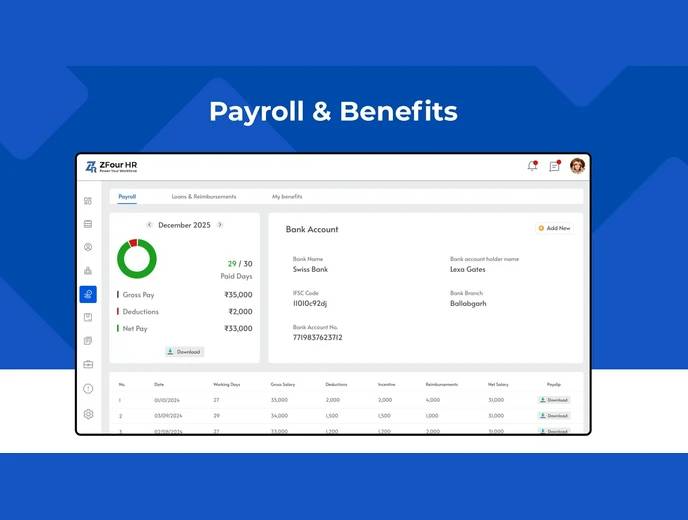
Understanding where your salary comes from — the breakdown, the benefits attached to it, and any outstanding loans or advances — shouldn't require a conversation with HR every time you have a question. The Salary & Benefits section in ZFour HRMS consolidates this information so employees can check it directly.
This guide covers what's in your salary breakdown, how benefits are tracked, and how to monitor loan or advance repayments — plus where to go for payslip downloads specifically.
Quick Answer: What Can I See in Salary & Benefits?
The Salary & Benefits section typically shows:
Your complete salary structure (basic pay, allowances, bonuses, deductions)
Benefits you're entitled to (allowances, reimbursements, other perks)
Loan or salary advance balances and repayment status
Notifications when your compensation changes (revision, bonus, allowance update)
For downloading actual payslip documents, see how to download your payslip in ZFour HRMS — this guide focuses on the broader salary and benefits picture, not the download process itself.
Understanding Your Salary Breakdown
Your salary structure is typically broken into components:
Component | What It Represents |
|---|---|
Basic Pay | The core fixed portion of your salary |
Allowances | Additional fixed amounts (HRA, travel, etc.) |
Bonuses | Variable, performance- or event-based payments |
Deductions | PF, ESI, TDS, and other applicable withholdings |
Net Pay | The final amount after allowances and deductions |
Seeing this breakdown directly — rather than just a final number on a payslip — makes it easier to understand exactly how your monthly salary is calculated, and to spot a genuine discrepancy if one occurs. SHRM's research on pay transparency has found that clearer communication about pay structures builds employee trust and reduces the confusion that comes from opaque compensation practices.
How Attendance Affects Your Salary
Your salary calculation typically factors in attendance, leave, overtime, and holidays. Because these records are connected within the system, an accurate attendance record generally means an accurate salary calculation without manual intervention.
This is also why attendance discrepancies matter beyond the attendance record itself — an unresolved issue (a missed check-out, an unapproved absence) can affect the salary calculation for that period. If you notice a mismatch between your recorded attendance and your salary, check your attendance history before assuming it's a payroll error — it's often traceable to a specific attendance record.
Tracking Benefits
Beyond base salary, the Salary & Benefits section typically shows what you're entitled to beyond your paycheck — allowances, reimbursement eligibility, and other perks configured by your organization. Reviewing this periodically helps ensure you're aware of and using benefits you're entitled to, rather than discovering them after the fact.
Tracking Loans and Advances
If you've taken a company loan or requested a salary advance, this section typically shows:
Outstanding balance
Monthly deduction amount
Repayment schedule and status
This gives you visibility into your own repayment progress without needing to ask HR or payroll for an update. For the process of requesting an advance in the first place, see how to request advance salary in ZFour HRMS.
Staying Informed About Compensation Changes
When your compensation changes — a salary revision, a bonus, an allowance update — the system typically reflects this automatically in your Salary & Benefits view, rather than requiring you to wait for a separate email or announcement.
Best Practices for Reviewing Salary and Benefits
Check your breakdown periodically, not just at payday.
Reviewing the structure occasionally, rather than only glancing at the final net pay figure, makes it easier to notice a genuine discrepancy early.
Cross-check attendance before assuming a payroll error.
If your salary looks off for a specific period, check your attendance record for that period first — many discrepancies trace back to an attendance issue rather than a payroll calculation error.
Review benefits you're entitled to.
Don't assume you're automatically using every benefit available — periodically checking what's listed can surface reimbursement eligibility or allowances you hadn't accounted for.
Monitor loan or advance repayment progress.
Checking this periodically, rather than only at the end of the repayment period, helps you track your own financial planning accurately.
Final Thoughts
The Salary & Benefits section in ZFour HRMS gives employees direct visibility into their salary structure, entitled benefits, and any outstanding loan or advance balances, reducing the need to ask HR for information that's already available directly. For payslip downloads specifically, or for the advance salary request process, the dedicated guides go into the specific steps involved.
Have a question about your salary structure or benefits?
Contact your HR team, or explore ZFour HRMS to see how salary and payroll workflows connect.

Farheen Ahmed
HR Tech Content Strategist at ZFour Technology Private Limited
Research-driven content on HRMS, payroll, attendance management, employee management, and modern HR technology for Indian businesses.


