19 min read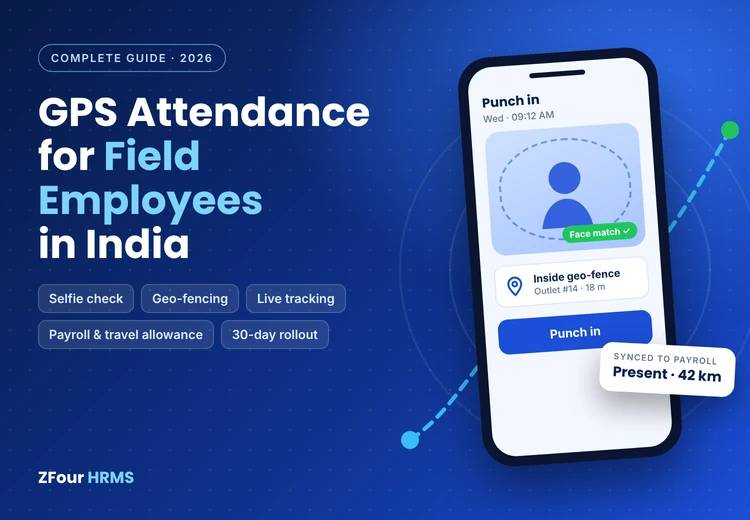
Quick answer
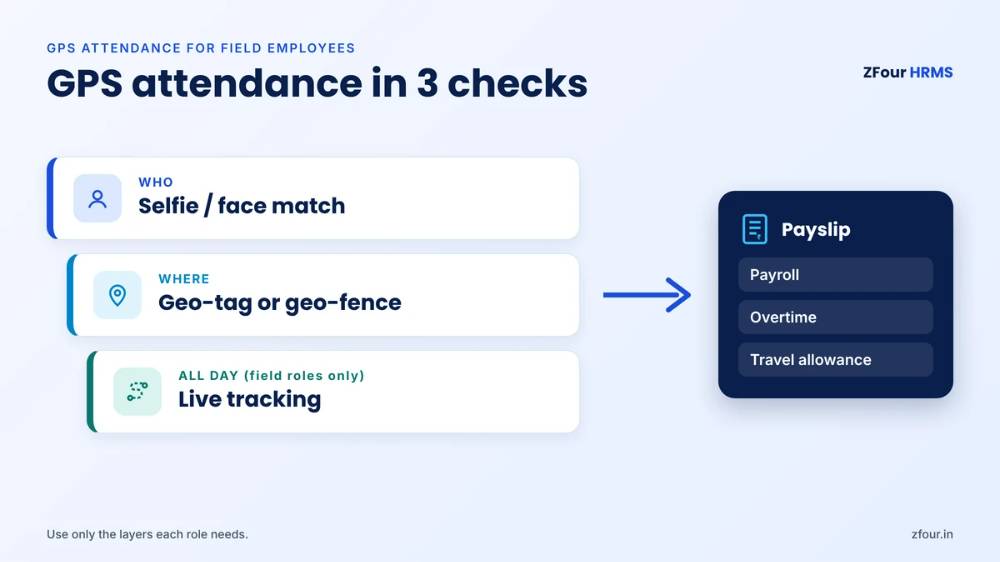
GPS attendance for field employees is a mobile attendance method where staff punch in and out on a phone app that records their location, usually with a selfie to confirm identity. It replaces registers, phone calls to managers and self-reported timesheets for people who don't work at a fixed desk: sales reps, medical representatives, service engineers, collection agents, delivery staff, security guards and site workers. A good setup does three things. It verifies who punched (selfie or face match). It verifies where they punched (geo-tagging or geo-fencing). And, for roles where moving is the job, it records the working day (live tracking). The attendance data then flows straight into payroll, overtime and travel allowance. Done well, it cuts proxy attendance, speeds up payroll and gives managers a reliable picture of field work, without tracking anyone outside working hours.
Key takeaways
Field attendance fails on paper and phone calls because nobody can check who worked, where and when.
GPS attendance has three layers: geo-tagging (location of the punch), geo-fencing (punch only at the right place) and live tracking (the route during working hours). Use only the layers each role needs.
Always pair location with identity. A selfie at the punch is the simplest way.
The real return comes when attendance feeds payroll, overtime and travel allowance automatically, not from the map.
Location is personal data. Write a policy, tell employees, track only during working hours, and keep data only as long as you need it.
In ZFour HRMS, geo-tagging and geo-fencing are included in every plan. Live tracking is ₹100 per field user per month on any plan.
Who this guide is for
This guide is for HR heads, business owners, operations managers and finance teams at Indian companies with employees who work away from a single office. It is written for:
Companies starting from scratch, still using registers, WhatsApp check-ins or calls to area managers.
Companies with an attendance app that isn't working, because staff complain, managers ignore the data or payroll still runs on spreadsheets.
Companies comparing HRMS vendors and trying to work out which field features matter.
This complete guide to field employee attendance tracking links to deeper guides on each topic. If you need one specific answer, jump to the section you need.
What counts as a "field employee"?
A field employee is anyone whose work regularly happens away from a fixed company workplace. In India, that covers a very large share of the workforce:
Role | Where they work | What attendance needs to prove |
|---|---|---|
Field sales and FMCG reps | Shops, distributors, markets on a beat | Started the day, covered the beat, ended the day |
Medical representatives | Doctors' clinics, hospitals, chemists | Visits to planned doctors and chemists |
Service and installation engineers | Customer homes and businesses | Arrival and completion at each job |
Collection and recovery agents | Borrower homes and businesses | Visits to assigned cases |
Delivery and logistics staff | Routes, hubs, customer addresses | Shift start and end, route coverage |
Security guards and facility staff | Client sites | Presence at the assigned post for the full shift |
Construction and project staff | Project sites that change over time | Presence on the right site |
Home-care nurses and sample collectors | Patients' homes | Visits during duty hours |
Auditors, surveyors, inspectors | Client premises, villages, project areas | Presence at the assigned location |
Each group needs a slightly different setup, covered in the industry playbooks below.
Why traditional field attendance fails
Registers and timesheets
A register at a branch or distributor proves only that someone wrote a name. Weekly timesheets filled in by the employee prove only what the employee remembers, or chooses to remember. Neither can be checked.
Phone calls and WhatsApp check-ins
Many businesses run field attendance through morning calls to area managers or a "reached" message on a WhatsApp group. It feels like control, but:
The manager has no way to confirm the location.
Messages get lost in busy groups and are hard to turn into payroll data.
Someone has to transfer the information into a spreadsheet every month, with errors.
There's no record if a dispute arises later.
Biometric devices at the office
Some companies ask field staff to punch at the office every morning and evening. This wastes travel time, delays the first customer visit and pushes staff to go to the office instead of the field. It also tells you nothing about the hours in between.
The cost of getting it wrong
Weak field attendance shows up in four places:
Wages paid for days not worked — proxy and remote punching. Read our guide on how to stop proxy attendance.
Inflated travel and overtime claims — kilometres and hours that can't be checked.
Missed customer visits — lost sales and service failures that never show up as an attendance problem.
Slow, error-prone payroll — HR rebuilding attendance from calls, messages and spreadsheets every month.
How GPS attendance works
The basic flow
The employee opens the app on their phone and taps punch in.
The app captures the location for a few seconds and, if required, takes a selfie.
The system checks the punch against the rules — for example, inside an assigned geo-fence, or within a set distance of the planned first visit.
The punch is accepted, flagged for approval or blocked, depending on the rule.
During the day, if live tracking is on for that role, the app records location at intervals.
At the end of the day, the employee punches out and tracking stops.
Attendance, hours, overtime and distance flow into payroll and reports.
The three location layers
Geo-tagging
Records the location of each punch. Doesn't block anything. Best for roles that start the day at different places.
Geo-fencing
Accepts a punch only inside a virtual boundary around an assigned workplace. Best for staff at fixed or assigned sites, including guards at client locations and store staff.
Live tracking
Records location at intervals between punch in and punch out. Best for roles where the route is the work — sales beats, service visits, collections, delivery.
For a detailed comparison, including geo-fence radius guidance by site type, read geo-tagging vs geo-fencing vs live tracking.
The identity layer
Location proves where the phone is, not who's holding it. A selfie at the punch, optionally with face match, confirms the person. Without it, one employee can carry a colleague's phone, which is the field version of buddy punching.
What happens without internet
Field staff often work in areas with weak signal. A good app records the punch, location and selfie offline and syncs when the phone reconnects, with the original time preserved. GPS itself doesn't need mobile data, though network and Wi-Fi signals improve accuracy and speed.
The business case: what GPS attendance actually returns
The map is the most visible feature, but rarely the most valuable. The return comes from what attendance data does downstream.
1. Payroll that runs on verified data
When attendance, leave, overtime and travel come from the same system as payroll, HR stops rebuilding the month from messages and spreadsheets. DNA Digital Studio, a ZFour customer, told us payroll processing dropped from three days to 20 minutes after moving attendance and payroll onto one system.
2. Fewer days paid for no work
Proxy and remote punching become hard to do and easy to spot. The saving is direct: every proxy day removed is a day's wage not paid for work that didn't happen.
3. Travel allowance based on distance travelled
Distance from live tracking replaces self-reported kilometres. Claims are faster to approve and harder to inflate, and employees no longer keep odometer logs.
4. Managers who manage work, not calls
Area managers stop chasing morning check-ins and spend the time on coaching, visits and planning. They see planned against completed visits instead of a stream of WhatsApp messages.
5. Evidence when disputes arise
When a customer says no one came, or an employee says they were on duty, the record answers the question.
Estimate your own return
The leakage formula
Monthly leakage = proxy or unverified days × average daily wage + unverified travel claims + unverified overtime
A worked illustration
Illustrative figures; use your own.
Item | Assumption | Monthly amount |
|---|---|---|
Field staff | 100 employees | — |
Average daily wage | ₹800 (₹24,000/month) | — |
Unverified days | 1 day per 10 employees per month = 10 days | ₹8,000 |
Inflated travel claims | ₹300 per employee per month on 30% of staff | ₹9,000 |
Unverified overtime | 20 hours a month at ₹150/hour | ₹3,000 |
Estimated leakage | ₹20,000 a month (₹2.4 lakh a year) | |
HR time on attendance and payroll | 2 days a month saved | Not counted above |
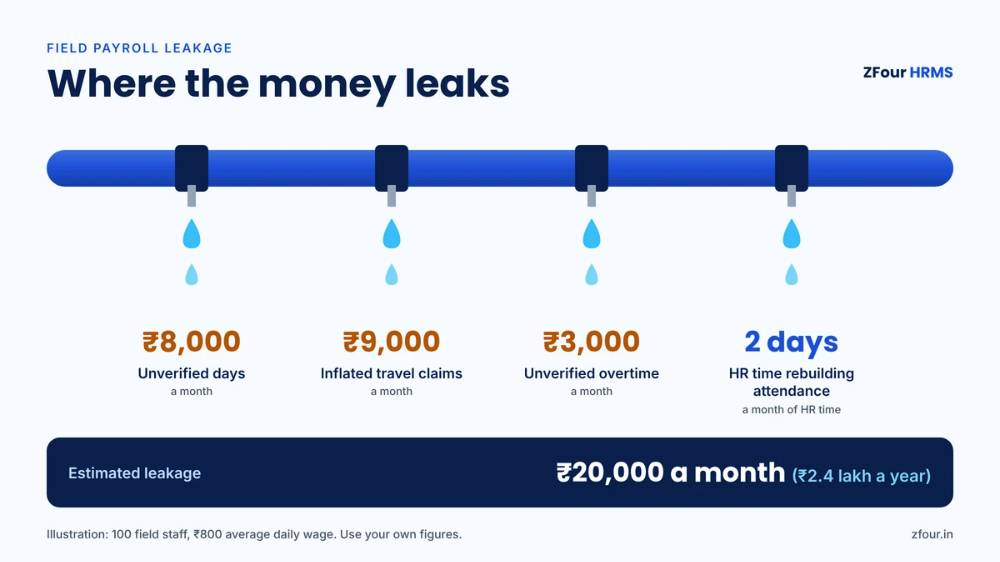
Compare the estimated leakage with the software cost for the same team, then add the HR time saved. The free Payroll Leak Audit below runs this calculation on your actual attendance export.
Is your field payroll leaking? Find out in 10 minutes.
Paste last month’s attendance export into our free audit sheet. It flags clustered punches, shared phones, off-site punches, days with no recorded output and unapproved overtime, then estimates your monthly leakage.
Get the free Payroll Leak Audit (Google Sheet) →
Free for Indian companies with field teams. Your copy stays in your own Google Drive.
How to choose GPS attendance software
Whether you call it a field employee attendance app or field staff tracking software, the checklist below is what separates tools that work from tools that get abandoned.
Must-have features
Attendance and identity
Mobile punch in and out with location.
Selfie at punch, ideally with face match.
Geo-tagging and geo-fencing, with multiple sites per employee.
Mock-location (fake GPS) detection.
Offline punching with sync.
Regularisation and approval workflow for genuine exceptions.
Field work
Live tracking that runs only between punch in and punch out.
Visit or task logging against a beat or job plan.
Distance calculation for travel allowance.
A manager dashboard with planned against actual activity.
Payroll and compliance
Attendance, leave, overtime and shifts in the same system as payroll.
Automatic PF, ESI, PT and TDS calculations based on attendance.
Overtime rules that follow the Labour Codes and state rules.
Exportable registers and reports for audits.
Employee experience
A light app that works on budget Android phones.
Local language support — at minimum Hindi and English.
Employees can see their own attendance, route and payslips.
Low battery use for punch-only GPS.
Data and security
Data hosted in India.
Role-based access, so only the right people see location data.
Configurable retention and audit logs.
Questions to ask every vendor
Is geo-fencing included in every plan, or only higher tiers?
How is live tracking priced: per tracked user, or per total employee? Is it available on every plan?
Does tracking stop automatically at punch out?
How long is GPS active per punch, and what's the battery impact of live tracking?
How do you detect fake GPS?
Does attendance feed payroll automatically, including overtime and travel allowance?
Where is the data hosted?
Is the app available in Hindi and other Indian languages?
How long does setup take, and what does it cost?
Is there a free trial or a live demo with our own scenarios?
Comparing vendors? Take this checklist into every demo.
All 10 questions in a printable table, with a column for each vendor and the red flags on page 2.
Download the free checklist (PDF)
Free PDF, no sign-up needed.
Red flags
Live tracking that can't be limited to working hours.
Live tracking priced per total employee, so you pay for office staff who don't need it.
Attendance that has to be exported to a separate payroll tool every month.
No mock-location detection.
A demo that only shows the map, never the payroll output.
Standalone attendance app or full HRMS?
Some companies buy a standalone field attendance or field force app, then export attendance into a separate payroll tool or spreadsheet every month. Others choose an HRMS where field attendance, leave, shifts, payroll and compliance sit in one system. Both can work. The right choice depends on where the pain is.
Situation | Better fit |
|---|---|
Payroll is already automated in another system that accepts attendance imports, and the main need is visit tracking | Standalone field app, with a tested import |
Payroll runs on spreadsheets or a CA's tool, and HR rebuilds attendance every month | HRMS with field attendance built in |
Overtime, travel allowance and statutory deductions depend on attendance | HRMS, so the numbers flow without re-entry |
Large field team with complex order-taking, inventory or CRM needs | Field force or CRM tool for sales work, HRMS for attendance and payroll |
Mixed office, factory and field workforce | HRMS, so every employee is on one attendance and payroll record |
The hidden cost of separate tools is the monthly reconciliation: matching employee IDs, fixing missing punches, re-keying overtime and arguing about which system is right. If HR spends days on that every month, the integration is worth more than any single feature.
What does it cost in India?
Pricing structures vary, so compare the total for your actual team rather than headline rates.
Typical pricing structure
Per employee per month for the core HRMS or attendance plan.
Live tracking as an add-on, per tracked user per month, sometimes restricted to higher plans.
One-time setup or implementation fee at some vendors.
GST at 18% on top.
Examples (as of October 2026, excluding GST)
ZFour HRMS | greytHR | |
|---|---|---|
Core plans | People First ₹50, Workforce Pro ₹70, Talent Master ₹100 per employee per month | Essential ₹2,495/month including 50 employees, then ₹45 per employee; Growth ₹4,495/month including 50 employees, then ₹85 per employee |
Geo-tagging and geo-fencing | Included in every plan | Check plan details |
Live tracking | ₹100 per field user per month, on any plan | ₹140 per user per month, Growth and Premium only |
Selfie attendance | From Workforce Pro | Check plan details |
Setup | ₹7,500 (introductory offer; ₹15,000 standard) | Check with vendor |
Free trial | No — live demo | 7-day trial |
Competitor pricing is taken from greytHR's public pricing page and may change. Always confirm current prices.
A worked cost example
Illustrative. A company with 120 employees, 40 of them on the road, on ZFour's Workforce Pro plan:
120 employees × ₹70 = ₹8,400 a month
40 field users × ₹100 live tracking = ₹4,000 a month
Total: ₹12,400 a month + GST, plus one-time setup
Because live tracking is charged only for field users, the 80 office and warehouse employees don't add tracking cost. See current plans on ZFour pricing.
What would it cost for your team?
Tell us your total headcount and how many staff work in the field. we’ll send you an exact monthly price.
Get a price for your team →
Geo-tagging and geo-fencing included in every plan. Live tracking charged only for field users.
Legal and privacy: the essentials
Location tracking of employees for genuine work purposes isn't prohibited in India, but it has to be done fairly. Our full guide — is GPS tracking of employees legal in India? — covers this in depth. In summary:
The rules that apply
The Digital Personal Data Protection Act, 2023 and its Rules (notified November 2025) apply to employee personal data, including location. Most core obligations apply from May 2027. Processing for employment purposes is a recognised ground under section 7(i), but purpose limitation, data minimisation, security and reasonable retention still apply. Penalties for serious failures can reach ₹250 crore.
Employment contracts and standing orders should cover attendance methods.
The Labour Codes, in force since 21 November 2025, govern working hours, overtime and records — which accurate attendance supports.
Five practical rules
Purpose: state why you collect location — attendance, visit verification, travel allowance, safety.
Proportion: use live tracking only for roles that move. Geo-fencing is enough for everyone else.
Working hours only: tracking starts at punch in and stops at punch out. Never on leave days or after hours.
Notice: tell employees in writing what is collected, why, who sees it and for how long.
Access and retention: limit who can see location data, and delete it after a defined period.
This is general information, not legal advice. Consult your legal adviser on your policy.
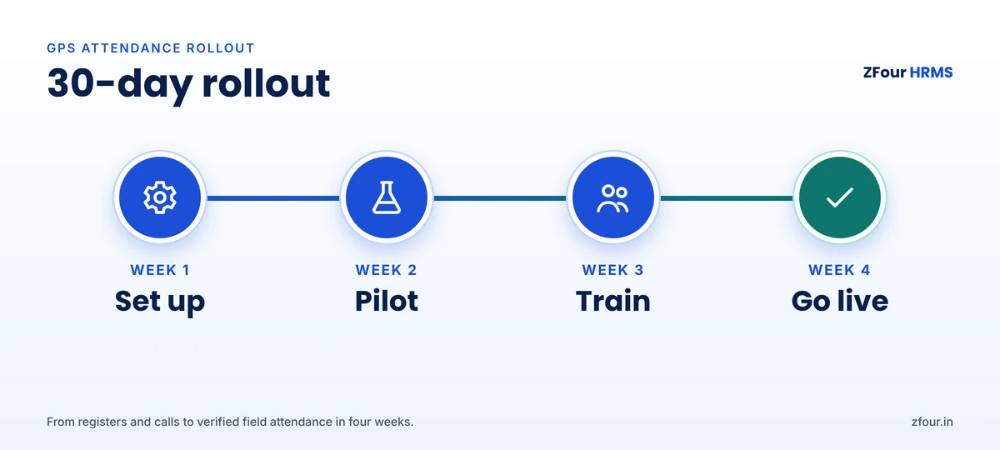
Implementation: a 30-day rollout plan
Before you start
Map your workforce
List every employee by role and work pattern: fixed site, assigned client site, beat or route, or mixed. This decides which layers each group needs.
Decide the rules
For each group, decide:
The location layer: geo-tag, geo-fence or live tracking.
Whether a selfie is required.
What happens to an out-of-fence punch: blocked, or sent for approval.
Who approves exceptions and within what time.
Rules for travel days
Staff who are usually at a fixed site but sometimes travel should raise an on-duty or travel request, rather than being tracked every day.
Rules for shift workers
Guards and hub staff on rotating shifts need rosters in the system so punches are checked against the right shift.
Night shifts that cross midnight
Make sure the system assigns a punch-out after midnight to the shift that started the previous evening, or overtime and attendance will be wrong.
Week 1: set up
Add employees, sites, shifts and reporting managers.
Create geo-fences for each site.
Configure selfie, live tracking and approval rules by group.
Write the attendance and location policy and the employee notice.
Week 2: pilot
Choose one fixed-site team and one field team.
Run the app alongside the current method for a week.
Review failed punches, flags, battery complaints and gaps in tracking.
Adjust radii, intervals and rules.
Week 3: train and communicate
Share the policy and notice with all employees.
Run short team sessions — in Hindi or the local language where needed — on how to punch, what to do if a punch fails and how to request an exception.
Brief managers on reviewing flags and approving genuine exceptions the same day.
Help employees set the app as exempt from battery savers on their phones.
Week 4: go live
Switch all teams over and stop the old method.
Review exceptions daily for two weeks.
Run the first payroll on the new data and reconcile against the previous month.
Share early results with leadership: attendance accuracy, exception rates, payroll time.
Ready to roll out? Get the Field Attendance Policy Kit.
An editable location tracking policy, the employee notice in English and Hindi, a retention schedule, a geo-fence radius planner and a 4-week rollout checklist.
Get the free policy kit (Google Doc) →
Free, editable template for HR teams. Not legal advice.
Measuring success
Track a small set of numbers monthly:
Metric | What it tells you | Direction you want |
|---|---|---|
Punches flagged or out-of-fence | How well rules fit reality, and how much misuse remains | Falling after the first month |
Exceptions approved within 24 hours | Whether managers are keeping up | Above 90% |
Planned visits completed | Field productivity | Rising |
Travel allowance per employee | Whether claims match real distance | Stable or falling |
Overtime hours | Whether overtime is real and approved | Stable, all pre-approved |
Payroll processing time | HR efficiency | Falling |
Employee app adoption | Whether staff are actually using it | Close to 100% |
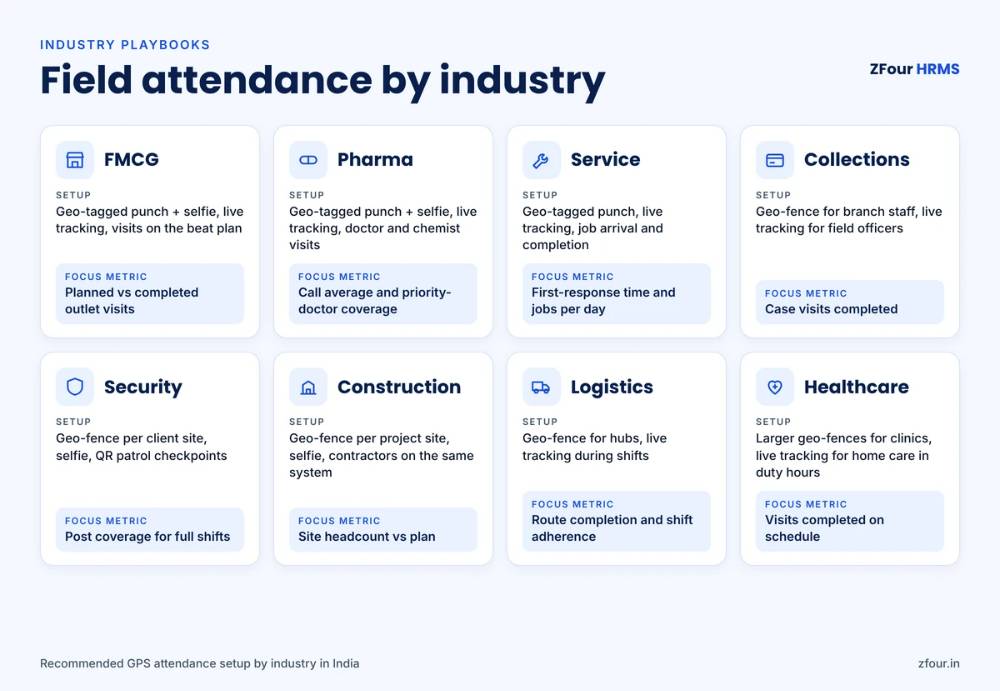
Industry playbooks
FMCG, consumer goods and distribution
Setup: geo-tagged punch with selfie; live tracking during working hours; visits logged against the beat plan. Focus metric: planned against completed outlet visits. Watch for: reps punching at home and starting late. Flag punches far from the first planned outlet.
Pharma and medical representatives
Setup: geo-tagged punch with selfie; live tracking; doctor and chemist visits logged in the app. Focus metric: call average and coverage of priority doctors. Watch for: visit logs without matching location; clustered visits logged at the end of the day.
Service, installation and repairs
Setup: geo-tagged punch; live tracking; job arrival and completion logged at the customer location. Focus metric: first-response time and jobs completed per day. Watch for: jobs marked complete far from the customer address.
NBFCs, microfinance and collections
Setup: geo-fenced punch for branch staff; live tracking for field officers; visits logged against assigned cases. Focus metric: case visits completed. Watch for: visits logged without matching location. Make sure tracking stops at punch out — collection work raises extra sensitivity.
Security and facility services
Setup: geo-fence for each client site, guards assigned to posts, selfie at punch, QR checkpoints for patrol rounds. Live tracking for mobile supervisors only. Focus metric: post coverage for full shifts. Watch for: guards leaving mid-shift. Use mid-shift selfie checks or patrol QR scans.
Construction and infrastructure
Setup: geo-fence per project site, updated as the site moves; selfie at punch; contractor workers on the same system as staff. Focus metric: site headcount against the plan. Watch for: contractor attendance that doesn't match the principal employer's records.
Logistics and last-mile delivery
Setup: geo-fence for hubs; live tracking for drivers and riders during shifts. Focus metric: route completion and shift adherence. Watch for: shifts that start without a vehicle check or route assignment.
Healthcare and home care
Setup: geo-fence hospitals and clinics with larger radii for weak indoor GPS; live tracking for home-care staff during duty hours. Focus metric: visits completed on schedule. Watch for: tracking outside duty hours, which is especially sensitive for staff visiting patients' homes.
Common mistakes
Tracking everyone. Live tracking for office staff adds cost and resistance with no benefit.
No selfie. Location without identity lets a colleague punch with someone else's phone.
Tight geo-fences. A 25-metre radius around a large building causes daily failures and erodes trust.
No exception process. Honest employees with genuine problems need a fast, fair way to correct attendance.
Switching on without a policy. Staff hear about tracking from rumours, not from HR.
Data that goes nowhere. If attendance doesn't feed payroll and managers don't review flags, nothing changes.
Ignoring contract workers. Contractor staff on paper registers undo the controls on employees.
Tracking after hours. The fastest way to lose employee trust and create legal risk.
What happens after you go live: an illustrative example
This is an illustrative scenario, not a customer case study.
A home-appliance service company in North India had 90 service engineers, 25 office staff and two warehouses. Engineers called the service desk at the start and end of each job, attendance was compiled from call logs, and travel allowance was paid on self-declared kilometres.
The company moved to geo-tagged punches with a selfie for engineers, live tracking during working hours, and job arrival and completion logged at the customer location. Office and warehouse staff used geo-fenced punches with a selfie.
Within the first payroll cycle, attendance came straight from the system instead of call logs. Travel allowance was calculated from tracked distance. Service managers could see which jobs were completed and where engineers were, so emergency jobs went to the nearest engineer instead of whoever answered the phone. The company paid for live tracking on its 90 engineers only, not on every employee.
How ZFour HRMS handles field attendance
ZFour HRMS was built for Indian businesses with mixed office, site and field teams:
Geo-tagging and geo-fencing in every plan, with multiple sites per employee and a radius set per site.
About 3 seconds of GPS per punch, so punch-only attendance barely touches the battery.
Selfie attendance from the Workforce Pro plan, to confirm who punched.
Live tracking add-on at ₹100 per field user per month on any plan — routes, stops, distance and visits, from punch in to punch out only.
Payroll in the same system, with PF, ESI, PT and TDS calculated from attendance, plus overtime controls.
Hindi and English app for field teams.
Data hosted on AWS Mumbai.
Go-live in up to 7 business days, with setup at ₹7,500 on the current offer.
Explore GPS attendance and field tracking, the attendance management system and overtime management. For a look at how leakage builds up, read your payroll is leaking.
See it working for your own team.
Field attendance, live tracking and payroll in one 30-minute demo. Bring your toughest scenarios: night shifts, contract workers, travel allowance.
Pick a demo time →
Go live in up to 7 business days. Geo-tagging and geo-fencing included in every plan.
Glossary
Term | Meaning |
|---|---|
Geo-tagging | Recording the location of each attendance punch |
Geo-fencing | Accepting a punch only inside a virtual boundary around a workplace |
Live tracking | Recording location at intervals between punch in and punch out |
Accuracy radius | The circle within which the phone's true location most likely sits |
Mock location | A phone setting or app that fakes GPS location |
Selfie attendance | A photo taken at the punch to confirm who punched |
Face match | Automatic comparison of the punch selfie with the employee's registered photo |
Beat plan | The planned list of outlets or customers a rep should visit |
Regularisation | Correcting an attendance record with approval |
On-duty request | A request to mark attendance for approved work away from the usual site |
Sources and further reading

Farheen Ahmed
HR Tech Content Strategist at ZFour Technology Private Limited
Research-driven content on HRMS, payroll, attendance management, employee management, and modern HR technology for Indian businesses.